
Inspiring
April 6, 2022
Answered

Numeric and Alphabetic Index Order

  • April 6, 2022
  • 2 replies
  • 591 views

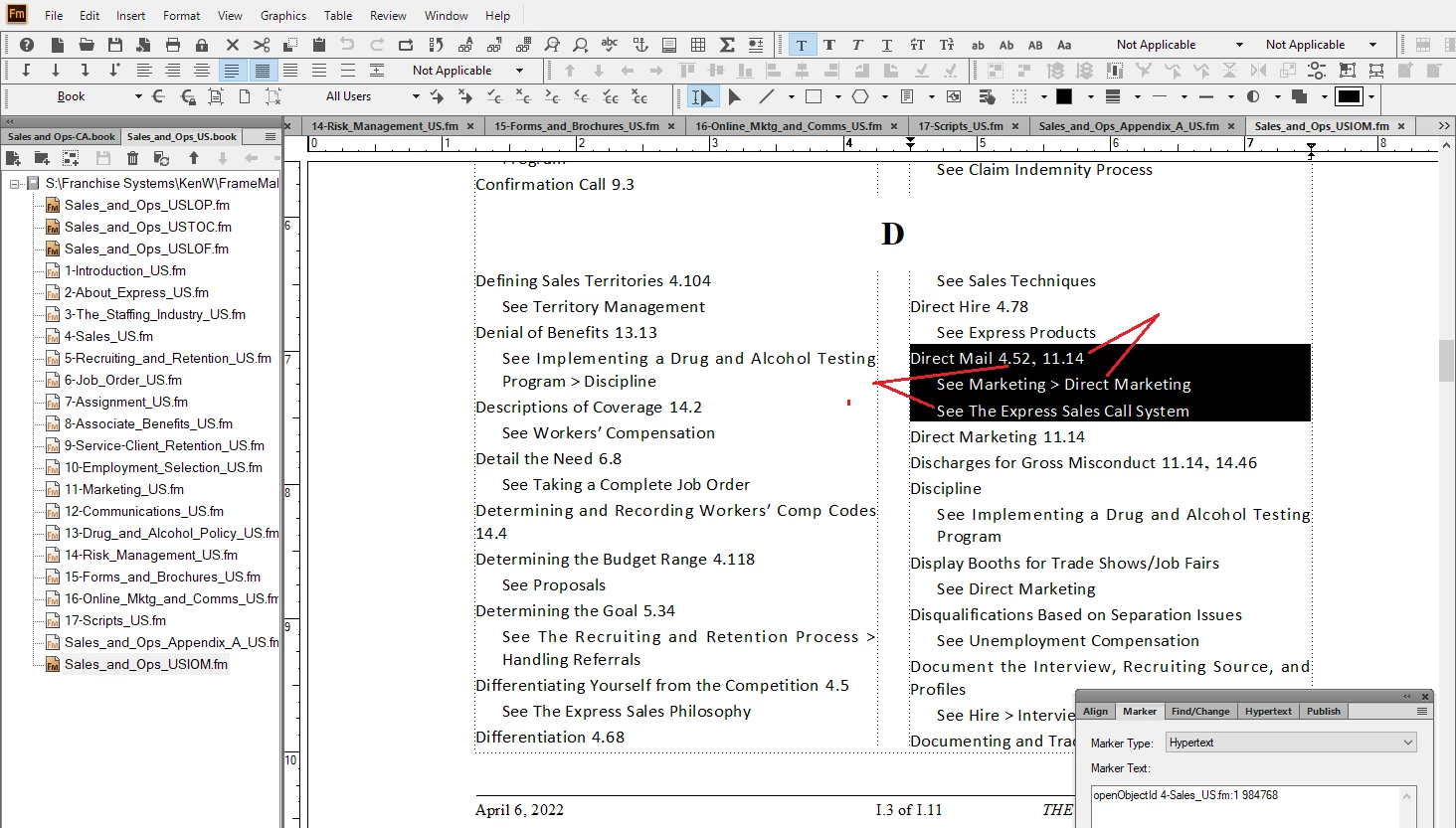
When I create an Index (term) entry for multiple locations in the manual (for page numbers and subsequent text entries), I noticed that the numberical index lists in order. However, the text index entry is listed in alpabetic order. In this case, the page number listed for the first numerical page entry does not match the the same order of the text entry listed, since the text entry is listed alphabetically.


The first numerical page entry is: Direct Mail;<$nopage>Direct Mail:See The Express Sales Call System

The second numeric page entry is: Direct Mail;<$nopage>Direct Mail:See Marketing > Direct Marketing


Note the text in the image is backwards from the page number listing above.
    This topic has been closed for replies.
    Correct answer frameexpert

    Apparently I still don't understand the correct order of the sytax or where exactly it goes.

    The Index output is:

    Documenting and Tracking 12.8, 16.4, 16.39
    See Online Marketing & Communications Guide > Recruiting Online
    See Online Marketing & Communications Guide > Social Media
    See Social Media Policy


    The three separate index entries are:

    Documenting and Tracking;<$nopage>Documenting and Tracking:See Social Media Policy


    Documenting and Tracking;<$nopage>Documenting and Tracking:See Online Marketing & Communications Guide > Social Media


    Documenting and Tracking;<$nopage>Documenting and Tracking:See Online Marketing & Communications Guide > Recruiting Online


    I have tried every combination, using the syntax displayed in your image, but none of them work.

    I tried:

    Documenting and Tracking;<$nopage>[Documenting and Tracking:aaa]:See Social Media Policy

    Documenting and Tracking;<$nopage>Documenting and Tracking:[See Social Media Policy:aaa]

    Same syntax for all of them in all possible orders.


    Based on the Direct Mail example, you need this:

    Direct Mail;<$nopage>Direct Mail:See Marketing > Direct Marketing[Direct Mail:zzz]

    Direct Mail;<$nopage>Direct Mail:See The Express Sales Call System[Direct Mail:aaa]

    2 replies

    Jeff_Coatsworth
    Community Expert
    Community Expert
    April 6, 2022

    Don't have an answer for you on that one - I presume that the earlier page numbered reference comes before the second one? I don't think this comes up very often because the rationale for the See: reference usually precludes putting in page numbers for the "hit" on the actual term, i.e. when "Direct Mail" is encountered, you want them to ignore the place where it's found & head over to the See: references instead.
    However, make sure you're running the latest version of FM & if it's still happening you can contact the FM folks - see https://helpx.adobe.com/contact/enterprise-support.other.html#framemaker for your Adobe Support options. I'd recommend using the tcssup@adobe.com e-mail address as it reaches a team dedicated to Technical Communication Suite products including FrameMaker.
    OR you can log a wishlist item using the Tracker (https://tracker.adobe.com/).

    Inspiring
    April 6, 2022

    Thanks for the info, Jeff. I realize that the page and topic text markers do not coincide, in order, probably because all of the marker hyperlinks (page and topic text) are active. I just thought that it would be nice to have the page numbers and topic text references in the same order. I submitted it to tracker wishlist, although I doubt we will see anything come of it.


    Thanks again!

    frameexpert
    Community Expert
    Community Expert
    April 6, 2022

    Don't forget that there is a way to specify sort order for an index marker. I don't remember the exact syntax, but I think you end the marker with a sort key in square brackets. For example, this marker text:

    aardvarks[z]

    zebras[a]

    should force these to appear in the index like this:

    zebras
    aardvarks

    Jeff_Coatsworth
    Community Expert
    Community Expert
    April 6, 2022

    Yup - and what would you like it to do?
    ps - don't attach images - use the image icon to insert inline images in your post (makes for an easier read for anyone checking out your post)

    Inspiring
    April 6, 2022

    I would like the alphabetic order to match the numical page numbering order.