

Object format menu has completely disappeared
Update #2: Problem solved. I expected to find it in a dropdown menu of a dropdown menu, but it was in the main dropdown menu. Not sure why it disappeared, but I found it again. Thanks all.
Update: I fixed the "Find" menu problem. It was under the "Edit" menu. But the Object Format menu is totally MIA.
HELP!
Suddenly for NO REASON that I can discern (I have NOT messed with my menus AT ALL) The Object Format menu is completely gone from my menus on the right, and there is no option for it in the toolbars or panels menus.
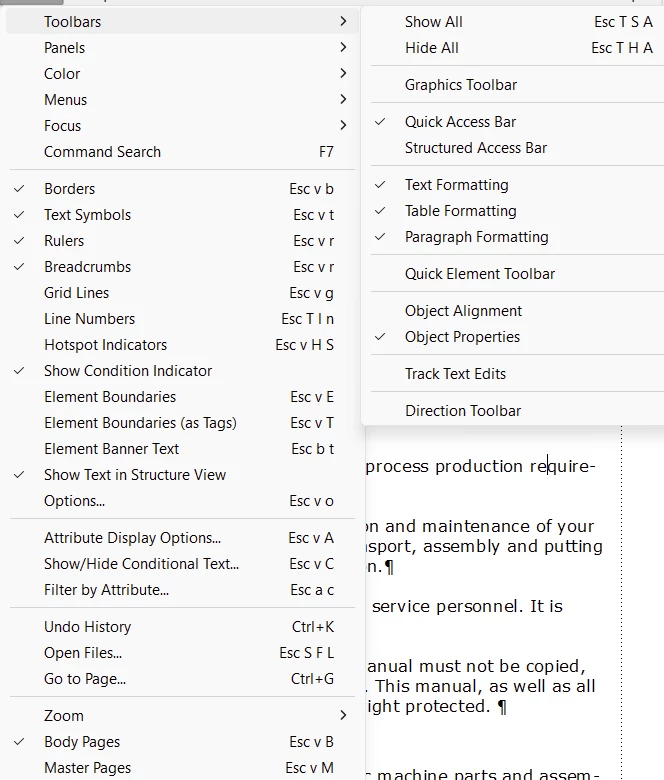
Nor is it under the "Graphics" menu:
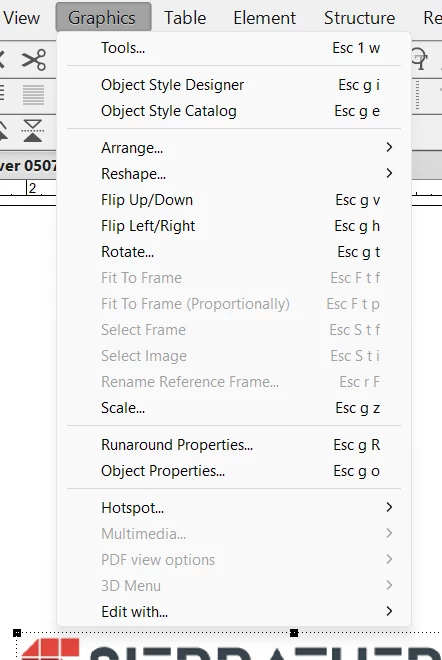
Behold. They no longer exist. This is really messing me up. I need those menus. There is an "Object Properties" menu, but it doesn't do what I need to do. I want to edit the actual object, not create an object style. This doesn't let me adjust the size by percentage or edit an object in any way, it only lets me create a style.
I don't want to create a style. I want to format an individual object, and that menu disappered.
Furthermore, this problem exists across ALL documents I open. I can't refer back to another document and do File-Import-Format to resolve this. I've even tried restarting my computer.
I'm pretty sure Adobe builds in bugs to force users to consult people who want to be paid for their time.
When you answer, please do not reference programming/coding. I am a simple technical writer who creates graphics and text. I know nothing about coding. Thank you.




 AdChoices