Inspiring
January 27, 2016
Answered

Object Properties - Reference File

  • January 27, 2016
  • 2 replies
  • 1523 views

Hi All,

I have inherited a document which has a lot of images.

Images are embedded as well as referenced to the external files.

My question is, is there a way to get a list of figures which are linked to the external flies

Or the only way to do is one image at a time by using Object Properties dialog box???

The reason, I may have a folder with 100 images but only 50 might be used in the document.

I would like to get rid of the images that are not used, so I can clean things up.

If you have better alternative, I would appreciate it.

Thanks.

    This topic has been closed for replies.
    Correct answer Stefan Gentz

    May I add two alternatives to the list of reference?

    1. Open the book/file in question and pack the whole book (> File > Package…). This will create a ZIP including only the referenced graphics. However, it does only include graphics if they are in the same folder or in subfolders.
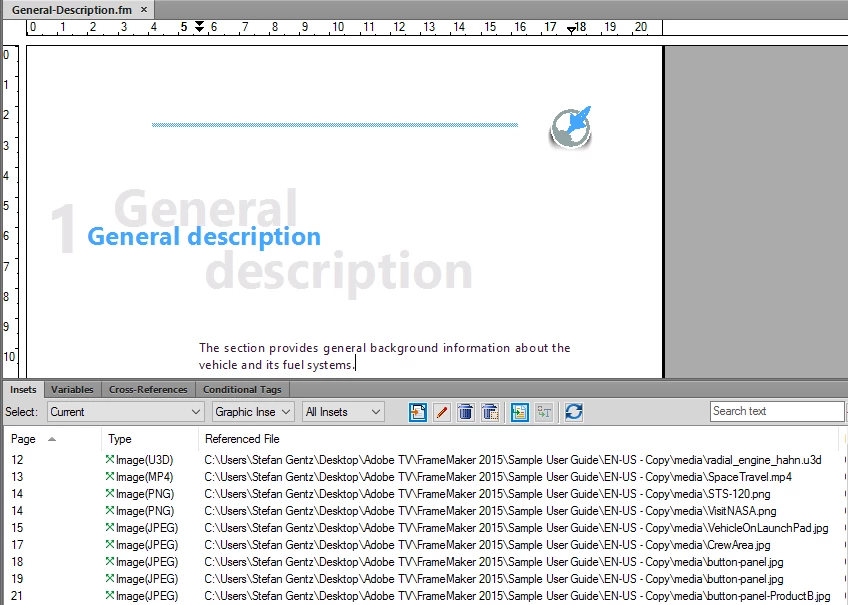
    2. Why not use the Insets pod? It gives you a nice list of all (text/graphic) insets. You can filter it to only show graphics. It distinguishes between linked and embedded graphics and indicates if a graphic is missing or not and it shows the whole file path. You can sort by page, path, image type etc.

    Cheers,

    *Stefan.

    2 replies

    Stefan GentzCorrect answer
    Legend
    January 27, 2016

    May I add two alternatives to the list of reference?

    1. Open the book/file in question and pack the whole book (> File > Package…). This will create a ZIP including only the referenced graphics. However, it does only include graphics if they are in the same folder or in subfolders.
    2. Why not use the Insets pod? It gives you a nice list of all (text/graphic) insets. You can filter it to only show graphics. It distinguishes between linked and embedded graphics and indicates if a graphic is missing or not and it shows the whole file path. You can sort by page, path, image type etc.

    Cheers,

    *Stefan.

    AixtronAuthor
    Inspiring
    January 27, 2016

    Thanks Stefan,

    Insets POD is a good one and easiest for my purpose.

    I will have to try Book > File >Package sometime. I think that would be good one which would give me all the necessary files in one package. So I can move it anywhere and it would comprise all the project file.

    The method Arnis mention is also good one to get a list of references (which includes Imported Graphics, Unresolved references etc.)

    Once again. Appreciate your help.

    Arnis Gubins
    Inspiring
    January 27, 2016

    Generate a List of References > Imported Graphics for the entire book.

    AixtronAuthor
    Inspiring
    January 27, 2016

    Hello,

    I did add a List of Reference > Imported Graphics.

    Then I was prompted to update the Book, so I did; however, my List of Reference file is empty.

    I can not seem to find any reason but at the same time I have never tried to create List of References, so I do not know!

    Arnis Gubins
    Inspiring
    January 27, 2016

    The empty file seems to imply that no graphics in that particular book were imported by reference (i.e. they're all embedded), assuming that the LOR was properly defined.

    Check your LOR setup and also the Generate dialogue to make sure that the LOR is not sitting in the Don't Generate list.