



Community Expert
April 14, 2025
Question

Odd error message

  • April 14, 2025
  • 3 replies
  • 281 views

FrameMaker Version: 17.0.6.798

After I have upgraded to the latest FM version I have had font issues. Documents come up with missing fonts in the error log, but in the Fonts Panel everything is good. All fonts are ok and the error log does not detail WHAT fonts are missing.


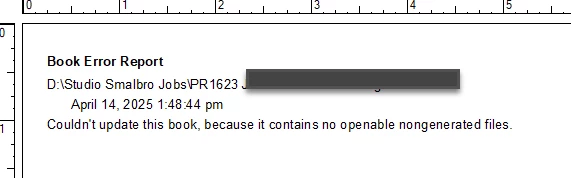
And now this:
    3 replies

    Matt-Tech Comm Tools
    Community Expert
    Community Expert
    April 14, 2025

    Keep in mind that missing fonts can be in unused catalog entries, as well as master pages and reference pages. 

    Create a MIF file and search it for fonts that show as missing in your error logs and book update messages.


    -Matt Sullivan, FrameMaker Course Creator, Author, Trainer, Consultant
    Community Expert
    April 14, 2025

    Thanks for your prompt feedback @Matt-Tech Comm Tools  and @Winfried Reng I eventually did manage to strangle the odd font messages by limiting the access to only the right fonts. The other message still pops up once in a while. I suspect it has to do with the files being originally mac files from mid nineties. 🙂  

    Bjørn Smalbro - FrameMaker.dk
    Matt-Tech Comm Tools
    Community Expert
    Community Expert
    April 14, 2025

    To expand on @Winfried Reng  's response, after upgrading Fm, all the alert messages reset. That usually means that 'missing resource" messages, and messages about older Fm files will pop up, preventing your book update from completing successfully.

    His advice to open all book files is a quick temporary fix, and if the only alert messages were related to older Fm files, saving all files in the book should resolve the issue.


    -Matt Sullivan, FrameMaker Course Creator, Author, Trainer, Consultant
    Community Expert
    April 14, 2025

    Hi Bjørn,

    Yes. Nongenerated files are the regular FrameMaker files.

    When these files cannot be opened during the update, then something went wrong.

    Could you open all files and then update your book?

    Then you could close all files and check, if you now can update the book.


    I am still on 17.0.3, as later versions do not support FrameScript which I need for some processes.

    Best regards, Winfried