Participating Frequently
February 3, 2021
Question

Older paragraph tags don't display in .pdf file

  • February 3, 2021
  • 14 replies
  • 1780 views

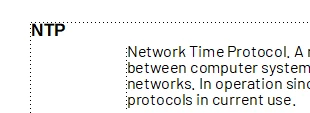
I created a tag in an older version of FrameMaker.  It displays fine in the FM file, but not in the .pdf file.


    This topic has been closed for replies.

    14 replies

    Barb Binder
    Community Expert
    Community Expert
    February 4, 2021

    Hi @defaultfsavg7hoktq2:


    I opened the file in FrameMaker version 16.0.1.817 and used File > Save as PDF (which means I am using the default conversion settings). Here is the result—the heads appear as expected:


    I know you are hoping for a quick answer to this, but there does not appear to be anything wrong with this file. I don't see any issue with the paragraph style definitions, or color definitions, so the next step is to look at how you are creating the PDF.


    Are you using File > Save as PDF? Would you mind sharing a screen shot of your .STS file settings—used by Save as PDF—similar to the bottom one I am sharing in step 3, below? 


    1. Choose File > Publish
    2. Select PDF and click the Edit button
    3. Click Outputs and then take a screen shot your dialog box, If you don't know how to take a screen shot, see https://cnet.co/36GaJIY


    ~Barb 


    ~Barb at Rocky Mountain Training
    Participating Frequently
    February 8, 2021

    Do not feel bad if you cannot figure it out.  Adobe does not seem to have a clue either what is causing the issue.


    Barb Binder
    Community Expert
    Community Expert
    February 4, 2021

    @defaultfsavg7hoktq2 :


    It can be difficult to follow a conversation on the forum because there are two ways to reply. I choose to always use the blue reply button at the top so that my responses will appear at the bottom of the thread, in chronological order, which I think makes it easier to follow. The other alternative is to use the black reply button, in which case the responses are embedded in the middle. Mixing and matching the response technique—which is happening in this thread—causes order issues and it can be hard to find the latest response. 


    I have tried twice to attach the file to this message. Please tell me how to send it to you.

    Please take a moment to go back and review my responses. I have given instructions—twice—on how to share the file with me.


    ~Barb

    ~Barb at Rocky Mountain Training
    Participating Frequently
    February 4, 2021

    I do apologize, but I do not see the instructions.  Let me look again.


    Jeff_Coatsworth
    Community Expert
    Community Expert
    February 4, 2021

    To send files, use a file sharing service like Dropbox or Onedrive, and send a link to Barb either through a reply here (which makes the link public) or by Private Message to her.
    PS - use the Blue Reply button at the top of the web forum please; these nested replies are hard to follow

    Community Manager
    February 4, 2021

    @defaultfsavg7hoktq2,


    Please remember, that this is a user-to-user community forum. All participants in the forum are users just like you are. They voluntary spend their free time in helping each other.


    The more information you provide, the more likely it is that other users will be able to help you. When community members ask specific, detailed questions to better understand the problem, it's a matter of courtesy and respect to answer those queries carefully. In addition, it is also simply helpful to work together to reach a solution quickly.


    Please let me also refer to the Adobe Support Community Guidelines here.


    Participating Frequently
    February 4, 2021

    Yes.  I get that.  It is volunteers doing Adobe employees jobs.

    Community Manager
    February 4, 2021

    The Adobe Support Community is a place to ask questions, find answers, learn from experts, and share your knowledge. It is a platform that helps people deepen their knowledge of Adobe products and services and connects learners to teachers from around the world.


    You can always reach out to the Adobe Technical Communication Support directly at tcssup@adobe.com, where the dedicated Adobe Support team will be happy to assist you.

    Barb Binder
    Community Expert
    Community Expert
    February 4, 2021

    As per my first post, above:

    If you would like to share a page from your .fm file, I can take a look and cut through all of the background questions. You can put it on dropbox and add the link in a reply here (public), or message me directly by clicking on my name above the post. 


    ~Barb 

    ~Barb at Rocky Mountain Training
    Participating Frequently
    February 4, 2021

    Please let me know how to share it.  I have tried twice to attach the .fm file.  It gets stripped out every time.

    Jeff_Coatsworth
    Community Expert
    Community Expert
    February 4, 2021

    Fastest way to resolve this is to take Barb up on her offer.

    Barb Binder
    Community Expert
    Community Expert
    February 4, 2021

    Has anyone looked at the other example?

    We can see your screen shots. It's likely the same issue for both situations.


    For us to help you, we either need to look at your file or get answers to the previously asked questions. Please be forewarned that more questions may arise, based on your answers.


    We are all very experienced in FrameMaker and in many cases, we can quickly ID an issue from a sentence or two. This is not one of those cases.


    ~Barb 

    ~Barb at Rocky Mountain Training
    Participating Frequently
    February 4, 2021

    How do I send you the file?

    Participating Frequently
    February 4, 2021

    I have tried twice to attach the file to this message.  Please tell me how to send it to you.

    Jeff_Coatsworth
    Community Expert
    Community Expert
    February 4, 2021

    Because you're the one with the problem 🤣
    Winfried & I are trying to figure out what you've done to have this happen.
    It could be a number of things - let's just stick with one piece of text at a time. What's the "NTP" text defined as in the paragraph designer? Does it have any conditions on it?
    Have you tried (as an experiment) any other PDF creation methods (Print to Adobe PDF printer instance, Publish to PDF)?

    Participating Frequently
    February 4, 2021

    Has anyone looked at the other example?


    Barb Binder
    Community Expert
    Community Expert
    February 4, 2021

    Why am I the only one answering questions?

    Because we can't help you until we fully understand your workflow. 


    If you would like to share a page from your .fm file, I can take a look and cut through all of the background questions. You can put it on dropbox and add the link in a reply here (public), or message me directly by clicking on my name above the post. 


    ~Barb 

    ~Barb at Rocky Mountain Training
    Jeff_Coatsworth
    Community Expert
    Community Expert
    February 4, 2021

    Ok, that's one question answered - let's keep going - are you expecting to see that "NTP" text?
    How is it defined in the FM file?
    How are you creating the PDF?

    Participating Frequently
    February 4, 2021

    Why am I the only one answering questions?  And yes, if you read above I have already stated that I created the PDF file by File > Save as PDF, and I provided a screenshot of the the paragraph designer.

    LinSims
    Community Expert
    Community Expert
    February 4, 2021

    We're asking questions because we need information in order to figure out what's going on. Those questions may also help YOU figure out what's going on.


    For example, your screen shot shows only the basic tab. Showing us the Font tab would also help. And while it's not something I work with, it's possible the issue is in your Color Views settings, so a screen shot of that it could also help.