Inspiring
September 1, 2023
Question

One TOC per Chapter.

  • September 1, 2023
  • 2 replies
  • 747 views

Hi!

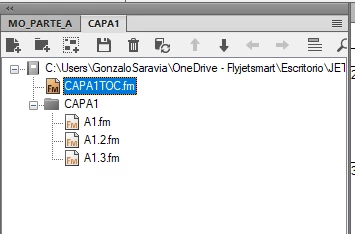
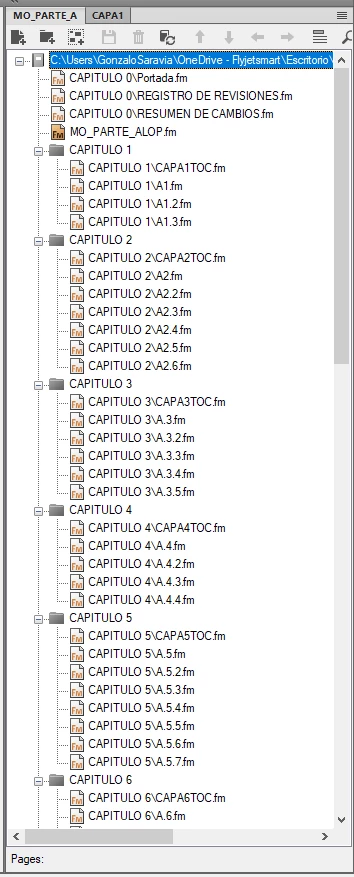
Please I need your help, I have a complex book called MO_PARTE_A and I have a lot of Chapters separated in folders (attached screenshot), but I need and idea that how can I create a TOC for each chapter (Folder) for example a TOC with the Chapter A1, A1.2 and A1.3, the solution that I have for the moment is that Im working in an individual book for each Chapter (Folder, in this case CAPA1, attached screenshot), but im sure that is not the best way to do this.


Please!! thanks!!


    This topic has been closed for replies.

    2 replies

    frameexpert
    Community Expert
    Community Expert
    September 1, 2023

    I would make a book for each folder's files and add a TOC for each book. Remember that a book is just a pointer to FrameMaker documents so you can have multiple books pointing to the same documents. The purpose of these books is just to create individual TOCs for each folder's documents. Then, in your main book, add each TOC to the book at the correct position. Note that you will be adding these TOCs to the main book as normal FrameMaker files and not generated files.


    You are still going to use the main book to manage and edit your documents. After making changes, go to each of the individual books and Update them to get the current content in each TOC.


    One important note: in the Numbering properties in the folder books' components, make sure you choose From File so that your numbering doesn't reflect what is in the folder book, but in the main book.

    frameexpert
    Community Expert
    Community Expert
    September 1, 2023

    If you need help setting this up, please contact me offlist. rick at frameexpert dot com

    Jeff_Coatsworth
    Community Expert
    Community Expert
    September 1, 2023
    Community Manager
    September 1, 2023

    Just for completeness: "Generate a miniature table of contents" in the FrameMaker Online Help.