
Participant
August 8, 2024
Question

OpenType features in FrameMaker

  • August 8, 2024
  • 3 replies
  • 473 views

Is it true that Adobe FrameMaker does not support OpenType font features? I'm talking about standard features, such as glyph positioning. Diacritical marks are not positioning correctly in FrameMaker, but work correctly in Word. Is there a workaround? FrameMaker is at version 10.0.0.388.
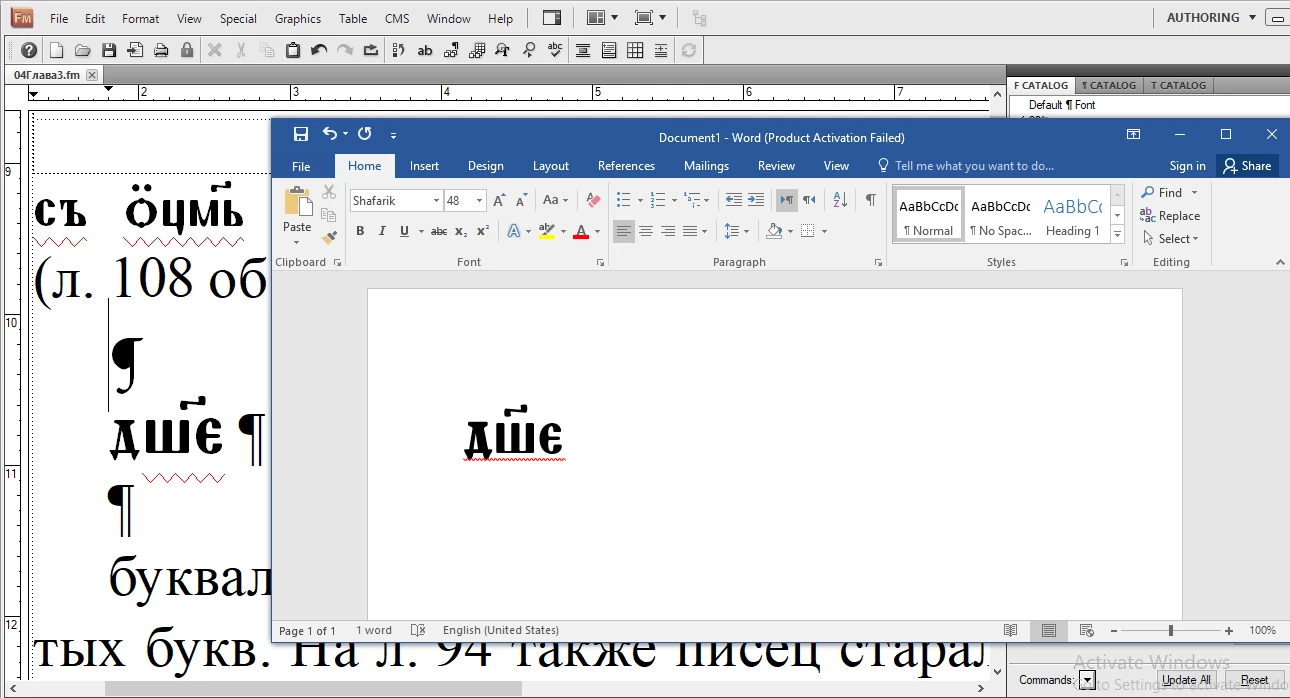
    This topic has been closed for replies.

    3 replies

    Bob_Niland
    Community Expert
    Community Expert
    August 8, 2024

    Is the font in question Shafarik? (it apparently focuses on Medieval Cyrillic)
    I see that it's available as Shafarik-Regular.otf, but is it available as both Variable and as Static instances?

    As far as I know, no version of FM properly supports OTF Variable fonts yet.


    And in case it matters, no version of FM supports Unicode codepoints above U+FFFF yet. This would make code block
    Cyrillic Extended-D: U+1E030–U+1E08F, 63 characters (including 3 modifiers & 1 combining diacritical)
    unusable.

    Participant
    August 8, 2024

    Thanks for your response. Yes, the font is Shafarik. It is not a variable font.

    Yes, I noticed the lack of support of the Supplementary Multiligual Plane, which is also unfortunate, but not critical (at least for my purposes).

    The lack of support of GPOS, however, seems like a serious flaw in the software. In fact, I find it inexplicable.

    Jeff_Coatsworth
    Community Expert
    Community Expert
    August 8, 2024

    Never heard of glyph positioning, but since you realize that this a user-to-user forum, your best bet is to talk with the FM folks themselves - see https://helpx.adobe.com/contact/enterprise-support.other.html#framemaker for your Adobe Support options. I'd recommend using the tcssup@adobe.com e-mail address as it reaches a team dedicated to Technical Communication Suite products including FrameMaker.

    Jeff_Coatsworth
    Community Expert
    Community Expert
    August 8, 2024

    That's a pretty old old version of FM you've got there - have you tried getting the trial version of FM2022 and playing around in it?

    Participant
    August 8, 2024

    Sadly, the same  behavior is in the latest version as well, 17.0.4.628:

    Jeff_Coatsworth
    Community Expert
    Community Expert
    August 8, 2024

    Since I don't deal with any non-English fonts, I have no idea what's going on with your problem, but the fact that I don't ever recall hearing about issues with dicriticals before, leads me to think it may be something to do with the font choice you've made. Have you tried using other fonts (that support the language you're working in)?

    Participant
    August 8, 2024

    Sorry, I mean Diacritical marks are not positioning correctly in FrameMaker!

    Jeff_Coatsworth
    Community Expert
    Community Expert
    August 8, 2024

    [Moderator: Fixed up your post.]