
Known Participant
September 11, 2021
Answered

Page Numbering

  • September 11, 2021
  • 3 replies
  • 3362 views

I am working on a book with 14 chapters and 4 chapters before the first one (title page, intro, TOC and preface). I am using FrameMaker 2020 e 2019 32-Bit. FrameMaker 2019 32-Bit is for using IXgen Power Indexing & Marker Management Tool for FrameMaker.

I am trying to number chapters before the first one (title page, intro, TOC and preface) with the roman (xiv) format. Then I procede as follows (the steps that follows is from the book "FrameMaker Working with Contents" by Matt R. Sullivan):

1. Select all of the files in the book window;

2. Select Format>Document>Numbering to display the numbering properperties;

3. Click the Page tab to display the page numbering properties;

4. Click the Continue Numbering from Previous Page in Book radio button and click button;

5. Now, set numbering exceptions. Select intro file and display the Page tab in the Numbering dialog box again. In the First Page # field, type 1. In the Format drop-down list, click roman (xiv). Click the Set button;

6. Select the first chapter file. Display the Page tab. In the First Page # field, type 1. In the Format drop-down list, click Numeric (14). Click Set button.

7. Update the book.

After doing these procedures, FrameMaker 2020 and 2019 number the pages of the chapters before the first one with the format Roman (XIV) instead of roman (xiv).

What can I do for FrameMaker number these pages correctly? What am I doing wrong?

Any help will be appeciated!
    This topic has been closed for replies.
    Correct answer frameexpert

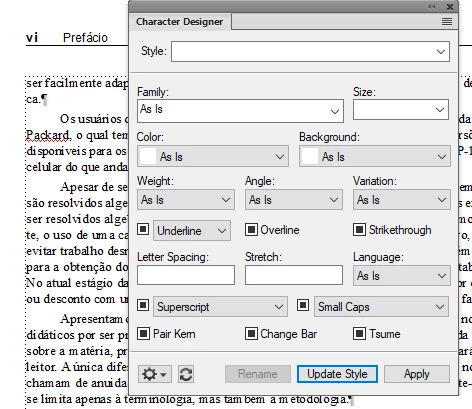
    To fix it, go to any body page and click in the margin so no text is selected.

    Choose View > Panels > Character Designer.

    Select Number from the Styles drop-down menu.

    Uncheck Uppercase (click the checkbox twice).

    Click the Update Style button.

    If you are prompted about Overrides, you can Retain them.


    3 replies

    frameexpert
    Community Expert
    Community Expert
    September 21, 2021

    OK, here goes: You have a Number character format applied to your Current Page # variable definition.

    It is making the page number bold, but it is also setting it to Uppercase:


    frameexpert
    Community Expert
    frameexpertCommunity ExpertCorrect answer
    Community Expert
    September 21, 2021

    To fix it, go to any body page and click in the margin so no text is selected.

    Choose View > Panels > Character Designer.

    Select Number from the Styles drop-down menu.

    Uncheck Uppercase (click the checkbox twice).

    Click the Update Style button.

    If you are prompted about Overrides, you can Retain them.


    Known Participant
    September 21, 2021

    Hi, Rick!

    You killed the riddle! You are THE GUY!

    I already corrected the problem.

    Thank you very much

    Regards

    Iracildo

    Matt-Tech Comm Tools
    Community Expert
    Community Expert
    September 14, 2021

    Hi Iracildo, 

    Have you tried creating a new book and adding your existing chapters?

    If that doesn't work, can you reproduce the problem with new (short) test files?

    If your problem still remains with simple test files, we can get Adobe techs to take a look at it.

    -Matt

    -Matt Sullivan, FrameMaker Course Creator, Author, Trainer, Consultant
    Known Participant
    September 18, 2021

    Hi, Matt!

    Thanks for helping!

    I already created several books trying to solve this problem without success!

    I am thinking of your suggestion of testing with small files. I did not get the idea!

    Regards

    Iracildo

    frameexpert
    Community Expert
    Community Expert
    September 20, 2021

    I am pretty sure if I see your files via a short web meeting, we can solve it quickly. There would be no cost for this.

    LinSims
    Community Expert
    Community Expert
    September 13, 2021

    You have to set the numbering format for every single file, not just the first one. Continue numbering only affects the page number, not the format used.


    My usual practice is to go to the first file and set the page # to 1 and the page formatting, then I select the files following the first file that use the same numbering format and set them to continue and the correct page formatting. Repeat each time your numbering format changes.

    Known Participant
    September 13, 2021
    Hello!

    Thanks for your e-mail and your help!

    There is nothing wrong with the page numbering itself. The problem is the
    roman numbers in the chapters before the first one. It should be in
    lowercase roman, but when I update the book the roman numbers are set to
    uppercase roman.

    Can you understand what I mean?

    Regards
    Iracildo
    Community Expert
    September 13, 2021

    Hi Iracildo,


    I just tested this with a single file.

    When I select roman, the page numbers are lower case roman numbers.

    When I select Roman, the page numbers are upper case.

    Does this work for you?

    When I make a copy of one of my books and test this, it's the same. The roman page numbers are still lower case.

    Was the book file selected, when you changed the numbering of some files in the book? The settings in the book will overwrite the settings in the files, when you update the book.


    Is FrameMaker up-to-date? What's the version number in Help | About? For FM 2020 it should be 16.0.2.916.


    Best regards


    Winfried