
Answered
Pagination issues in FrameMaker 2020
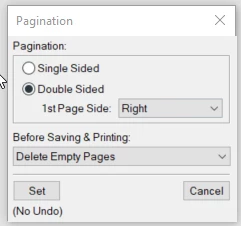
I currently have a book file set up that contains a book file for each chapter, then document files for each section within the chapter. I have the pagination set so that the first file for each book starts on the Right page (double-sided, delete empty pages) and the following files use Next Available. However, when I generate my PDF, the chapters are starting on the next available page, rather than adding in a blank page where needed so that they always start on the right. Is there a setting in the main book that I'm missing to get this to happen? I have also tried setting the first file to Read from File, but that hasn't worked either.
First file settings:


 AdChoices