
Inspiring
July 20, 2023
Answered

pagination odd - even

  • July 20, 2023
  • 3 replies
  • 370 views

Hello,

I have set a template with page numbering in master page and would like to import/Format/Template in my book chapters.

In my book, I would like to show pagination numbers like this :

- on odd page : page number at the top right of the page

- on even page  : page number at the top left of the page

How to do this ?
This topic has been closed for replies.
Correct answer frameexpert

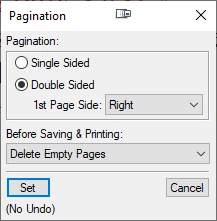
Make sure your document is double-sided (Format > Page Layout > Pagination):


You will have at least two master pages (View > Master Pages), Right and Left. Add Current Page # variables to the desired locations on the master pages.

3 replies

Inspiring
July 20, 2023

Ok, I think I understand better :

By selecting the double sided template, I have 2 master pages in my template :

- the first master page is Left

- the second master page is Right

And by selecting "1st page side Right" it corresponds to the second master page (Right).

As on the template master page right I have put a number at the top right, when I go on an odd page of my document I have a number at the top right of this odd page.

Is that correct ?

frameexpert
Community Expert
Community Expert
July 20, 2023

Yes, that is correct.

Inspiring
July 20, 2023

About my template :

I have succeeded to do it, but only to better understand :

If I select Format/Page layout/Pagination I can see "1st page side Right" in your screenshot.

What is the 1st page side ? By example is it corresponding to the book binding ?

In that case, on an odd page, the book binding is at left, so do I need to select "1st page side Left" ?

Bob_Niland
Community Expert
Community Expert
July 20, 2023

re: "1st page side Right"

This means that the first page of the document.fm uses Master Page "Right".
Right pages are presume to have the binding to the left.

frameexpert
Community Expert
frameexpertCommunity ExpertCorrect answer
Community Expert
July 20, 2023

Make sure your document is double-sided (Format > Page Layout > Pagination):


You will have at least two master pages (View > Master Pages), Right and Left. Add Current Page # variables to the desired locations on the master pages.