Known Participant
December 10, 2010
Question

Paragraph Catalog

  • December 10, 2010
  • 2 replies
  • 831 views

Hi

The Framemaker tutorial I'm reading keeps mentioning a 'Paragraph Catalog' which can be access from the tool bar on the right of the screen - as per the screenshot below:
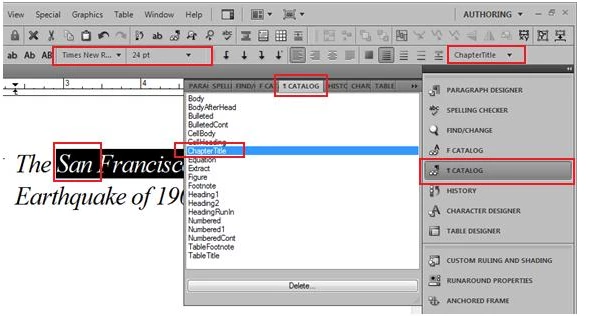
I'm running Framemaker 9 in Windows 7, all I see in the same toolbar is this:
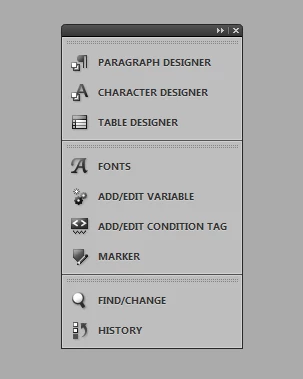
As you can see, I don't have as many options as in the tutorial's screenshot. Can anybody explain this for me?

Thanks

    This topic has been closed for replies.

    2 replies

    Karmakat66
    Known Participant
    December 17, 2010

    These are buttons on the tool bars, which then open a pod, and then you can customize your desktop to add these anywhere. These are accessed in different ways.

    Paragraph and Character Catalogs
    View toolbars>Quick Access Bar

    Click the buttons (hover over the top to see the names). The Character button is lower case 'ab' and the paragraph catalog is next to it (...and hard to describe)

    After you click the Character or Paragraph buttons, the windows that open can be docked, added to the workspace, moved around and more. When opened you can move back and forth between the 2 catalogues.

    Also if you are looking for the graphics toolbar
    View>Toolbars>Graphics Toolbar Or Graphics>Tools

    You can move it around like all other pods and dock it when you  see a blue line indicating it can be released (in the left side of the  toolbar, there is a vertical line you can grab with the mouse to move  it).

    Jeff_Coatsworth
    Community Expert
    Community Expert
    December 10, 2010

    If you want to follow along, you could change your environment to the same "Authoring" one they're running in the tutorial.