


May 10, 2010 2:32 PM UTC
Question

paragraph designer - fig caption numbering problem

Hi all

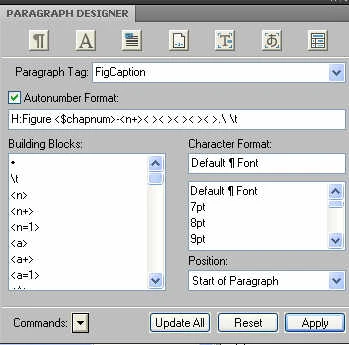
I am having problems with one chapter in my new book and I am using version 9.  All my fig caption numbering tags are fine except for one chapter and when I copy my settings from paragaph designer from my other chapters into this chapter it still does not work.  My chapter wants to start with Figure 2 no matter what i do instead of 1.  I do not see any fig caption tags before this tag that wants to start at 2.  How do I change my first tag to begin with 1?

Please help

Thanks

Caryn
    This topic is closed to new replies. Start a new post to keep the conversation going.

    3 replies

    Arnis Gubins
    Inspiring
    May 10, 2010 3:25 PM UTC

    Are you using any other paratags that have the H: series autonumbers prior to the first figure?

    Translate
    May 10, 2010 3:29 PM UTC

    Arnis

    Thanks that fixed it!  I changed it to the letter "I."  Did not realize it was that easy.

    Caryn

    Translate
    Arnis Gubins
    Inspiring
    May 10, 2010 3:35 PM UTC

    Caryn,

    If that fixed it, then something is out of place in the numbering matrix for one of the other paratags. For the long run, you should try to fix the template that uses the H: series autonumbers.

    Translate