Inspiring
May 3, 2013
Answered

Paragraph Designer not available

  • May 3, 2013
  • 1 reply
  • 1542 views

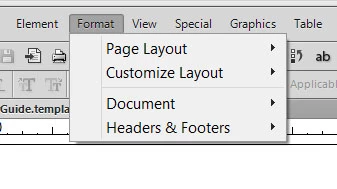
I'm trying to customize the template for my Structured App, and the Paragraphs is not showing up when I click on Format, so I can't get to the paragraph designer.  As soon as I open my template, the number of choices under the Format pull down menu shrinks to 4 items.   Can anybody tell me why?

This topic has been closed for replies.
Correct answer SteveHeflin

That's a shortcut to toggle a document into/out of the View-only mode.

Does ctrl+m bring up the paragraph designer? Does <esc> o p c open the Paragraph catalog?

What does your Format menu look like - do a screen capture and post here please (use the camera icon to add an image file).


ctrl+m  shows the paragraph designer!  that saves my rear - bless you oh wise one

<esc> o p c    does open the Paragraph catalog

Here's my  reduced Format menu:

1 reply

Arnis Gubins
Inspiring
May 3, 2013

It sounds like it's a locked/view-only document. Are you in an environment where you're allowed to do this?

Inspiring
May 3, 2013

As far as I know unless I accidently changed it!  I own the computer, the license, and am creating my own Structured Application.

Arnis Gubins
Inspiring
May 3, 2013

<esc> F l k

That's <esc> shfit+F (uppercase "F") l (lowercase "L") k (lowercase "K")