
Participating Frequently
March 24, 2017
Answered

Paragraph tag

  • March 24, 2017
  • 1 reply
  • 243 views

I'm trying to create a paragraph tag that includes a check mark at the beginning of the paragraph.

I put the check mark in a frame in the reference page.

I can put the check mark above or below the paragraph by defining the paragraph tag, but don't know how to put it at the beginning of the paragraph.

    This topic has been closed for replies.
    Correct answer Barb Binder

    As you figured out, you can add image from the references pages either above or below a paragraph, but not on the sides.

    I would suggest bullets. The steps are in the blog below, but instead of a chipmunk (what was I thinking?) use a checkmark.

    https://www.rockymountaintraining.com/adobe-framemaker-but-i-dont-want-a-plain-round-bullet/

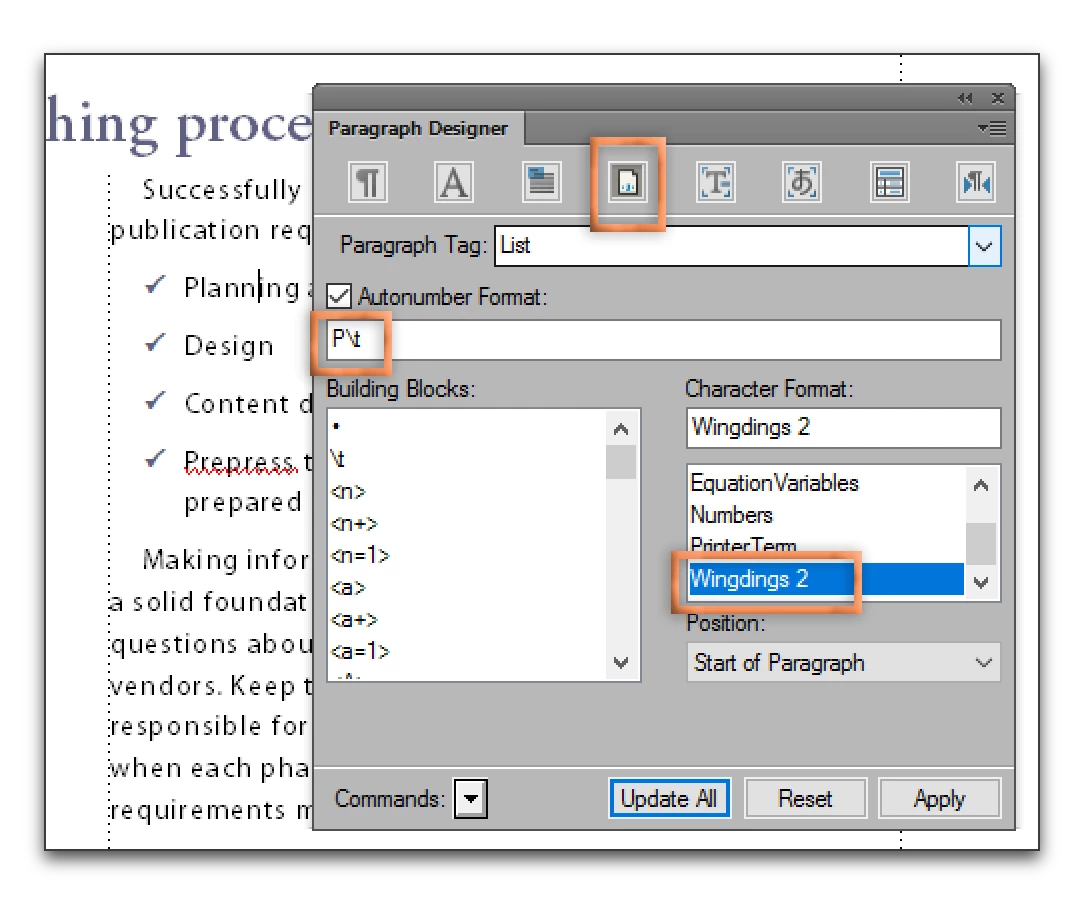
    An uppercase P in Wingdings 2 is a checkmark. If you don't have that font, take a look at the ones you do have. You can see the ornamental characters in File > Utilities > Character Palette.

    1 reply

    Barb Binder
    Community Expert
    Barb BinderCommunity ExpertCorrect answer
    Community Expert
    March 24, 2017

    As you figured out, you can add image from the references pages either above or below a paragraph, but not on the sides.

    I would suggest bullets. The steps are in the blog below, but instead of a chipmunk (what was I thinking?) use a checkmark.

    https://www.rockymountaintraining.com/adobe-framemaker-but-i-dont-want-a-plain-round-bullet/

    An uppercase P in Wingdings 2 is a checkmark. If you don't have that font, take a look at the ones you do have. You can see the ornamental characters in File > Utilities > Character Palette.

    ~Barb at Rocky Mountain Training