andspence1
Known Participant
February 6, 2019
Answered

Paragraph text not showing up in TOC

  • February 6, 2019
  • 3 replies
  • 1116 views

FrameMaker Release 2019, version 15.0.2.503.

I've inherited a document, and having one hiccup on TOC generation.  One particular paragraph style is not showing up.

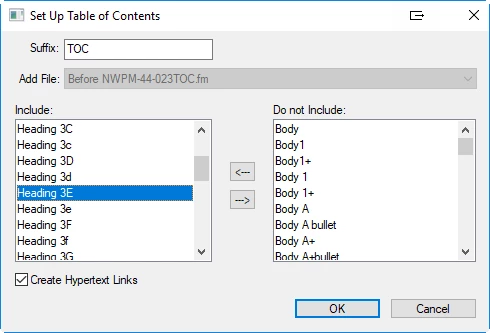
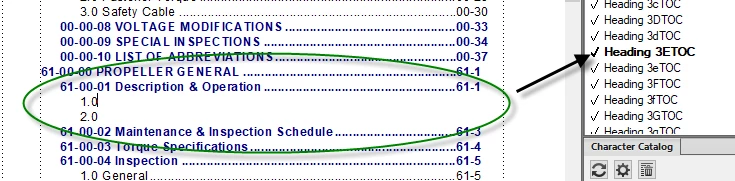
The paragraph style that is not showing up is called "Heading 3E". It is listed as included on the setup TOC window.  I don't know enough about this book file and the chapters to know where to look next.
    This topic has been closed for replies.
    Correct answer Barb Binder

    Hi Andrew:

    Thank you for sharing the file with me.

    You are right about the reference pages—there are over two pages of TOC paragraph tags. I can't tell if you need all of them for the whole book—if so, keep them—but for the section you sent me you are only using three tags: Heading1TOC, Heading2 TOC and Heading 3ETOC. All those TOC paragraphs made it difficult to pinpoint the problem so I changed the Heading 3ETOC to Magenta:

    This also changes the color on the reference pages and sure enough, the building blocks were missing from Heading 3ETOC—which is the first entry at the top page Reference page TOC (1 of 11).

    Copy them from another entry:

    And update your book:

    Of course, the magenta is just to help you follow my trail. When you fix your file, you can leave everything black.

    ~Barb

    3 replies

    Barb Binder
    Community Expert
    Barb BinderCommunity ExpertCorrect answer
    Community Expert
    February 7, 2019

    Hi Andrew:

    Thank you for sharing the file with me.

    You are right about the reference pages—there are over two pages of TOC paragraph tags. I can't tell if you need all of them for the whole book—if so, keep them—but for the section you sent me you are only using three tags: Heading1TOC, Heading2 TOC and Heading 3ETOC. All those TOC paragraphs made it difficult to pinpoint the problem so I changed the Heading 3ETOC to Magenta:

    This also changes the color on the reference pages and sure enough, the building blocks were missing from Heading 3ETOC—which is the first entry at the top page Reference page TOC (1 of 11).

    Copy them from another entry:

    And update your book:

    Of course, the magenta is just to help you follow my trail. When you fix your file, you can leave everything black.

    ~Barb

    ~Barb at Rocky Mountain Training
    andspence1
    Known Participant
    February 7, 2019

    Thank you so much Barb!

    Barb Binder
    Community Expert
    Community Expert
    February 7, 2019

    Always happy to help, Andrew.

    ~Barb

    ~Barb at Rocky Mountain Training
    LinSims
    Community Expert
    Community Expert
    February 7, 2019

    Did you check your reference page to be sure it was included there? Because to me, it looks as if it's missing the building blocks required.

    LinSims
    Community Expert
    Community Expert
    February 7, 2019

    <looks at pictures some more> No, you've got it showing just above where items aren't showing up. Barb is no doubt correct. You've probably got empty paragraphs tagged with that style.

    You could also try searching for Heading 3E using the Find/Change > Paragraph Tag function. If it stops on an empty line, you'll know you've found it and can either delete the line or retag it to something that isn't included in the TOC.

    Barb Binder
    Community Expert
    Community Expert
    February 6, 2019

    Hi AndSpence:

    I suspect empty ¶s tagged as Heading 3E. Please examine pages 61-1 through 61-3 for empty returns. Turn on View > Show Text Symbols Type > Show Hidden Characters. When you find them, remove them and update the TOC.

    ~Barb

    ~Barb at Rocky Mountain Training
    andspence1
    Known Participant
    February 6, 2019

    Hi Barb -

    I can't quite figure out how to turn on Show Hidden Characters.  I think I am missing something from "Turn on Type > Show Hidden Characters"

    Barb Binder
    Community Expert
    Community Expert
    February 6, 2019

    Hi AndSpence:

    My apologies! I hop around different forums and thought this was an InDesign question.

    Same answer though, except it's View > Show Text Symbols.

    ~Barb

    ~Barb at Rocky Mountain Training