



Answered
Paste without format - preserve target ¶ format
Lin Sims asked for an option for Paste: Preserve the target formatting.
I want to implement this in the script FMfindRepl. So I developed UnformatClipBoard. I needed to circumvent the following problems:
- After pasting there is no method to find the length of the pasted text range.I need to know this to apply the correct target format.
- As it turns out that there are no properties defined for the clipboard.
- I also have not found a method to apply the default paragraph format other than using FCodes.
Details for the function listed hereafter:
- The copied selection must not contain more than one paragraph. Hence the selection must not contain an end-of-paragraph mark.
- It is not 'looked into' objects. Hence any formatting inside a variable (e.g. font change) or a table or anchored frame is not modified.
The screen shot also shows the result from Paste Special > Unicode Text
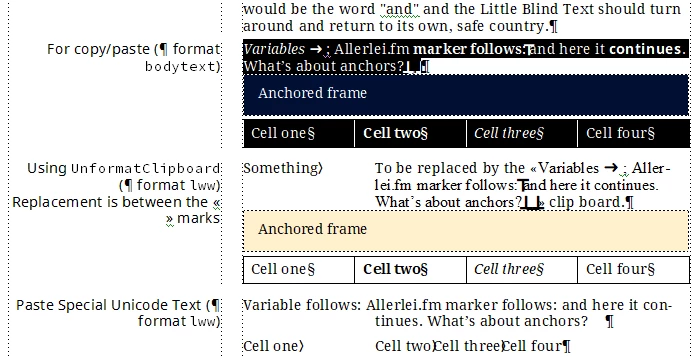
Two additional functions are required: ExecuteFCodes → Message .
Edit 2022-06-08: Function corrected (applying a ¶ format is not just setting the new name...)
KLD_Z.UnformatClipboard = function (oDoc, oPgf) { // =========================
// Calling       ExecuteFCodes (which calles Message)
// History       2022-06-08 Corrected: apply ¶ format is not just the name...
ApplyPgfFmt = function (oDoc, oPgf, sFormat) {
var oProps;
  oPgfFmt = oDoc.GetNamedPgfFmt(sFormat);
  if (oPgfFmt.ObjectValid()) {
    oProps = oPgfFmt.GetProps();
    oPgf.SetProps(oProps);
  } else {
    oPgf.Name = sFormat;
  }
} //--- end ApplyPgfFmt ---------------------
var oDoc, oPage, sPgfFmt, oLocation = {}, oPgfLocal, oTFr, oTL, oTR, MM = 185771;

  oDoc = app.ActiveDoc;
  if (app.Displaying == true) {                   // Avoid flicker
    app.Displaying = false;
  }
  oLocation.pgf      = oDoc.TextSelection.beg.obj;// Save current loc
  oLocation.txtRange = oDoc.TextSelection;
  oLocation.page     = oDoc.CurrentPage;
  sPgfFmt            = oPgf.Name;                 // Name of target paragraph format
// --- begin core function -----------------------
  oPage = oDoc.FirstMasterPageInDoc;
  oTFr = oDoc.NewTextFrame (oPage.PageFrame); // temporary text frame
  oTFr.Width  = 150 * MM;
  oTFr.Height =  50 * MM;
  oPgfLocal = oTFr.FirstPgf;
  oTR = new TextRange;
  oTR.end.obj = oTR.beg.obj = oPgfLocal;
  oTR.end.offset = oTR.beg.offset = 0;
  oDoc.TextSelection = (oPgfLocal,oTR);
  oDoc.Paste(0);                            // Paste the clip board
  oTR.beg.obj = oPgfLocal;
  oTR.beg.offset = 0;
  oTR.end.obj = oPgfLocal;
  oTR.end.offset = Constants.FV_OBJ_END_OFFSET;
  oDoc.TextSelection = oTR;
  KLD_Z.ExecuteFCodes (["SelectAll","CharacterDefaultPgfFont"]);
  ApplyPgfFmt (oDoc, oPgfLocal, sPgfFmt);  // Complete format must be applied
  oDoc.Copy (0);                           //  not interactive
  oTFr.Delete ();                          // Delete the helper text frame
// --- end core function -------------------------
  oDoc.CurrentPage = oLocation.page; // Restore current location
  oPgf = oLocation.pgf;
  if (oPgf.ObjectValid () === 1) {
    oDoc.TextSelection =   oLocation.txtRange;
  }
  oDoc.ScrollToText(oLocation.txtRange);
  if (app.Displaying == false) { // Restore previous state
    app.Displaying = true;
    app.ActiveDoc.Redisplay();
  }
} // --- end UnformatClipboard ----------------------------------------


 AdChoices