Known Participant
January 5, 2015
Answered

PDF Bookmarks

  • January 5, 2015
  • 2 replies
  • 523 views

We currently use FM11 to create PDF books that consist of 100 or more individual files (chapters). We manually create group sections which contain the individual chapters. The chapters use heading paragraph tags 1 thru 3. When the PDF book is created, the tags for each chapter are expanded in the bookmark view.  Is there a way to only show the chapter title without the paragraph tags expanding?  Thank you in advance.

    This topic has been closed for replies.
    Correct answer Arnis Gubins

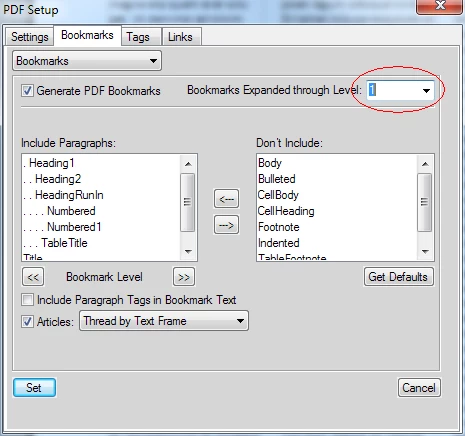
    In the Bookmarks setup panel, click in the "Bookmarks Expanded through Level" list and manually enter the desired level (in your case: 1).

    2 replies

    Inspiring
    January 5, 2015

    If I understand you correctly, I think this is what you are looking for:

    From book window, choose Format> Document> PDF Setup> Bookmarks tab.

    Then choose the paragraph formats you want to include or exclude to

    decide which bookmarks show up in the PDF. For those included, you can

    adjust the nesting level by clicking the "Bookmark Level" double-arrow

    buttons, and noting how many leading periods fall before the format's

    name in the Include Paragraphs window. Each dot represents and

    additional level of nesting.

    WRBAuthor
    Known Participant
    January 5, 2015

    We currently use your suggestion for our TOC.  When we open the PDF book right now and open a group section, all bookmarks are expanded.  This we don't what.  Currently testing the suggestion from the first reply sent.

    Arnis Gubins
    Arnis GubinsCorrect answer
    Inspiring
    January 5, 2015

    In the Bookmarks setup panel, click in the "Bookmarks Expanded through Level" list and manually enter the desired level (in your case: 1).

    WRBAuthor
    Known Participant
    January 5, 2015

    We are giving this a try right now.  Program will run for quite a while, will let you know what happens in the morning.