Inspiring
June 15, 2026
Answered

PDF lists paragraph styes in bookmarks

  • June 15, 2026
  • 2 replies
  • 23 views

I asked a similar question a good while ago and it was answered. 

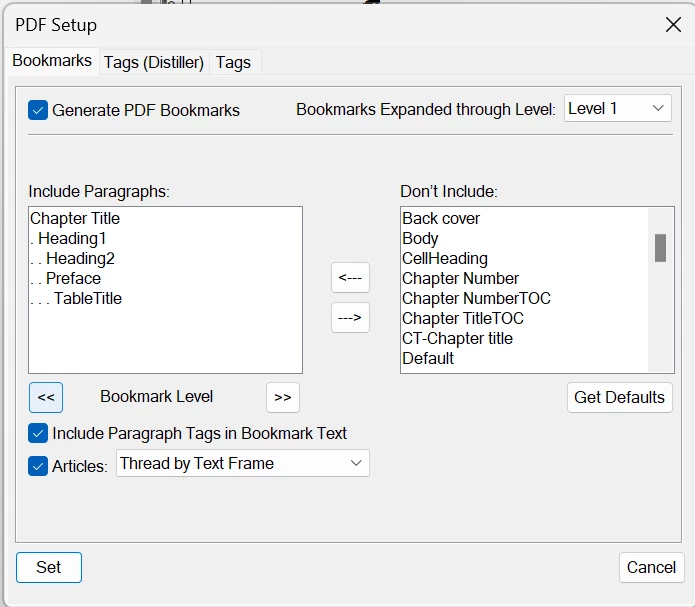
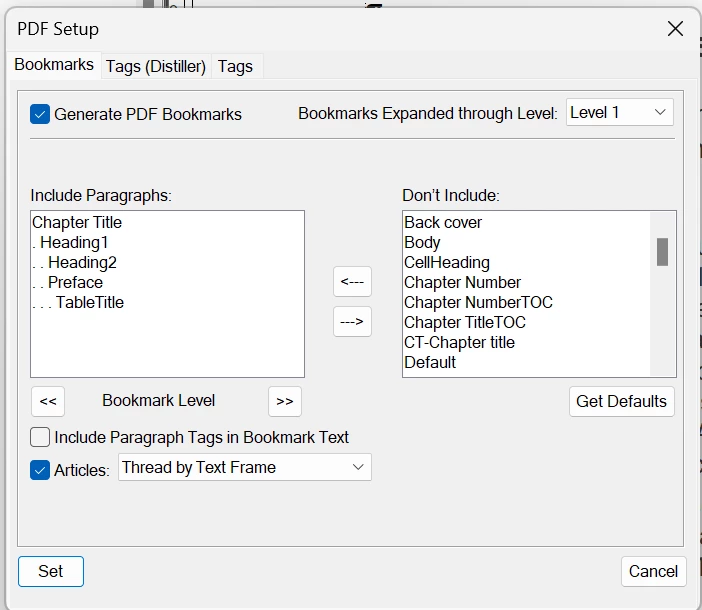
However, the referenced answer doesn’t work in a current document because the Include Paragraph Tags in Bookmark Text option in FrameMaker resets to the selected state during PDF generation.
 

FrameMaker PDF setup block immediately before PDF generation
FrameMaker PDF setup block immediately after PDF generation

Any help will be greatly appreciated.

    Correct answer Winfried Reng

    Hi,

    To help I would need some more info.

    Which FrameMaker version do you have (Help | About)? The newest one is 18.0.0.

    Is your file unstructured or structured?

    It seems that you get this issue only with a specific file. All other files work? Is this file part of a book?

    Do you save the file before you save as PDF? How do you create the PDF? Save as PDF? With or without Distiller? (You can set this in the Publish pod.)

    Best regards, Winfried

    2 replies

    Community Expert
    June 16, 2026

    I just tested this with FM 18.0.0, and everything worked.

    I activated or deactivated the option “Include Paragraph Tags in Bookmark Text”, activated or deactivated Distiller in the Publish pod. Everything correct.

    Does it help, when you move your file into another folder where this option works?

    Winfried RengCommunity ExpertCorrect answer
    Community Expert
    June 16, 2026

    Hi,

    To help I would need some more info.

    Which FrameMaker version do you have (Help | About)? The newest one is 18.0.0.

    Is your file unstructured or structured?

    It seems that you get this issue only with a specific file. All other files work? Is this file part of a book?

    Do you save the file before you save as PDF? How do you create the PDF? Save as PDF? With or without Distiller? (You can set this in the Publish pod.)

    Best regards, Winfried

    TCBillAuthor
    Inspiring
    June 16, 2026

    I had formerly been at FM17.0.8 (which had always worked before), but an update to FM 17.0.9 resolved the issue.

    Thank you for the tip!

    Community Expert
    June 17, 2026

    Hi,

    Very good that this simple trick did it! And 18.0.0 is also very stable!

    All the best, Winfried