

Community Expert
March 27, 2024
Answered

PDF printer instance keeps disappearing

  • March 27, 2024
  • 4 replies
  • 1494 views

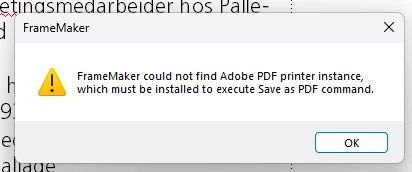
I am running FrameMaker Version: 17.0.0.226 on Win11 and a really annoying problem has appeared. The PDF printer instance keeps disappearing and provokes this message:
    This topic has been closed for replies.
    Correct answer Klaus Göbel

    I'm working with Windows11 and since the last update this problem is gone. So my conclusion is, that it is not a matter of FrameMaker, but Windows.


    4 replies

    Inspiring
    June 10, 2024

    I had this ptoblem. A couple weeks ago I ran Acrobat as Admin, reinstalled the driver and havent had an issue since. 

    Running Win 11.  

    Klaus Göbel
    Klaus GöbelCorrect answer
    Legend
    June 10, 2024

    I'm working with Windows11 and since the last update this problem is gone. So my conclusion is, that it is not a matter of FrameMaker, but Windows.


    Community Expert
    June 10, 2024

    Hi Klaus, thank you very much for your comment!

    Then it seems that I have to wait until our IT department allows us to switch to Windows 11. Probably not before we get new laptops after 3 or 5 years usage.

    Before some months ago the Adobe PDF printer was removed maybe once in 3 months. Now every 3 days.

    Best regards, Winfried

    Community Expert
    June 10, 2024

    I do not know what the cause is.

    On my laptop at about 1/3 of all days the Adobe PDF printer is removed.

    I cannot tell, if this happens right in the morning or after I worked with a specific program. Or if I worked with a specific program, and the Adobe PDF printer is removed after the next restart. I do not notice any rule yet.

    I will monitor this and check, when the Adobe PDF printer is removed.

    Annoying!

    Fortunately I can do a repair installation of Acrobat Pro which installs the Adobe PDF printer again. Takes 3 minutes.

    Community Expert
    June 10, 2024

    I work on Windows 10, FrameMaker 17.0.3 and always the latest Acrobat patch.

    Bob_Niland
    Community Expert
    Community Expert
    March 28, 2024

    A general web search suggests that this is a more general Acrobat problem than a specific FM problem.

    Presumably all the installs are being done as Admin.

    Is full Acrobat {pro} or Acrobat Reader installed on the same system?


    Community Expert
    March 28, 2024

    I think you are right. Browsing the Acrobat forum shows that I am no alone with this issue. Not that it has been resolved, though.

    Bjørn Smalbro - FrameMaker.dk
    Bob_Niland
    Community Expert
    Community Expert
    March 29, 2024

    I'm wondering if this happens on systems which don't have stand-alone Acrobat (Reader or Pro) installed. There may not be many such systems, as anyone generating PDF typically wants to air-check them pre-distribution/publication. As an uninformative data point, I have both installed, and have yet to see the PDF printer instance go poof.

    Acrobat tends to just update itself by default (whereas CC makes updates available, and FM relies on user initiative).
    Is there some chance that the PDF printer is going over the cliff as a result of an Acrobat update?
