Participating Frequently
August 2, 2023
Answered

PDF Publishing setting - folder structure

  • August 2, 2023
  • 4 replies
  • 440 views

Hello all,

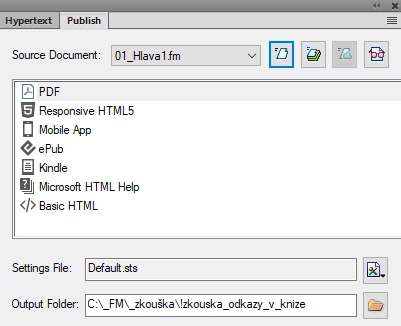
I´m trying to find the solution how to change publishing settings to generate and save .pdf file directly to the chosen Output Folder.


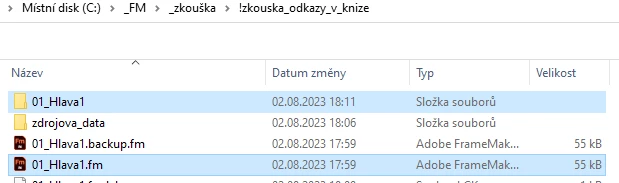
Now it automatically creates new folder 01_HLAVA1 in the Output Folder:


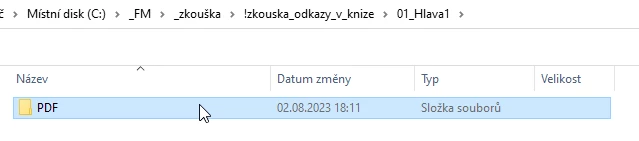
Then sub-folder PDF:


And then finally I can find .pdf file.


Do you have any suggestions how to solve this?


Thank you.


Adam


    This topic has been closed for replies.
    Correct answer Matt-Tech Comm Tools

    The folder structure for Publish output is set to use your output folder as the parent directory, then with the project name and file type inserted as you see. 

    I imagine "the thinking" is that you can generate multiple types of output for multiple projects without having to shuffle to various directories.

    However, if you "only" have one output type for a single project, it does seem to be overkill.

    **To avoid the additional layers of organization, use the File > Save as PDF option, which uses the current Publish panel settings. In this way, you can select the directory you need. In my experience, especially when the PDF is saved to your project directory, it sort of becomes the default location for saving, so you don't need a ton of navigation to identify the directory after you first save the file.

    -Matt

    4 replies

    Jeff_Coatsworth
    Community Expert
    Community Expert
    August 2, 2023
    Community Expert
    August 2, 2023

    Hi,

    You can also just open the File menu and click Save as PDF.

    FrameMaker then saves the book (or file) as PDF in the same folder as the book or file.

    No folders or subfolders.

    Best regards, Winfried

    Matt-Tech Comm Tools
    Community Expert
    Matt-Tech Comm ToolsCommunity ExpertCorrect answer
    Community Expert
    August 2, 2023

    The folder structure for Publish output is set to use your output folder as the parent directory, then with the project name and file type inserted as you see. 

    I imagine "the thinking" is that you can generate multiple types of output for multiple projects without having to shuffle to various directories.

    However, if you "only" have one output type for a single project, it does seem to be overkill.

    **To avoid the additional layers of organization, use the File > Save as PDF option, which uses the current Publish panel settings. In this way, you can select the directory you need. In my experience, especially when the PDF is saved to your project directory, it sort of becomes the default location for saving, so you don't need a ton of navigation to identify the directory after you first save the file.

    -Matt
    -Matt Sullivan, FrameMaker Course Creator, Author, Trainer, Consultant
    Jeff_Coatsworth
    Community Expert
    Community Expert
    August 2, 2023

    Not entirely sure what your issue is - but you could simplify it by creating a C:\Output\ folder and publishing to it. You'll always get a folder within that with the "name" of the content and sub-folders of each output type within it.

    Participating Frequently
    August 2, 2023

    I would like to publish only .pdf file, that is saved directly to the Output Folder.

    Not to create 2 new folders and then the published .pdf file, like the FM does it by default.


    Is it possible to change that?

    Jeff_Coatsworth
    Community Expert
    Community Expert
    August 2, 2023

    Nope - the mechanics of FM Publishing "under-the-hood" are really RoboHelp - and RH always created a \<project_name>\!SSL!\<output_names>\ folder structure when generating outputs.