
Known Participant
January 31, 2019
Question

PDF Setup Bookmark settings changing spontaneously

  • January 31, 2019
  • 2 replies
  • 707 views

When I generate a .pdf from a book file or an individual file, the bookmarks no long include only the Chapter, Heading 1, and Heading 2 Paragraph styles. Now, about half of the Paragraph catalog is listed in the Include Paragraphs section of the PDF Setup for Selected Files > Bookmarks tab:
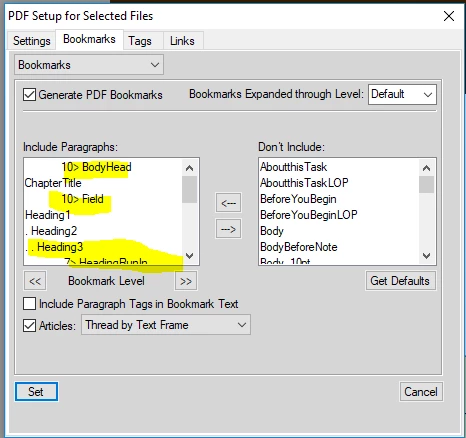
I reset the Include Paragraphs to be only the ChapterTitle, Heading1, and Heading2:
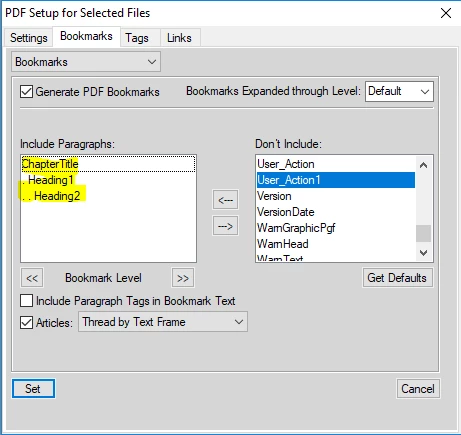
Then I Save the file/book and print the PDF.

And the next time I need to print a pdf, I have to do it all over again.  I thought things like PDF set up/print settings were saved with the doc/book?

This started about a month ago.  I am using FrameMaker 11.  This happens with all of my FrameMaker individual files and book files, when I'm doing Save as PDF... or Print Book... (to PDF) or Save Book As... (pdf).

This topic has been closed for replies.

2 replies

LinSims
Community Expert
Community Expert
February 5, 2019

Rick Quatro's Import Formats Special plugin lets you select which document properties you import, and you can deselect the PDF Properties on his dialog.

Or, you can make sure that the file you're importing from has the same PDF properties as the one you're importing to. If there's a reason they can't use the same properties, I refer you to Rick's script.

Seriously, the dude is a Frame world treasure.

davidcfrye5910298
Inspiring
February 5, 2019

I'm not sure about your specific situation, but the settings can be changed when you import formats. I think they come over with Document Properties, but maybe Paragraph Tags. This has happened to us several times.

Known Participant
February 6, 2019

Hi

Thanks for the insight.  I did do an import formats across several files in December.  But since then I've saved a couple of my docs to pdf several times and the pdf settings aren't sticking. Each time I have to reset them and I haven't done any imports since the beginning of the year. Don't the pdf settings get saved when you save the book file?  

davidcfrye5910298
Inspiring
February 6, 2019

It's been a while since had to sort this same sort of issue out, but here's what I would try. First, I assume that all of your files can have the same document properties. Set 1 of them with the correct bookmarks. Import document properties and only document properties into all of the files. If you're in a book, make sure that the TOC file also has the same document properties. Make sure you are saving each one as you close them.

Second, I never Save As PDF. I can't quite remember all the details, but in our department over the last 15 years, it's only been trouble. I print as PDF. There may be no issues these days with Save As PDF, but it's just habit. If you do all of that, close the book, reopen, and the bookmarks are back to the way they were, then my next move would be uninstall and reinstall Acrobat and repeat the process. We ran into some PDF weirdness twice over a 6 month period last year and the fix was to uninstall/reinstall Acrobat Pro. We suspect that it had to do with auto updates in Creative Cloud, Acrobat DC, and Acrobat Reader. But, we can't prove exactly what. Maybe it was just a bug they fixed.