Participating Frequently
June 25, 2026
Question

PDF will export from Framemaker, but bookmarks and cross-references don't work

  • June 25, 2026
  • 2 replies
  • 53 views

Hello - I’m having trouble with the bookmarks and cross-references in a PDF export from Framemaker. Once I create the PDF, none of the bookmarks and cross-references work. I’ve tried Publish to PDF and Save to PDF with no luck either way. I’ve also exported just one file to see if the links would work if I created one PDF at a time but that doesn’t work either. 

My process: Update book, Save all files in book, save book, Publish to PDF or Save to PDF.

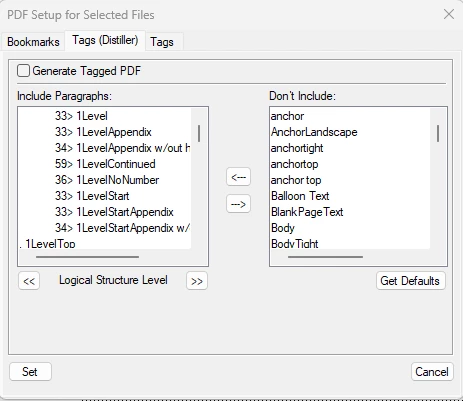
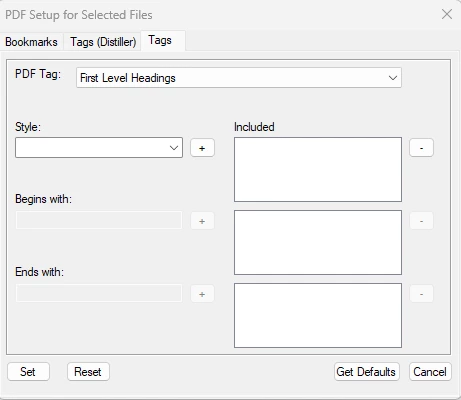
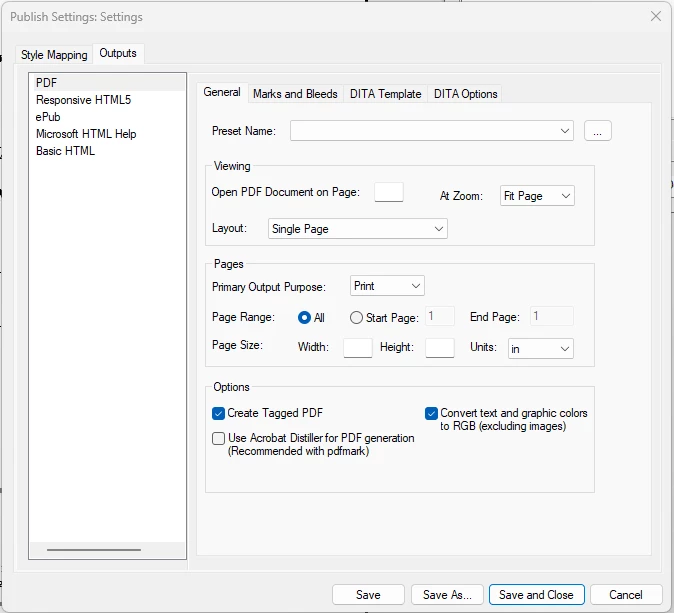
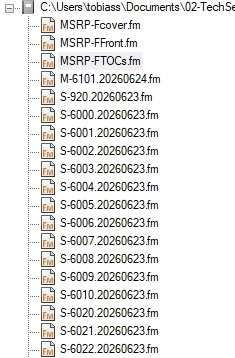
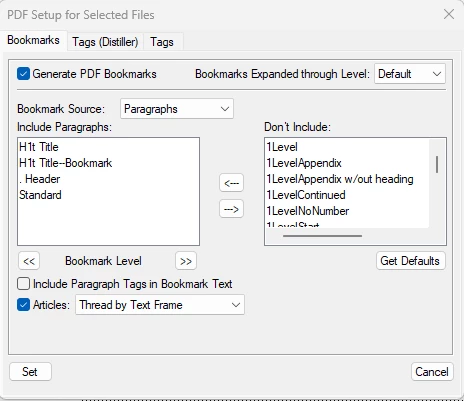
I’ve included images of the following: PDF output settings, Settings.sts, list of book files.

Any help you can offer would be greatly appreciated. Thank you!
 

2 replies

Jeff_Coatsworth
Community Expert
Community Expert
June 26, 2026

What version of FM? Structured or Unstructured? Was this working for you before or is this the first time you’ve done this? Save As PDF and Publish to PDF both use the same “engine” (the Publish one). As Winfried suggests, try printing to the Adobe PDF printer instance and try the Publish route, but select the “Use Acrobat Distiller” option in your second-last image.

Community Expert
June 26, 2026

Hi,

Very strange. This works always automatically!

Which PDF Viewer do you use?

Did this work with other files?

Which printer is selected in FrameMaker? (Although this should not matter.)

You could also make a test. In the Print Setup in the Files menu select Adobe PDF as your printer. Then print book and print to a PostScript file. Activate Generate Acrobat Data in the Print dialog. Then distill this to a PDF.

Do your cross-references in FrameMaker work? You can check this. Press CTRL+ALT and move your mouse pointer over the cross-reference. It should turn to a finger.

Best regards, Winfried


Participating Frequently
June 29, 2026

Hello,

I agree it’s very strange.

PDF Viewer: Adobe Acrobat

Works with other files: Yes

Printer: Adobe PDF

Cross-references work in FrameMaker: Yes

Version of FM: 17.0.3.546

Structured or unstructured: Structured

Working before: Everything was working until this publication.

The print to PostScript and distill to PDF worked (Yay!) but this is the first time I’ve had to do that. It’s so strange! I used Print to PDF on other documents earlier in the week. Perhaps I’ll have to use different processes for different publications?? 

Thank you so much for your help ​@Winfried Reng and ​@Jeff_Coatsworth!

Community Expert
June 29, 2026

Hi,

You should update to the latest FrameMaker update 17.0.9. Or even better to 18.0.0:

https://helpx.adobe.com/framemaker/kb/framemaker-downloads.html

There is a difference between Save as PDF and Print to PDF.

Save as PDF uses the same routines as when you print to a PostScript file with Generate Acrobat Data activated.

When you activate the Use Acrobat Distiller option in the Publish dialog, there is not difference to the manual process. When this option is deactivated, FrameMaker uses its internal PDF generation engine.

When you Print to PDF, you would just print to the Adobe PDF printer. I do not know, the Acrobat Data would be included.

You could also do a repair installation for Acrobat in the Windows control panel.

And what happens, when you just create an unstructured file and save this to a PDF?

Or one of your other structured files?

Best regards, Winfried