Inspiring
November 20, 2016
Answered

performing actions on an entire book

  • November 20, 2016
  • 1 reply
  • 454 views

Hi,

I used FrameMaker till 2005 and was pretty good at it.

Now I have purchased FM 2015 for some work I am doing.

I have some questions about whether and how I can perform certain actions on an entire book or most of it.

This is probably pretty basic stuff for experienced users.

1. Can I control line numbering for an entire book? Both turning it on and off and controlling it (e.g., color)

2. Master page propagation. I want to make changes to master pages and have those changes apply to all the files in the book. Is there a way to exclude certain files from that?

3. Similarly, I want to define new character formats and have them appear in the catalogs of all the files in the book.

Thanks!

Shalom Bresticker

    This topic has been closed for replies.
    Correct answer Barb Binder

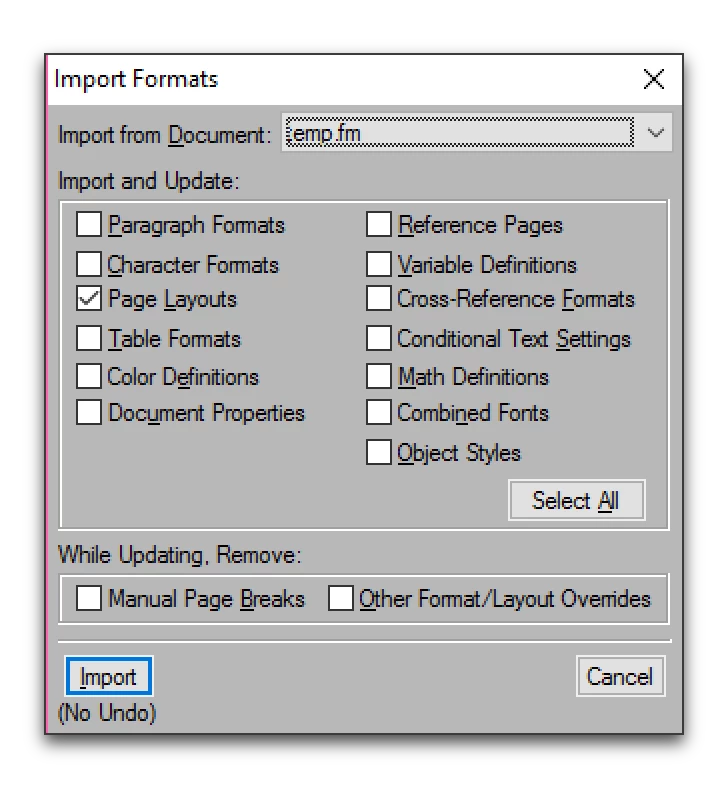
    Use File > Import > Formats (as you did up until 2005) to copy formatting from one document to another, or from one document to selected files in a book. You can pick and choose which formatting commands you want to import:

    Page Layouts refers to Master pages, Character Formats is for character formats, of course. But here's where it gets weird, IMHO, Page Layouts controls the visibility and color of the Line numbers, not Document Properties, which I assumed would do it.

    1 reply

    Barb Binder
    Community Expert
    Barb BinderCommunity ExpertCorrect answer
    Community Expert
    November 20, 2016

    Use File > Import > Formats (as you did up until 2005) to copy formatting from one document to another, or from one document to selected files in a book. You can pick and choose which formatting commands you want to import:

    Page Layouts refers to Master pages, Character Formats is for character formats, of course. But here's where it gets weird, IMHO, Page Layouts controls the visibility and color of the Line numbers, not Document Properties, which I assumed would do it.

    ~Barb at Rocky Mountain Training
    Inspiring
    November 21, 2016

    Great!

    I found the Import > Formats after writing the question, but I had also expected Document Properties to control Line Numbering.

    You're correct that Page Layouts does it.

    FM has a lot of power, but there is inconsistency and lack of documentation about what you can do at book level and what you have to at document level + import.

    This is getting off the subject, but I also found that Format > Page Layout > Apply Master Pages does not have a real Cancel option. It asks you something about a map file, but if you decide that you don't want to do the operation and click X, for example, it starts performing the operation anyway.

    Shalom

    Barb Binder
    Community Expert
    Community Expert
    November 21, 2016

    Apply master pages uses a table stored on a reference page, and ties master pages to paragraph tags. Use Format > Page Layiut > Master Page Usage if you don't want to assign the master pages automatically.

    ~Barb at Rocky Mountain Training