

Susan305351693t3o
Inspiring
February 21, 2024
Question

Permanantly unresolved cross references?

  • February 21, 2024
  • 4 replies
  • 2501 views

I have some files in a book that ALWAYS have unresolved cross references, and I don't understand why.

When I open the files, I get this message:
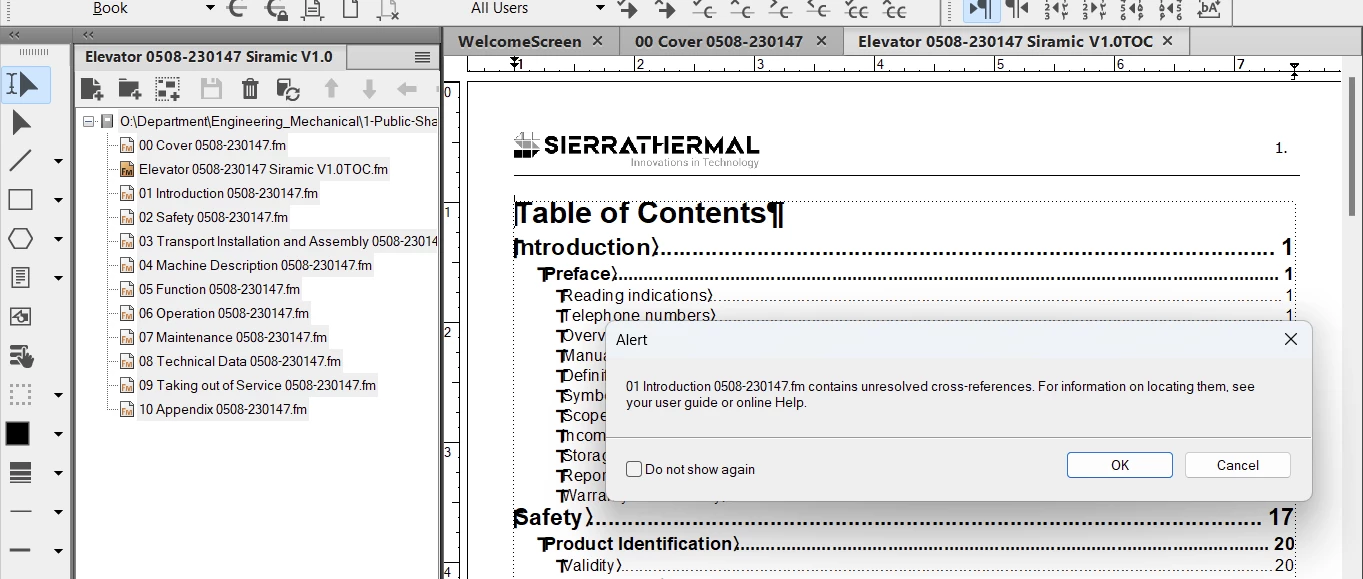
 

This happens for several files in the book. Always the same ones.

So I fix the unresolved cross references using the Find/Cross References-Unresolved tool and repairing them on the Cross References menu. After the "Find" yields no more unresolved cross references, I save all of the files. Then I update the book.

But despite saving ALL of these files, once they are closed and opened again, they once again have the SAME unresolved cross references, even though NOTHING has changed since I repaired the unresolved cross references and saved the files.

How is this happening and how do I fix it, permanantly?

Thank you.

    This topic has been closed for replies.

    4 replies

    BelindaLebbink
    Known Participant
    August 9, 2024

    Hello,


    I do have the same issues as the poster. Unavailable fonts and unresolved cross-references.


    Fonts

    I resolved these by replace all those with available one. Check by closing and opening while book is still open, save all files, no errors anymore.


    Cross-references

    All cross-references to other files in the book are unavailable. I find them via Find (or per file a LOR) and replace them. They are available when I open all the files. Check via Find and LOR states there are NO unresolved cross-references anymore.

    Save all files, update book (yes, everything works!), save book and close Framemaker.


    I'll open Framemaker 2022 again, and surprise... there are missing fonts and unresolved cross-references.

    What! is! happening?! I'm using Windows 11 and Framemaker 2022, and the files are in the cloud (did assign a drive letter to the OneDrive). Also, the files are made in the previous version.


    BTW, I'm not a newbie; using Framemaker since edition 5.


    With regards, Belinda

    Jeff_Coatsworth
    Community Expert
    Community Expert
    August 9, 2024

    @BelindaLebbink I'd suspect that your issues are caused by the OneDrive location. Test that out by fixing up all the files again and saving them to a local drive location (that's NOT being included in the OneDrive scoop up). Then see if they still misbehave. 

    Matt-Tech Comm Tools
    Community Expert
    Community Expert
    March 1, 2024

    Once you have all the files open, and have updated your book (preferably after fixing any any Book Error Report messages), can you please use the Edit > Update References to get a list of the unresolved cross-references, and then post the result here?

    If no errors appear when updating references, then the issue is what was mentioned in an earlier post...you have an error message upon opening a file that is preventing FrameMaker from confirming and updating the cross-reference when you open one or more files.

    To get rid of this issue permenantly, you'll need to address the missing resource message(s) that are preventing your book from functioning optimally.


    -Matt

    **Also check your preferences to ensure that missing resource messages are not being surpressed.


    -Matt Sullivan, FrameMaker Course Creator, Author, Trainer, Consultant
    Susan305351693t3o
    Inspiring
    March 1, 2024

    Thank you, Matt. When it happens next, I will do these things and post the results here.

    frameexpert
    Community Expert
    Community Expert
    February 22, 2024

    Are the unresolved cross-references internal to each file or are some of them to other files in your book? Do you get any other messages when you open files in the book? For example, missing fonts, or graphics?


    Here is what happens when you open a FrameMaker document: if it has cross-references, FrameMaker automatically tries to resolve them. If there are any external cross-references (cross-references to other files), FrameMaker has to open the target files in order to resolve them. If the target file or files aren't already open, FrameMaker attempts to open them invisibly. If the target files have any issues that would prevent them from opening without warnings (missing fonts, missing graphics, etc.), then they won't open and FrameMaker will give you the unresolved cross-reference message.


    To permanently resolve external cross-references, first make sure that every file in the book can be opened without any warnings.

    Community Expert
    February 27, 2024

    You can also open all files in the book and then update. I expect that this will fix your issue.

    If this helps. then FrameMaker was not able to open the target file invisibly.

    Susan305351693t3o
    Inspiring
    February 29, 2024

    No, it doesn't work. I fix all the cross references, save the documents, and when I reopen them, the unresolved cross references come right back.


    Jeff_Coatsworth
    Community Expert
    Community Expert
    February 21, 2024

    Have you tried the older way of creating a list of unresolved xrefs & hunting them down that way? Do you have any source or version control at play here? Maybe you're not actually saving the fixed copy of the files.

    Susan305351693t3o
    Inspiring
    February 21, 2024

    Hi Jeff,

    I am new to FrameMaker, so I don't know about "the older way." Do you mean generating a pdf document, testing all of the links, and re-doing cross references for the links that don't work? Because yes, I have done that, and the result is the same: I fix them, they don't stay fixed.


    I just don't understand why I keep fixing the same unresolved cross references and they don't stay fixed, despite my saving my work and then not making any further changes.

    Jeff_Coatsworth
    Community Expert
    Community Expert
    February 21, 2024

    No, I was talking about doing the old Special > List Of > References and then choosing "Unresolved Cross-Refs" and hunting them down that way.

    Where are the files located? Are "regular" changes to the content saved? Is there anything special about these xrefs that aren't saved?