

K.Daube
Community Expert
Community Expert
March 29, 2023
Answered

Place text absolutely on dialogue/panel

  • March 29, 2023
  • 1 reply
  • 519 views

Since there is no possibility to make the label of a Radiobutton use multiple lines, I try to place the second line as Statictext below the group of radio buttons.

With this snippet


  	wSaveOld.g1.rb = wSaveOld.g1.add('group',undefined);
      wSaveOld.g1.rb.height = 15;
    	wSaveOld.g1.rb.rb8  = wSaveOld.g1.rb.add('radiobutton',undefined,"FM-08");
...
    	wSaveOld.g1.rb.rb17 = wSaveOld.g1.rb.add('radiobutton',undefined,"FM-17");
     wSaveOld.rbtxt = wSaveOld.add('statictext',undefined,"[2015]         [2017]        [2019]         [2020]        [2022]");
     wSaveOld.rbtxt.indent = 400;


I get this presentation:

However, I want to have the additional text closer to the radio buttons like this:

Hence in the snippet I replaced the last line by


wSaveOld.rbtxt.bounds = {x:400, y:30, width:270, height:15};


However, this has no effect at all! It turns out that only the width parameter is handled (smaller values truncate the string).

► Any ideas how to get the desired presentation?
This topic has been closed for replies.
Correct answer K.Daube

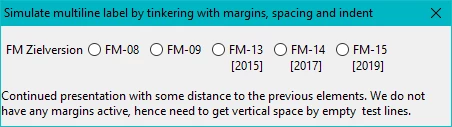
Based on the discussion in the InDesign forum, I have now found a solution:

This is, what I want to see: the second part of the lable of the radio buttons is close enough to build a unit.

PositionAbsolute = function (oObject, asProps, asMethods) { // ====================
  wPal = new Window('dialog', "Simulate multiline label by tinkering with margins, spacing and indent", undefined);
  wPal.size = [450, 100];
  wPal.spacing = 0;
  wPal.margins = 0;
  wPal.alignChildren = "left";
    wPal.st0 = wPal.add("statictext", undefined, "");                   // space
    
	wPal.g1 = wPal.add('group',undefined, "");
    wPal.g1.alignChildren = ["left","center"];
    wPal.g1.spacing = 5;
    wPal.g1.margins = 0;
    wPal.g1.indent = 5;
  	wPal.g1.st1 = wPal.g1.add('statictext',undefined,"FM Zielversion");
  	wPal.g1.rb = wPal.g1.add('group',undefined);
    	wPal.g1.rb.rb8  = wPal.g1.rb.add('radiobutton',undefined,"FM-08");
    	wPal.g1.rb.rb9  = wPal.g1.rb.add('radiobutton',undefined,"FM-09");
    	wPal.g1.rb.rb13 = wPal.g1.rb.add('radiobutton',undefined,"FM-13");
    	wPal.g1.rb.rb14 = wPal.g1.rb.add('radiobutton',undefined,"FM-14");
    	wPal.g1.rb.rb15 = wPal.g1.rb.add('radiobutton',undefined,"FM-15");
     wPal.rbtxt = wPal.add('statictext',undefined,"[2015]         [2017]          [2019]");
     wPal.rbtxt.indent = 230;
	wPal.st1 = wPal.add("statictext", undefined, "");                   // space
	wPal.st2 = wPal.add("statictext", undefined, "Continued presentation ...", {multiline:true});    
	wPal.st2.preferredSize.width = 450;    

  wPal.show();
} // --- end PositionAbsolute ---------------------------------------------------------------------

PositionAbsolute ();


1 reply

K.Daube
Community Expert
K.DaubeCommunity ExpertAuthor
Community Expert
March 30, 2023

I have now created a test case to present the full code - I can not find a method to place the additional text correctly. For reference a pixel-ruler is overlayed in the screen shot:


// E:\_DDDprojects\FM-JsxLib\FMjsxLib\Functions\Demos\PositionAbsolute.jsx ====== UTF-8 
// Test/Demo for aboslut position of text within dialogue/panel

PositionAbsolute = function (oObject, asProps, asMethods) { // ======================
  wPal = new Window('dialog', "Test absolute positioning", undefined);
  wPal.size = [450, 100];
  wPal.alignChildren = "left";
	wPal.g1 = wPal.add('group',undefined, "",{borderStyle:"black"});
	wPal.g1.margins = 0;
  	wPal.g1.st1 = wPal.g1.add('statictext',undefined,"FM Zielversion");
  	wPal.g1.rb = wPal.g1.add('group',undefined);
    	wPal.g1.rb.rb8  = wPal.g1.rb.add('radiobutton',undefined,"FM-08");
    	wPal.g1.rb.rb9  = wPal.g1.rb.add('radiobutton',undefined,"FM-09");
    	wPal.g1.rb.rb13 = wPal.g1.rb.add('radiobutton',undefined,"FM-13");
    	wPal.g1.rb.rb14 = wPal.g1.rb.add('radiobutton',undefined,"FM-14");
    	wPal.g1.rb.rb15 = wPal.g1.rb.add('radiobutton',undefined,"FM-15");
     wPal.rbtxt = wPal.add('statictext',undefined,"[2015]         [2017]         [2019]");
//   wPal.rbtxt.location = {x:230, y:30           // does nothing
//   wPal.rbtxt.location = [230, 30];             // does nothing
//   wPal.rbtxt.bounds = {x:230, y:30, width:140, height:15}; // only width is handled
     wPal.rbtxt.indent = 230;                     // ok, but not sufficient

  wPal.show();
} // --- end PositionAbsolute --------------------------------------------------

PositionAbsolute ();


Since "A RadioButton object has no creation properties", labels can not be multiline. Hence I try to place the "second line" close below - but no method works!

Have entered this as bug FRMAKER-12959

Inspiring
March 30, 2023

Hello K.Daube

While waiting for a simple solution from Adobe, the only way I see is to create independent radiobuttons and add a statictext next to them.

And manually control their operation that if one is checked, disable the others.

K.Daube
Community Expert
K.DaubeCommunity ExpertAuthorCorrect answer
Community Expert
April 2, 2023

Based on the discussion in the InDesign forum, I have now found a solution:

This is, what I want to see: the second part of the lable of the radio buttons is close enough to build a unit.

PositionAbsolute = function (oObject, asProps, asMethods) { // ====================
  wPal = new Window('dialog', "Simulate multiline label by tinkering with margins, spacing and indent", undefined);
  wPal.size = [450, 100];
  wPal.spacing = 0;
  wPal.margins = 0;
  wPal.alignChildren = "left";
    wPal.st0 = wPal.add("statictext", undefined, "");                   // space
    
	wPal.g1 = wPal.add('group',undefined, "");
    wPal.g1.alignChildren = ["left","center"];
    wPal.g1.spacing = 5;
    wPal.g1.margins = 0;
    wPal.g1.indent = 5;
  	wPal.g1.st1 = wPal.g1.add('statictext',undefined,"FM Zielversion");
  	wPal.g1.rb = wPal.g1.add('group',undefined);
    	wPal.g1.rb.rb8  = wPal.g1.rb.add('radiobutton',undefined,"FM-08");
    	wPal.g1.rb.rb9  = wPal.g1.rb.add('radiobutton',undefined,"FM-09");
    	wPal.g1.rb.rb13 = wPal.g1.rb.add('radiobutton',undefined,"FM-13");
    	wPal.g1.rb.rb14 = wPal.g1.rb.add('radiobutton',undefined,"FM-14");
    	wPal.g1.rb.rb15 = wPal.g1.rb.add('radiobutton',undefined,"FM-15");
     wPal.rbtxt = wPal.add('statictext',undefined,"[2015]         [2017]          [2019]");
     wPal.rbtxt.indent = 230;
	wPal.st1 = wPal.add("statictext", undefined, "");                   // space
	wPal.st2 = wPal.add("statictext", undefined, "Continued presentation ...", {multiline:true});    
	wPal.st2.preferredSize.width = 450;    

  wPal.show();
} // --- end PositionAbsolute ---------------------------------------------------------------------

PositionAbsolute ();