
Poor image quality in output
The images in my published output are of significantly less quality than the original images I insert in the Framemaker source files. This happens regardless of the output format.
Here's an example. On the left is a screen capture of an image as it appears in the Framemaker source file. On the right is a screen capture of the image as it appears in the published HTML file. As you can see, the published image is of lesser quality and the color is off.
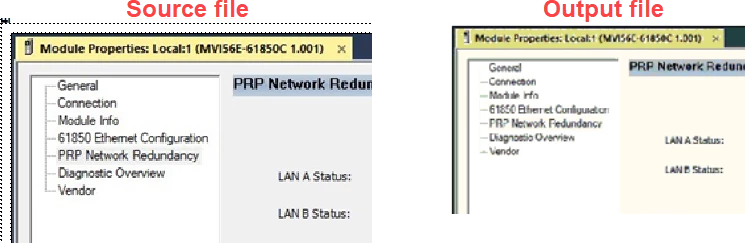
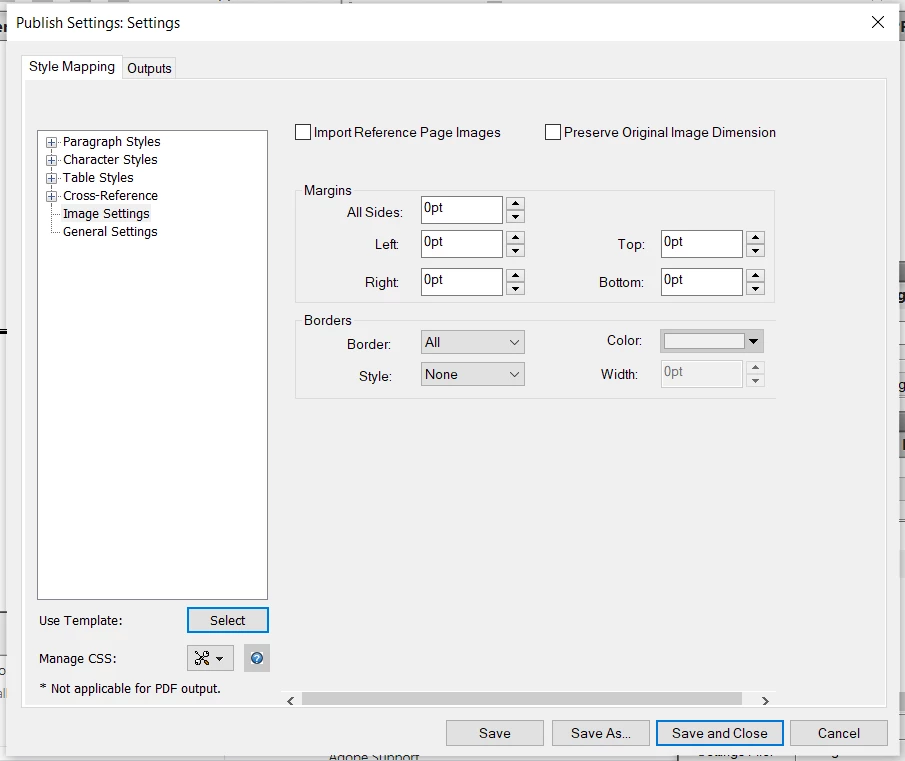
I'm thinking the issue could be that Framemaker changes the bit depth from 24 in the original to 8 in the published image. (I see this when I use File Explorer to navigate to the published PNG files, right-click them, and select Properties.) According to Framemaker's documentation, you can change the Color Bit Depth setting on the Image Settings tab of the Publish Settings dialog, but I don't see that setting (Adobe Support insists it is there, but I don't see it.) Here's a screen capture:
Has anyone else experienced this? I've been trying to resolve this for a few weeks now, and Adobe Support seems to be unable to help. Thank you.


 AdChoices