

Community Expert
September 27, 2023
Answered

predefined paragraph styles in tables

  • September 27, 2023
  • 1 reply
  • 275 views

I am making a bunch of table designs but somehow  I have managed to predefine some of the paragraph styles in the tables with bullets.
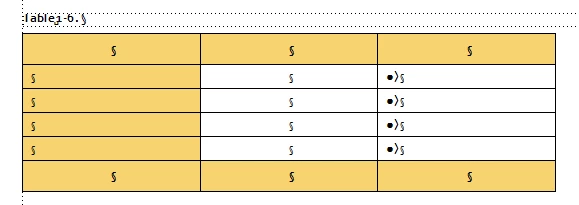
And now I can't remember how I manage predefined paragraph styles in tables, so I change the styles to work properly. Can anybody help?

    This topic has been closed for replies.
    Correct answer frameexpert

    When you make a table format, FrameMaker uses the paragraph formats in the first row of each row type in the table (heading, body, and footing). To change it, insert a table, set each cell's paragraph format in the first row of each type in the table. Open the Table Designer, click in the table, and click Update Style.


    Note that the default number of rows and columns and each column width for new tables of this format are stored also.


    Also note that these "defaults" are not accessible via scripting for the FDK, but you can see them in the MIF file.

    1 reply

    frameexpert
    Community Expert
    frameexpertCommunity ExpertCorrect answer
    Community Expert
    September 27, 2023

    When you make a table format, FrameMaker uses the paragraph formats in the first row of each row type in the table (heading, body, and footing). To change it, insert a table, set each cell's paragraph format in the first row of each type in the table. Open the Table Designer, click in the table, and click Update Style.


    Note that the default number of rows and columns and each column width for new tables of this format are stored also.


    Also note that these "defaults" are not accessible via scripting for the FDK, but you can see them in the MIF file.

    Community Expert
    September 27, 2023

    Much better - now it works! Thank you for your quick help!

    Bjørn Smalbro - FrameMaker.dk