
May 25, 2018
Question

Printing an FM document in CMYK causes embedding problems with font 'Arial Unicode MS'

  • May 25, 2018
  • 2 replies
  • 612 views

I'd like to print an FM document in CMYK.

There is only one paragraph tag used in the document.

The paragraph tag includes the font 'Arial Unicode MS'.

The PDF has to be in CMYK (Print vendor's requirement).

The font has to be 'Arial Unicode MS'.

  1. Choose File > Save as PDF...
  2. Choose the PDF-Joboption 'High Quality Print'.
  3. Deselect the option 'Convert CMYK to RGB'.

The PDF creation is faultless.

But the embedding of the font is faulty:
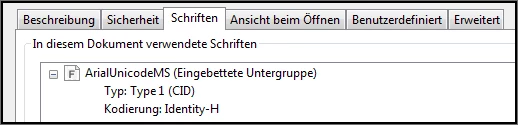
'Arial Unicode MS' is a True type font (TTF).

But Acrobat 'thinks', it's an Adobe 'Type 1' font.

The result is that the PDF is not searchable.

But it has to be searchable.

FM versions: FM10.0.2 or FM 2015 -> Same result

Where did I go wrong?

How can I force the correct embedding of 'Arial Unicode MS' in a CMYK PDF file?

    This topic has been closed for replies.

    2 replies

    Be.eM
    Inspiring
    May 27, 2018

    Lothar,

    you probably can't do anything about it, the Arial Unicode font is highly problematic. There's a similar thread about text which cannot be searched in a PDF. I've done several tests, and the results showed that it's definitely the font which makes the difference: http://www.meissner-dokuteam.de/Files/Frame/Test_FM_imported_graphics_2.pdf

    There's a minor difference because the thread above is about imported PDF graphics which are not searchable in FrameMaker PDF output, but it's basically the same problem.

    Bernd

    May 27, 2018

    Many thanks for the help.

    It can be a problem with 'Arial Unicode MS'. But I think, it's not only a font problem:

    • Using 'Arial Unicode MS' in FrameMaker (with the RGB option) works fine. The font is correctly embedded in the PDF file: TTF + searchable.

    • Using 'Arial Unicode MS' in InDesign (Paragraph tag using 'Arial Unicode MS' and a CMYK color) works fine, too. Correct embedding + Searchability in the PDF.
    Matt-Tech Comm Tools
    Community Expert
    Community Expert
    May 25, 2018

    It sounds like it has to do with the font. Can you double check that the appropriate font is in use, and that all versions of the font are actually installed?

    Make sure that subsetting of the font is disabled as well.

    -Matt

    -Matt Sullivan, FrameMaker Course Creator, Author, Trainer, Consultant
    May 27, 2018

    Many thanks for the hints.

    1. In this case, whether subsetting is enabled or disabled doesn't matter. The embedding of 'Arial Unicode MS' is always faulty.
    2. What do you mean by 'all versions of the font are actually installed'? There is only one 'Arial Unicode MS' file in my windows fonts folder: 'arialuni.ttf' (Version: 1.01).