

Printing to PDF problem?
In FM 12, I have a book open. I am trying to save Book as PDF and FM is crashing.
Can not find the reason why, I do not see Distiller coming on (or working).
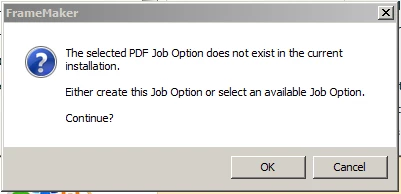
This is the last screen I see. I clicked OK.
In FM 12, I have a book open. I am trying to save Book as PDF and FM is crashing.
Can not find the reason why, I do not see Distiller coming on (or working).
This is the last screen I see. I clicked OK.

Try doing a Help > Repair Acrobat Installation in Acrobat. This should put the joboptions files in the correct location.
The default Acrobat joboptions files should be in C:\Users\All Users\Adobe\Adobe PDF\Settings and any custom ones should be in C:\Users\<username>\AppData\Roaming\Adobe\Adobe PDF\Settings
The .tps file is the temporary postscript file that FM first creates before handing off to Distiller to create the PDF. So it looks like FM is doing its part, but the process falls over when it hits the Acrobat side.
I rebooted the computer, and problem is solved. Did not do much else.
Do not know how the problem occurred and do not know what made the problem go away.
Thanks Arnis, for your responses. I will definitely keep in mind about Repairing the Acrobat Installation.
Also, I will share your suggestion with my associates here so they can keep that in mind for the future.
Once again, appreciate it very much.
Already have an account? Login
No account yet? Create an account
Enter your E-mail address. We'll send you an e-mail with instructions to reset your password.