
Known Participant
September 4, 2020
Question

Problem Italic Arabic text when publish from FrameMaker 2019

  • September 4, 2020
  • 7 replies
  • 2794 views

Helle all,


I have a problem when i pulbish file contain arabic text in italic style, text dont appper italic at all.


in my try to fix this, i tried print ps file then use distiler to get PDF. and yes the italic apper correct in arabic text but the colors changed and became very diffrent.
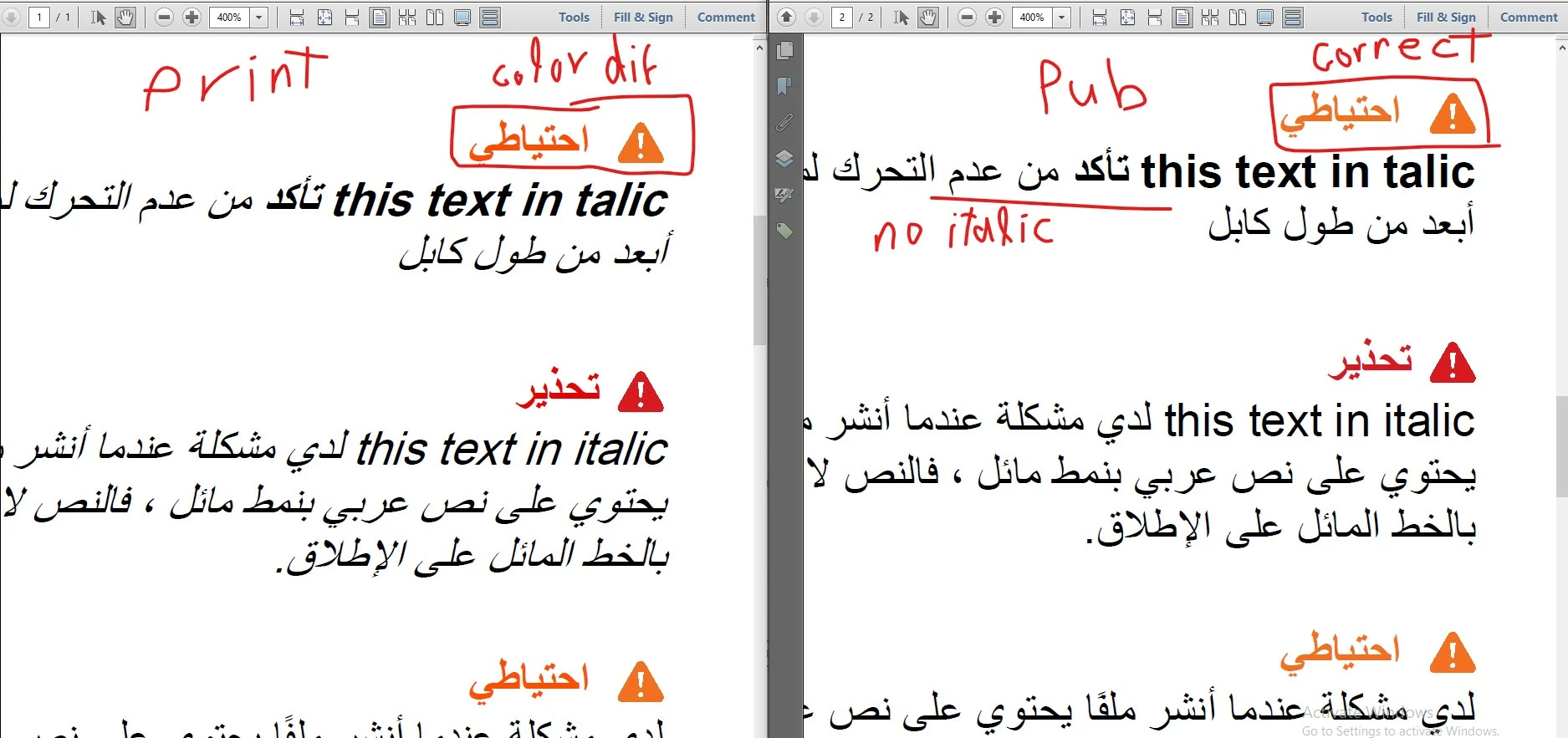


Is there a soultions to fix italic font in publish? 


font i use : Arial.


This topic has been closed for replies.

7 replies

Jeff_Coatsworth
Community Expert
Community Expert
September 11, 2020

For multiple documents all you would have to do is change one file's definition & then import the format definitons into all the other documents that use them. Yes, I understand that it will make everything look different, but isn't that the point of all this? You weren't happy with the way it looks now, right?

Hima.ibAuthor
Known Participant
September 11, 2020

No, I am happy with it , and I didn't want to change the font. I just need to get the PDF as I have/see in FMs files.  changing font was a suggestion to get over one problem I face when I produce the PDF file I face two things, 1) Italic text.  2) colors.


- When I produce PDF by Publish method all italic text disappear although  it is ok in FM files. I tried to figure why it disappeared and I couldn’t. but I found turnaround way to get the italic text correct by print method.


- but When I produce PDF by Print method, italic text can be fine, but some colors changed.

Hima.ibAuthor
Known Participant
September 8, 2020

Yes.  It is "Arial (Arabic)", but FrameMaker divide the Arial font by languages, i mean it is "Arial" but FrameMaker read it as "Arial (Arabic)", it is apper when the main language on your PC be arabic.


But maybe i couldn't explain that more clear.


The main Problem is italic, The FrameMaker don't display Italic at all for arabic and English text too. which mean when i publish there is no italic for english text or arabic 


Here is again link for the file with pdf to show the problem more. if you have time to check it.  

https://app.box.com/s/6zh3apk4ivc9d13uqf7u85f8t5y8egxe


Many Thanks for your time and your support


Bob_Niland
Community Expert
Community Expert
September 7, 2020

re: font i use : Arial.


Actually, it's "Arial (Arabic)"
which I do not have, by the way.

The default "Arial" on my system populates the Arabic range, but not as italic. Same problem with Segoe IU, and Source Sans Pro has no Arabic at all.

Bob_Niland
Community Expert
Community Expert
September 5, 2020

I don't have an FM2020 copy active at the moment (nor do I have any of your MIF to try).
If it's an option, stop using Arial. Source Sans Pro might be a more reliable alternative (if it populates the Arabic you need).

Also try toggling CYMK and RGB color model in the output workflow.
And since you are working with apparent safety colors, and bogus spam report notwithstanding, be sure to see: ANSI Z535.1 Safety Colors in Frame

Hima.ibAuthor
Known Participant
September 7, 2020

Hi Bob,

Sorry for late repling, Here just small file so if you get a chance to check it

https://app.box.com/s/zumgff5xkfbysvmck692siuduiq6i6yq

i didin't find attached in reply


About font, unfortunately  i can't replace Arial now.  in addtinal to, i think  "Source Sans Pro" don't support arabic text.


I tried toggling CYMK and RGB color and verse to verse but it not work corrctly too.

Ian Proudfoot
Legend
September 4, 2020

I am not an Arabic speaker, but I have worked on multilingual projects where Arabic was a requirement. I followed the requirements of the Arabic translators to ensure correct formatting. We did find that the most reliable font for working in a bilungual document was Adobe Arabic. This was able to correctly format the RTL Arabic text to slant on the opposite direction to the LTR Latin italicized text. Arial was not able to do that - at least in FrameMaker. Eventually it was decided that Arabic text should not be italicized...

Hima.ibAuthor
Known Participant
September 5, 2020

I am a native arabic Speaker, the problem isn't related to slant direction. in this case the slant of Arial font is the same direction of the latin text around and this is ok. actually i see that the same slant direction like latin in bilungual document is more familiar and comfortable than opposite direction.


But the problem here is diffrent, it is that when i publish the file i don't get italic/slant at all. whech i see it is as bug in the FrameMaker. where when i do print i get italic/slant correct but i can't use that printed file becouse i got another problem with the colors 😞


What i am checking now. is it a real bug in the FrameMaker 2019 or there is something at my side to fix it. 

If it is a FrameMaker bug. is it fixed in the last FrameMaker 2020 which released some days ago or not. and should i try to  report it as a bug or not.

Bob_Niland
Community Expert
Community Expert
September 4, 2020

How is the italic being invoked in the FM document?
• Paragraph Format
• Character Format

• named Style
• local override (Format  » Style)

And confirm that it is Angle: Italic and not Angle: Obliqued

Hima.ibAuthor
Known Participant
September 4, 2020

italic being invoked in the FM document? 

by all of these methods, some are  Paragraph Format, Character Format and Styles so it all


Yes, italic are by italic not Obliqued.


Be.eM
Inspiring
September 8, 2020

When checking the Arial Arabic font on the distributor's website, there is no italic version. Which suggests that FrameMaker is creating an italic version on its own. If this is the case, there's something I've noticed with Asian fonts in the past:

Correct PDF output of italicized/obliqued Asian characters (which also don't have native italic versions) is only possible when switching to RGB output. This may happen either by printing to PS/PDF (which automatically uses Windows Postscript and thus RGB), or by enabling the RGB option in the FrameMaker PDF/publish options. Of course this changes the colors of FrameMaker elements, which is why I'm using a Pitstop color conversion in Acrobat as a post process in such cases.


Jeff_Coatsworth
Community Expert
Community Expert
September 4, 2020

So you create PDFs by using the Publishing route and they don't look right? What produced the image on the left? Have you tried creating PDFs in other ways like Print to Adobe PDF or Save As PDF? Is your copy of FM2019 all patched up?

Hima.ibAuthor
Known Participant
September 4, 2020

Yes, i created PDFs with two diffrent ways, on right by publishing, on the left by Print to Adobe PDF.


the problem related to two things


Italic and Colors

In publishing :  Italic is wrong (don't apper at all), Colors are ok

In Printing to Adobe PDF:  Italic is ok  but Colors changes and worng