


Participant
March 4, 2014
Question

Problem - Section numbers not autonumbering

  • March 4, 2014
  • 1 reply
  • 568 views

I'm working on a book with the following document layout:
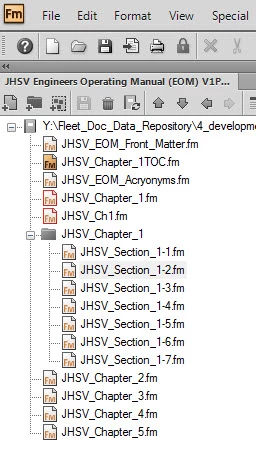
(Note: JHSV_Chapter_1.fm and JHSV_Ch1.fm are excluded documents.)

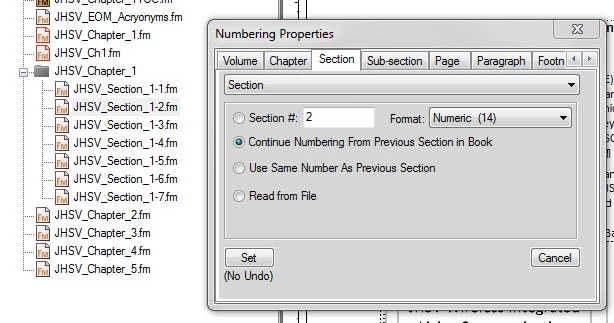
I have set Section 1-1 to start numbering at Section #: 1.  The remaining sections are set to Continue numbering from previous section in book:
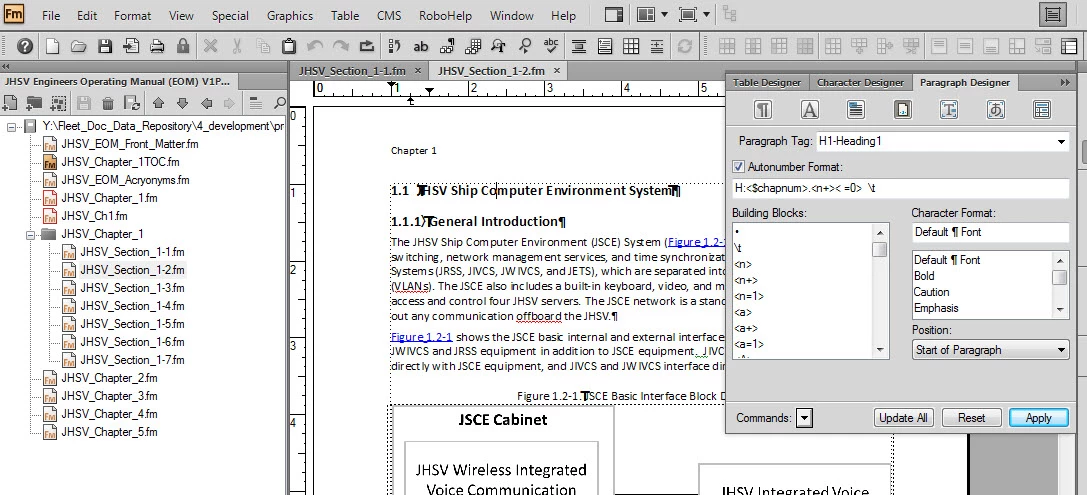
I can't get the section header numbers to autonumber.  I need them to be Section 1.2, 1.3, and so on. As can be seen below, the section numbers have reset back to 1.1.  (The figure titles remain correct since I have not updated my references.)  My header paragraph format can also be seen in the image below.

I have fought with this all day yesterday.  At one point, it actually corrected itself (hence, the correct figure numbers).  But now it has reset.

Help!

    This topic has been closed for replies.

    1 reply

    Arnis Gubins
    Inspiring
    March 4, 2014

    The Section Numbering is controlled by the <$sectionum> building block. I don't see you using that in your paratag auto-number format.

    Participant
    March 5, 2014

    Thank you.  That fixed it!

    Sort of.

    Now I have another related problem.  The section numbering is not continuing from previous section.  In order for this autonumbering to work, I have to manually set the section numbers, which I shouldn't have to do. 

    Below is a screen capture.  I have section 1 manually set.  Section 2, as well, since I wanted to conduct a test to see if the autonumbering worked.  But the following sections, as can be seen, are set to continue, but they're not doing so. 

    Participant
    March 5, 2014

    Ignore the prior post.  I learned something:

    You cannot import formats unless the document is literally opened.  I thought you could just select the book (at the left) and import format.

    And then one must be sure to Refresh the book for changes to take place.

    All things that I didn't do, but now have and all is wonderful and good.

    Thank you.