


Inspiring
April 2, 2026
Question

problem with a tab stop

  • April 2, 2026
  • 3 replies
  • 189 views

Hello,

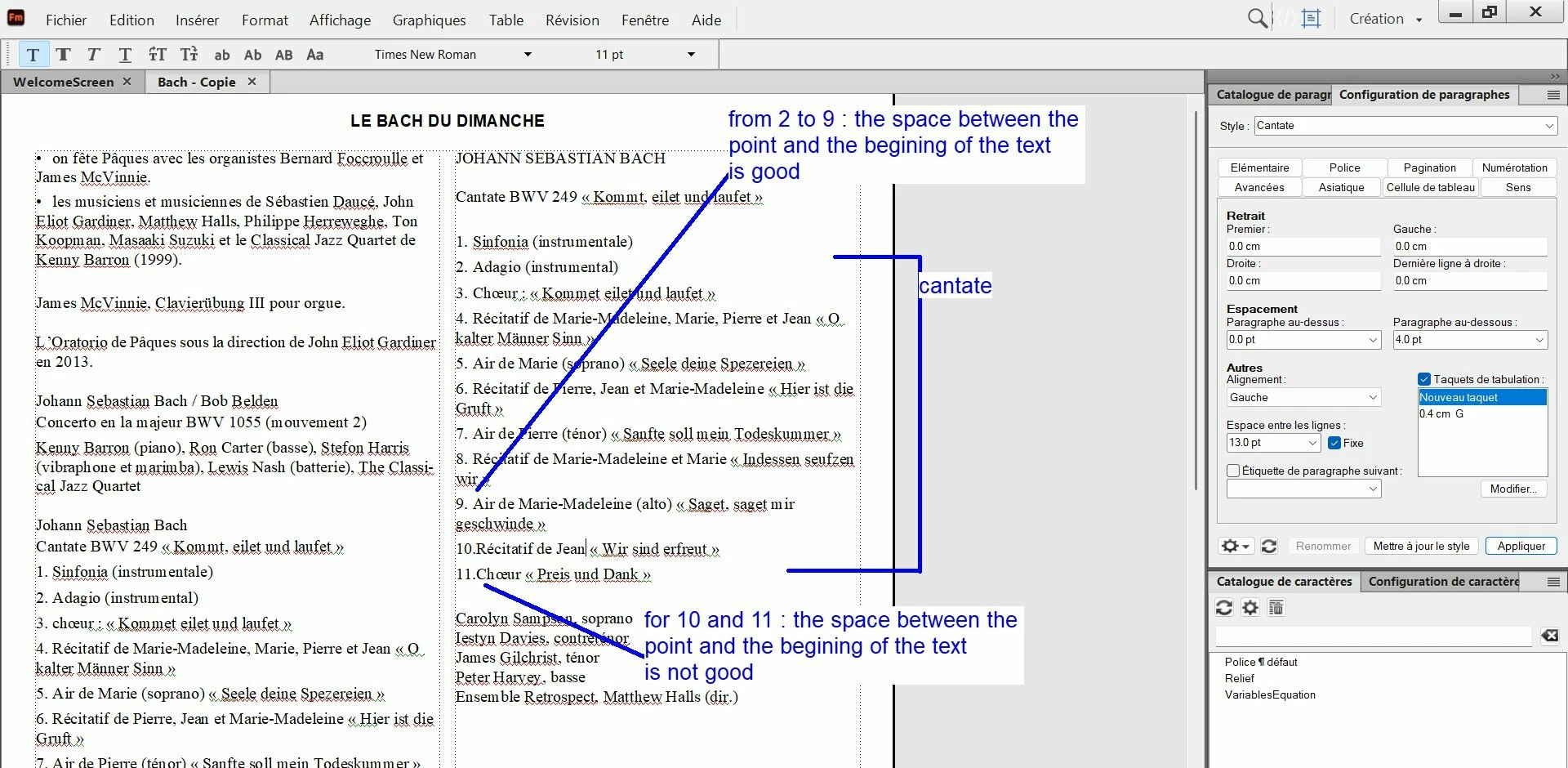
In this example, for the paragraph designer “cantate” I have set a tab stop of 0.4 cm left, with a numbering.

For numbers 1 to 9 : no problem, but from number 10, the space has gone betwen the point and the begining of the text. Why ?

My goal is ti keep the same space for all the numbers.


    3 replies

    Inspiring
    April 4, 2026

    Hi All, Hi Barb 😉

    Finally, I have chosen to use the “double tab stop” (see screenshots).

    Do you see something wrong in my settings, or all is OK ?


    Barb Binder
    Community Expert
    Community Expert
    April 3, 2026

    Hi Pierre!

    I hope you are doing well. If you still need a hand, I wrote this up a long time ago. I’ll go double check now but at first glance, nothing has changed!

    https://www.rockymountaintraining.com/adobe-framemaker-aligning-punctuation-in-numbered-lists/

    ~Barb at Rocky Mountain Training
    Dave Creamer of IDEAS
    Community Expert
    Community Expert
    April 3, 2026

    @Barb Binder It’s probably hard to see because of the (dumb) collapsed replies, but I posted a sample file that uses punctuation alignment. 

    David Creamer: Community Expert (ACI and ACE 1995-2023)
    Barb Binder
    Community Expert
    Community Expert
    April 3, 2026

    @Dave Creamer of IDEAS, I’m really struggling with the collapsed replies. It showed three but now I see that there were three more under that! I think nesting should be removed altogether. Didn’t mean to repeat!

         But on the bright side, I updated a 16 yo old post! 😊

    ~Barb at Rocky Mountain Training
    Dave Creamer of IDEAS
    Community Expert
    Community Expert
    April 2, 2026

    The tap stop is too close to the double-digit numbers.

    If you want the text to always jump to the same spot, regardless of the amount of numbers, you need to make the tab stop a higher measurement. For example, 6 or 8 mm instead of 4. 
    (If you use this method, consider making the left indent the same as the tab stop measurement.)

    If you want the same amount of space after the number/period, use an n-space or em-space. 

    David Creamer: Community Expert (ACI and ACE 1995-2023)
    Matt-Tech Comm Tools
    Community Expert
    Community Expert
    April 2, 2026

    Dave’s assessment is correct. Additionally, if you want the numbers to create a “hanging indent” effect, you may need to define two tab stops: One right-aligned decimal tab to create a consistent location for the period, and another to create the space between the period and the text.


    -Matt Sullivan, FrameMaker Course Creator, Author, Trainer, Consultant