Participant
May 2, 2017
Answered

Problem with bullets when publishing

  • May 2, 2017
  • 2 replies
  • 617 views

Hi all, first time posting here.

I have some templates that we had made years ago that have stuck with us through several upgrades and we are now using in Framemaker 2017.  They still work fine for print and PDF outputs.  However, I would like to start publishing them to EPUB and HTML5.  I've been playing around with HTML5 so far and everything looks fine, except our "Bullet1" format comes across as an "n" instead of a bullet.

I've sorted out that this is due to it being defined as a wingding font (n presumably) in the master template.  I'm just not clued in on either how to change it or what to change it to.

Any advice would be appreciated.  I would rather not just start fresh with new templates as these do what we need them to do for the most part.

Thanks,

Mike

This topic has been closed for replies.
Correct answer Matt-Tech Comm Tools

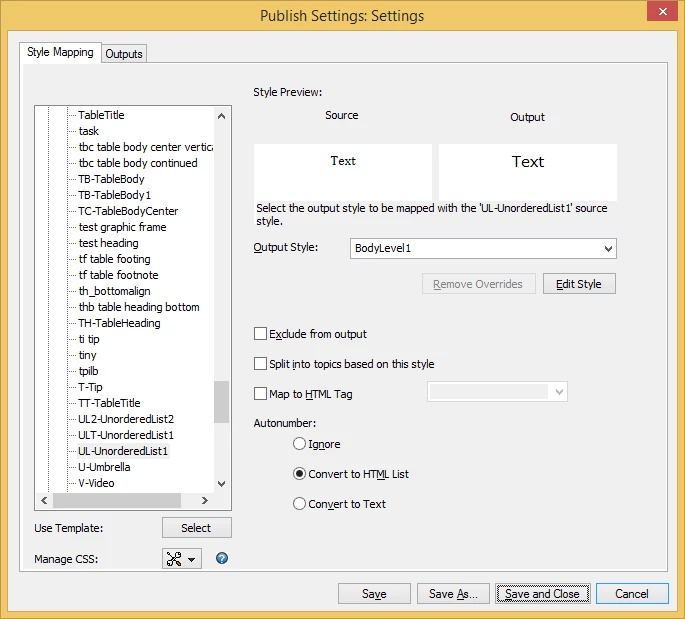
Hi Mike, check the mapping in your publishing pod settings. Set the Autonumber options to Convert to HTML List

From there you may still need to do some CSS work to get your custom bullets, but it'll give you the ul and li tags you want for easier formatting of the HTML.

2 replies

Bob_Niland
Community Expert
Community Expert
May 3, 2017

re: I've sorted out that this is due to it being defined as a wingding font (n presumably) in the master template.  I'm just not clued in on either how to change it or what to change it to.

Chances are that the "Bullet1" Paragraph Format has a Numbering property of something like:
Autonumber Format: [n\t     ]

CharacterFormat: WingDings

Either change it back to the FM default:

Autonumber Format: [\b\t     ]

CharacterFormat: Default ¶ Font

Or find a Unicode font that mimics the WingDings bullet, use it explicitly with a new Character Format that invokes that font.

Matt-Tech Comm Tools
Community Expert
Matt-Tech Comm ToolsCommunity ExpertCorrect answer
Community Expert
May 3, 2017

Hi Mike, check the mapping in your publishing pod settings. Set the Autonumber options to Convert to HTML List

From there you may still need to do some CSS work to get your custom bullets, but it'll give you the ul and li tags you want for easier formatting of the HTML.

-Matt Sullivan, FrameMaker Course Creator, Author, Trainer, Consultant
Participant
May 3, 2017

That looks promising.... but you found that menu where?  Sorry, upgraded from 9 a week ago still finding my way around.

Participant
May 3, 2017
  • Got it, and it worked!
  • Thanks so much!