


Participant
September 3, 2013
Question

Problem With Pdf creation

  • September 3, 2013
  • 2 replies
  • 493 views

Good afternoon,

I am an IT man and I installed Computer with framemaker11 and Adobe Professional 8. We didn't have too many problems. Users could save to pdf format.

Yesterday, I update our Adobe Pro 8 to XI and now I have an error message :

"PDF Option selected doesn't exist in the current installation. Please, create this option ou select one. Continue ?"

This is a translation from french.

How can I declare PDF option ?
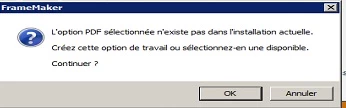
PS: I add picture but it's in french

    This topic has been closed for replies.

    2 replies

    Arnis Gubins
    Inspiring
    September 3, 2013

    You probably had a custom joboptions file defined in Acrobat 8 for Distiller. The new version of Acrobat is looking in the C:\Users\<username>\AppData\Roaming\Adobe\Adobe PDF\Settings folder on Win7 systems (or the correspionding Documettns and Settings folders on XP systems). Acrobat 8 used a different location to store the user-defined joboptions.

    Depending upon how you uninstallled your previous Acrobat installation before installing the new one, the old files may still be around on your systm. Look for the *.joboptions file(s) that you had and move them to the new folder.

    Alternately, re-create them in Distiller and save them with the same names.

    Jeff_Coatsworth
    Community Expert
    Community Expert
    September 3, 2013

    I would uninstall all instances of Acrobat and then reinstall XI - updates from one version to another don't always go smoothly.