Inspiring
December 4, 2022
Answered

Problem with TOC formatting

  • December 4, 2022
  • 2 replies
  • 662 views

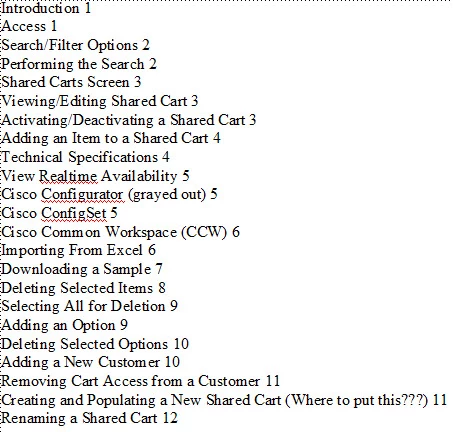
I generate a standalone TOC and it comes in without formatting. I am using numbered headings. I don't really have another TOC to replace it with (like I saw in other posts).

    This topic has been closed for replies.
    Correct answer Winfried Reng

    Hi,


    I really recommend to look this up in the online help F1.

    There everything is explained well.

    Switch to the reference pages of your TOC and enter the building block for the autonumbering of the paragraph. (I do not have FrameMaker here, therefore I do not remember the building blocks.)

    Also enter a tab between the autonumbering building block and the paragraph text building block. And two tabs between the paragraph text building block and the page number building block. (The two tabs are needed, when there are line breaks.)

    Then go back to the body page, update the book and then format the various TOC paragraph formats as you wish.


    Best regards


    Winfried

    2 replies

    Bob_Niland
    Community Expert
    Community Expert
    December 4, 2022

    re: I generate a standalone TOC and it comes in without formatting.

    Yep. That's what it looks like when initially auto-created.

    As Winfried points toward, you'll need to review the auto-created …TOC ¶formats, and also do some work on Reference Page TOC.

    Once all this customized, FM won't revert it.

    Inspiring
    December 6, 2022

    I found a couple of videos which were very helpful.

    https://www.youtube.com/watch?v=QRne1LE7Zu4

    https://www.youtube.com/watch?v=uAIXta-_BOQ


    I will probably indent each different number level but this is a start! Thanks again!


    Winfried RengCommunity ExpertCorrect answer
    Community Expert
    December 4, 2022

    Hi,


    I really recommend to look this up in the online help F1.

    There everything is explained well.

    Switch to the reference pages of your TOC and enter the building block for the autonumbering of the paragraph. (I do not have FrameMaker here, therefore I do not remember the building blocks.)

    Also enter a tab between the autonumbering building block and the paragraph text building block. And two tabs between the paragraph text building block and the page number building block. (The two tabs are needed, when there are line breaks.)

    Then go back to the body page, update the book and then format the various TOC paragraph formats as you wish.


    Best regards


    Winfried

    Inspiring
    December 5, 2022

    Thanks to you both. I will try tomorrow.
