
ntmh72
Participant
March 4, 2025
Answered

Problems exporting to Xliff 1.2

  • March 4, 2025
  • 2 replies
  • 470 views

Hi

I am very new to the world of Xliff, but not to Framemaker. I wish to look at our current process for translation which is to send our translation comany our FM files. They convert to mif, create the translations, recompile the FM files through a DTP outlet and send the completed translated FM files back to us along with a translated pdf. Systems works well and has done for years.

However, I would like to trim some time and cost from the process if possible by using Xliff. I wasnt to send them the Xliff and receive translated Xliff back. I am hoping the DTP time wil l ne negligible, albeit at our end.

Problem we are having is that Framemaker is just not allowing me to export an Xliff. I have tried a full book, a chapter and even a one page test doc with limited english text entered. All failed.

Framemaker Version: 17.0.3.546


Getting the following error:
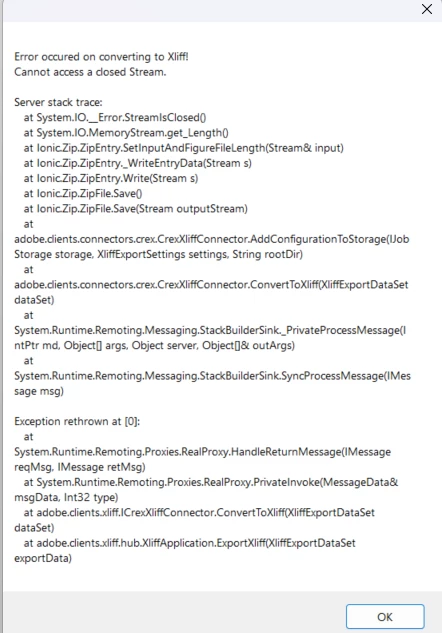

Has anyone come across this or similar? Is it a problem with our installation or am I missing a plugin or similar?

Thanks for any help/advice.

    2 replies

    Community Expert
    March 4, 2025

    Hi,

    17.0.3

    I just export my current document. After one or two minutes I got a report with 1 critical error. The zip file with the xliff file was correctly exported.

    I do not know, if my error is related to yours:

    ITS Transformation error, loading XMLs with schema set:__temp/3_toxliff/2_normalized/installation_128.xxxx.mifml.xml! System.NullReferenceException: Object reference not set to an instance of an object. at pi.ep.data.framework.utilities.mif.extensions.ContentRangeExtensions.GetAllNodesInRange(XElement rangeStart, XElement rangeEnd, Boolean includeEndElement) at pi.ep.data.framework.utilities.mif.extensions.ConditionalTextExtensions.\\<C3>k:tR~bY;_Xk7=I3ym_E.MoveNext() at

    System.Linq.Enumerable.<ConcatIterator>d__59`1.MoveNext() at pi.ep.data.process.formats.xliff.processor.mif.TranslationExtensions.‏‭‭‌‪‍‍‍‫‮‌‫‌​‎‎‏‬‭‫‭‫‍‮(IEnumerable`1 notToTranslateNodes) at pi.ep.data.process.formats.xliff.processor.mif.MifMlToItsDocProcessor.‎​‏‎‌‌‪‌‫‪‎‭‮‏​‎​‭‏‎‮‬‮‫‭‮(ResourceBase resource, ‌‍‭‮​‍​‭‪‍‪‌‌‬‫‏‭‏​‏‌‭​‫‮ conversionSettings) at

    pi.ep.data.process.formats.xliff.processor.XmlToItsDocProcessor.Execute()

    Best regards, Winfried

    Jeff_Coatsworth
    Community Expert
    Jeff_CoatsworthCommunity ExpertCorrect answer
    Community Expert
    March 4, 2025
    ntmh72
    ntmh72Author
    Participant
    March 4, 2025

    Thank you so much, now I feel slightly ashamed I never found this myself!

    I have now managed to export an Xliff .zip file. I am very  grateful for your help, and if my idea works....so will my boss!!

    Jeff_Coatsworth
    Community Expert
    Community Expert
    March 12, 2025

    You may also want to read Winfried's comment in this thread - https://community.adobe.com/t5/framemaker-discussions/xliff-doesn-t-work-it-crashes-the-software-i-have-tried-every-solution-and-nothing-has-worked/m-p/15206328#M87117 - about relying on machine translation (because that's what XLIFF is intended for).