
clarem17016750
Known Participant
May 3, 2018
Question

Problems inserting cross references

  • May 3, 2018
  • 1 reply
  • 1217 views

Please can someone help, I am having problems inserting a cross reference.

I am using Structred Framemaker version 10.

I have gone to the element that I want to use for the cross reference and selected Assign ID to element. I know it does assign an element as I did this twice and it prompted me that one was already assigned and did I want to replace it.

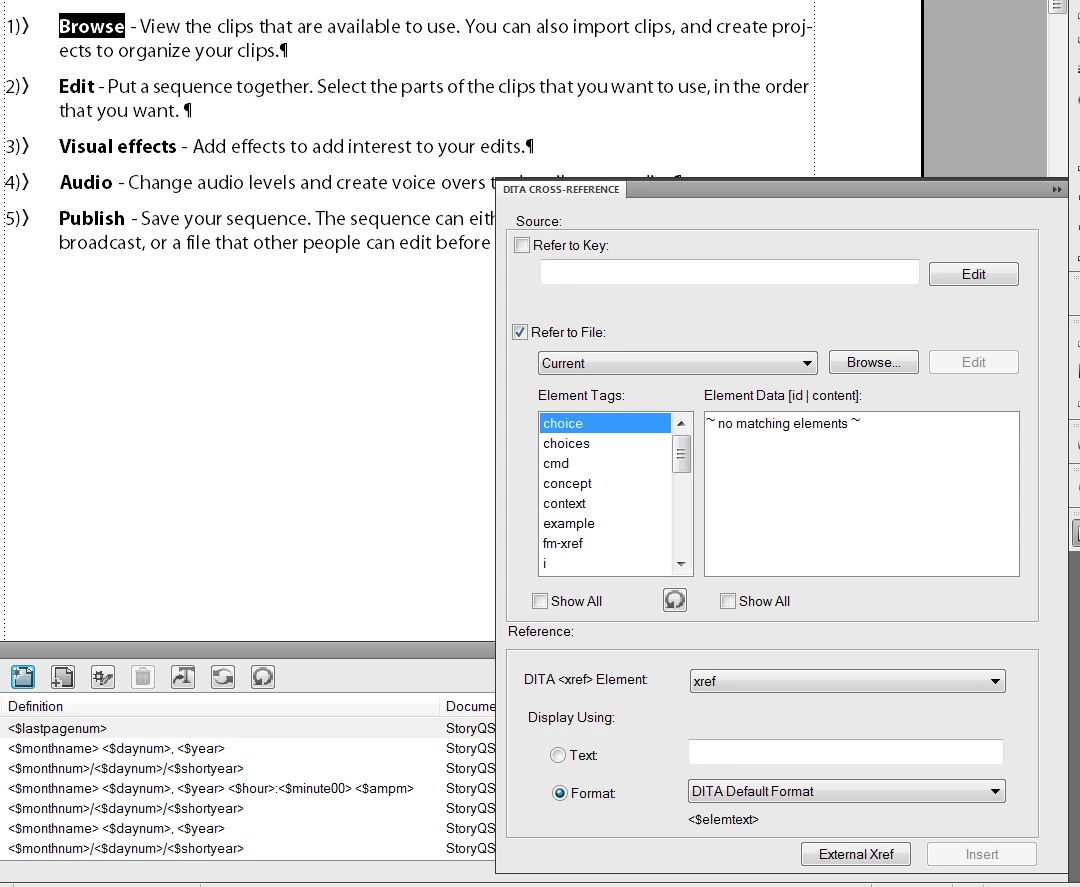
Then, when I click the text that I want to use to refer to this section and select the Special menu – Cross reference, the ID is not displayed in Element data list in the Dita Cross-Reference dialog: What am I doing wrong?
This topic has been closed for replies.

1 reply

Inspiring
May 3, 2018

Is the element that you're referencing in a different file? If so, make sure that the other file is open and then select it from the drop-down menu (where it says "Current" in your screenshot). Also make sure that you have selected the correct element tag in the "Element Tag" field.

clarem17016750
Known Participant
May 4, 2018

No the element is in the current file that I am using; I just want to jump to another part of it. I don't understand why it's not listed in this dialog as I've marked it as a cross reference.

Inspiring
May 4, 2018

I took another look at it this morning; it looks like the <choice> element cannot have an xref tag applied. The xref dialog won't let you insert invalid structure. You can, however, use a <ph> element within your <choice> element, assign an ID, and then apply an xref to that.