


Inspiring
February 29, 2016
Answered

Publish to Html5 -- Topics don't scroll!

  • February 29, 2016
  • 2 replies
  • 483 views

Hi All...

Trying to get my head around this feature, which looks awesome enough.  However, I publish to HTML5 and topics get cut off at the bottom - they don't scroll.  Am I missing something important?  Surely this can't be as designed!
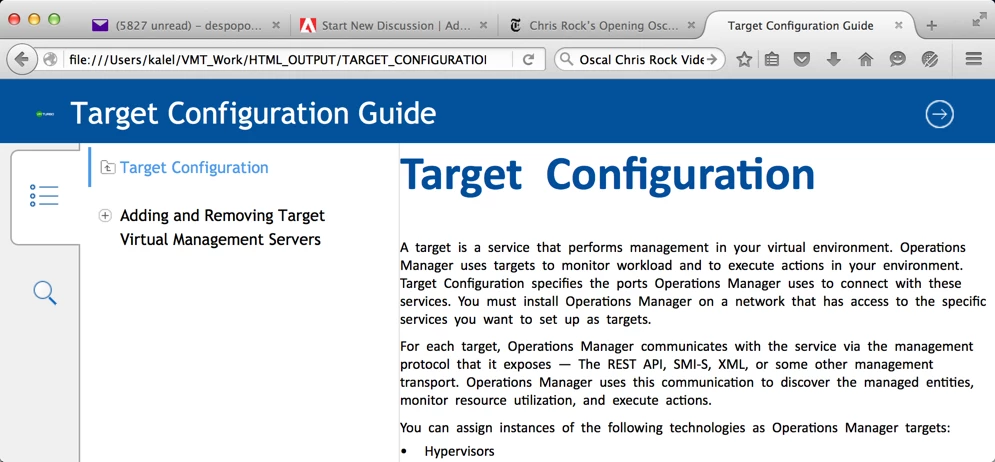
You can see the absence of a scroll bar...  There's much more to this topic, but there's no way to get to it.

Thanks       cud

    This topic is closed to new replies. Start a new post to keep the conversation going.
    Correct answer cudspan

    Thanks to Amit I got the help I need.  In the first place, I guess it was user error on my part.  I was trying to modify the Layout.css file so I can get other results that I need.  I must have bungled the job.  I started over, and now I have the results I need.

    It turns out that to get a new CSS into the .sts file I had to edit Layout.css (I did that within the zip -- I didn't unzip/edit/rezip), and then quit Maker, restart, and reload that sts file in the publisher.  All is good.  This is turning out to be very useful!

    2 replies

    Adobe Employee
    March 2, 2016

    Hi Cud,

    Could you please try to preview the same output in a different browser? Also please confirm the complete version of FM from Help> About FrameMaker.

    Regards,

    Ashish

    cudspanAuthorCorrect answer
    Inspiring
    March 4, 2016

    Thanks to Amit I got the help I need.  In the first place, I guess it was user error on my part.  I was trying to modify the Layout.css file so I can get other results that I need.  I must have bungled the job.  I started over, and now I have the results I need.

    It turns out that to get a new CSS into the .sts file I had to edit Layout.css (I did that within the zip -- I didn't unzip/edit/rezip), and then quit Maker, restart, and reload that sts file in the publisher.  All is good.  This is turning out to be very useful!