
Known Participant
September 1, 2016
Answered

Publish to HTML5: Weird span output for tab stops

  • September 1, 2016
  • 2 replies
  • 1296 views

Using FM2015 Publish to HTML5 Responsive: I'm trying to create output that represents programming code, so the characters and spaces should be fixed-width. Any suggestions on how best to do this?

I created a simple test FM doc that contains some fixed pitch text which is supposed to be programming code. Eg:
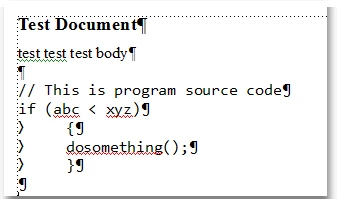
I created a paragraph format named "SourceCode" and applied it to the programming text. It uses a monospace font "Consolas" and tab stop every .5 inch. Note the tab stops used in the source code for indentation.

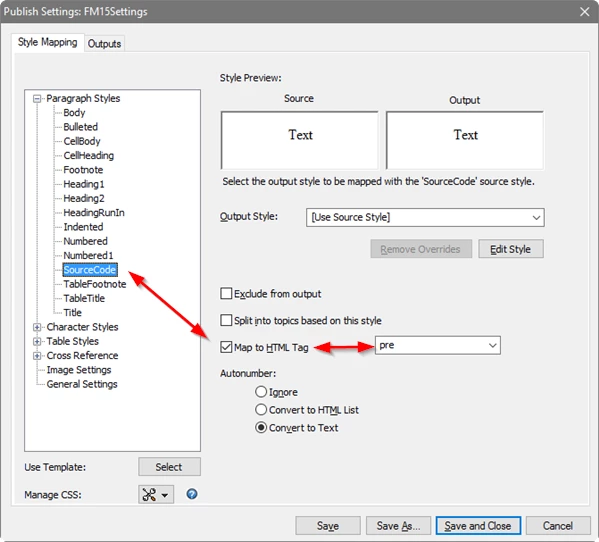
In the publish-settings, I mapped the "SourceCode" para format to the HTML "PRE" tag.
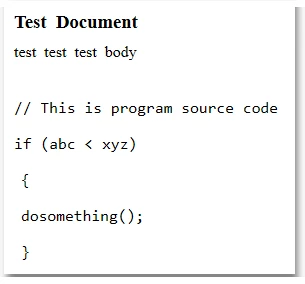
When I publish to HTML, the indentation is messed up:
This is what the HTML markup looks like. I drew a box around the weird span that is generated to represent the tabs:
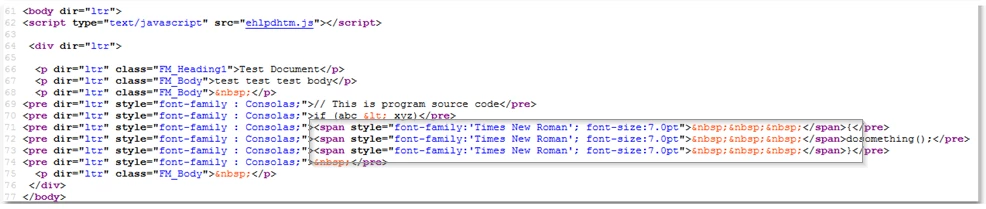
Why is that span in there? Why does it use inline styling to override the font family and size? How are tabs supposed to be handled in the publishing output?

Ideally it would just omit the extraneous span and just output some number of space characters using . Is there a way to control this?

If I change the settings to not map the SourceCode para format to PRE, and instead use "Use Source Style"
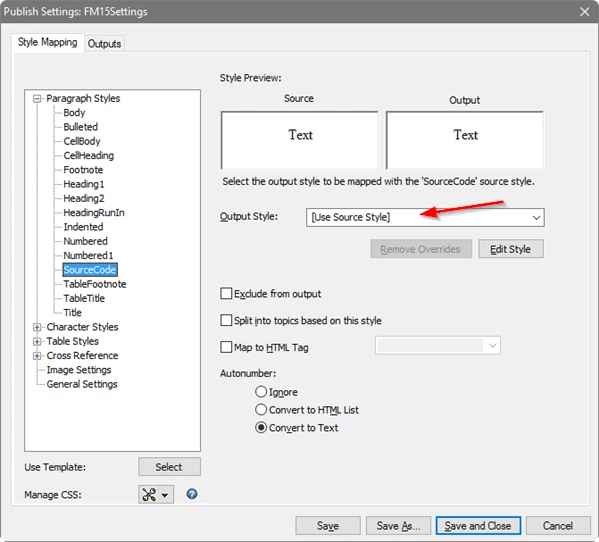
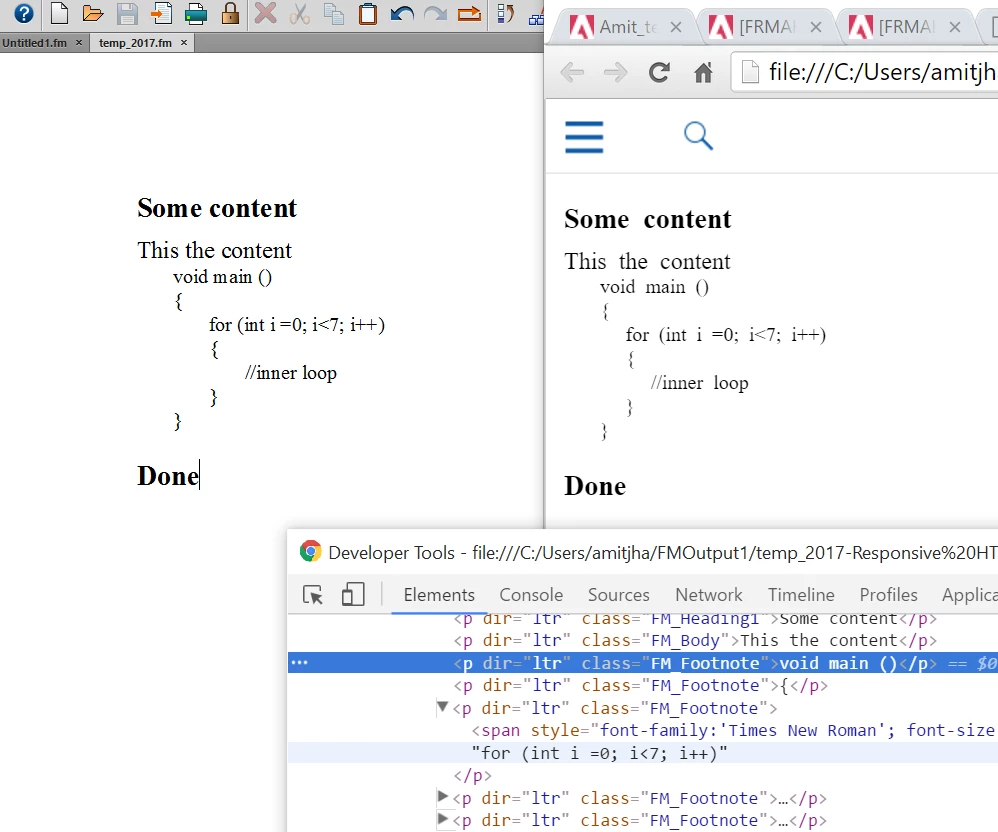
Then this is the HTML output:

Which also contains the unwanted span, plus unwanted inline styling for the font-family. Why didn't it put the font-family into the FM_SourceCode CSS class?

Any help would be appreciated! Thanks.
This topic has been closed for replies.
Correct answer amitjha-lt

Hi

Thanks for reporting this.

I think you have primarily following two questions,

1. Why the span with many   ?

HTML does not have tab stop equivalent characters, we can achieve either through hard space or use margin instead, currently FM use hard space to replace tabs in FM document. Though we have plans to make some thing better which can be controlled by CSS. Other way could be we can just use styles/formats with margin.

2. Why font family is coming in the output as inline style  ?

In case of format overrides, FM generate them as inline style in output to achieve design look. If you remove format overrides from FM document, it will go away.

Please let me know if you have further queries.

Thanks

Amit Jha

2 replies

Inspiring
April 28, 2022

I had the same issue.  Unfortunately tabs in FM don't work in HTML. By way of work-around, I converted the text to tables, with rows separated by tab characters. Then I straddled the "empty"columns (i.e., columns in which there is no text) in each row (one row at a time) .

After going through the process, you can change the colomn sizes the fit the text.

Let me know if you need clarification.

amitjha-ltCorrect answer
Adobe Employee
September 1, 2016

Hi

Thanks for reporting this.

I think you have primarily following two questions,

1. Why the span with many   ?

HTML does not have tab stop equivalent characters, we can achieve either through hard space or use margin instead, currently FM use hard space to replace tabs in FM document. Though we have plans to make some thing better which can be controlled by CSS. Other way could be we can just use styles/formats with margin.

2. Why font family is coming in the output as inline style  ?

In case of format overrides, FM generate them as inline style in output to achieve design look. If you remove format overrides from FM document, it will go away.

Please let me know if you have further queries.

Thanks

Amit Jha

whlotusAuthor
Known Participant
September 1, 2016

Thanks, Amit.

I thought I formatted the text without overrides, but somehow it did have overrides. You were correct. So that explains the inline styling. I'm sorry for the confusion.

Regarding the tabs, my suggestion for the future: if the PRE tag is used, OR if a fixed-pitch font is used in the FM paragraph format, then simply emit the tab character there and let the browser tabify the output correctly. If not, then use a tabify algorithm assuming some number of columns for a tab character.

Here is a simple HTML file that shows how it could be done with a PRE tag and some CSS. The width of the tab would need to be a parameter to your conversion. In this case, it is set to 4. Or, you can leave it up to the user to provide their own CSS.

Which produces this output in the browser:

In any case, I was able to get what I needed by manually editing all the code in my document to use spaces instead of tabs - of course that is not ideal

Thanks.

Bob_Niland
Community Expert
Community Expert
September 1, 2016

It's not even clear to me that the widely non-supported tab-size property in HTML is for space_count or advance_to_next_tab_stop, which is the same problem that this character has had forever.

Back in the terminal days, brand-to-brand, it might mean:

► advance 8 spaces

► advance to next multiple of 8 spaces

► advance to next tab, and if none set, then newline, or perhaps NOP

► advance to next field in a form

► and now for something, completely different

Outside a <pre>, and perhaps a few other isolated uses, it's just another HTML white-space character.

It's getting late for: What would an ASR33 do?