TCBill
Inspiring
August 27, 2024
Answered

Publish to PDF includes paragraph tags in bookmarks list

Hello.

Recently the Publish to PDF routine has been including the paragraph tags in the PDF bookmarks list:
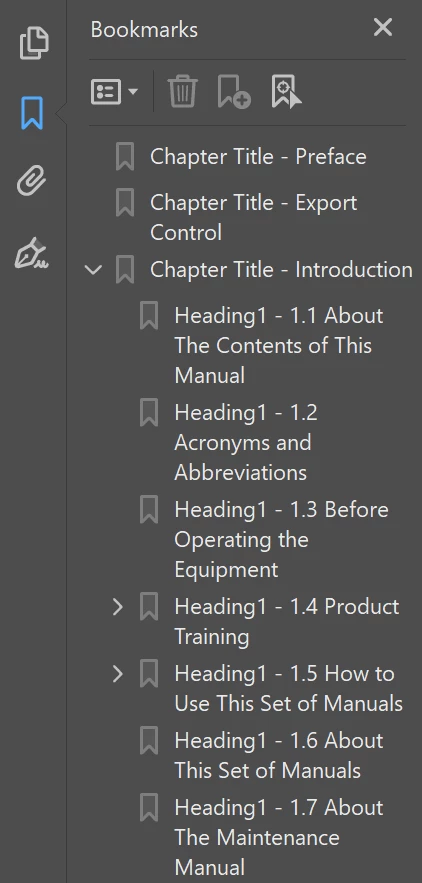
 

This is new behaviour and I'm hanged if I can find where to go to stop it. It's not in the .sts file setup, at least not that I can see.  

Anybody have any ideas about this? I really don't want my PDF bookmarks looking like this. 


Thanks in advance,

Bill

 

This topic is closed to new replies. Start a new post to keep the conversation going.
frameexpert
frameexpertCorrect answer
Community Expert
August 27, 2024

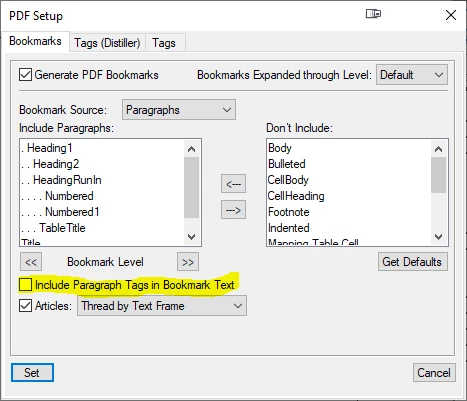
Go to Format > Document > PDF Setup and make sure this checkbox is not checked:


www.frameexpert.com

7 replies

Jeff_Coatsworth
Community Expert
Community Expert
August 27, 2024

What version of FM? Is it happening if you try creating a PDF through the Print to Adobe PDF printer instance?

Translate
TCBill
TCBillAuthor
Inspiring
August 27, 2024

My bad. I'm using FM 17.0.2.431. 

I did try the Save As PDF option, where it happened again. I was going to try the Print-to-PDF routine, but this is a massive document and it always takes at least 30 minutes to render a PDF that way. However, I'll give that a go.


Translate
frameexpert
Community Expert
frameexpertCommunity ExpertCorrect answer
Community Expert
August 27, 2024

Go to Format > Document > PDF Setup and make sure this checkbox is not checked:


Translate
www.frameexpert.com