
andspence1
Known Participant
April 23, 2019
Question

Publish to PDF not following thru

  • April 23, 2019
  • 3 replies
  • 891 views

Adobe Framemaker, 2019 Release, Version: 15.0.2.503.

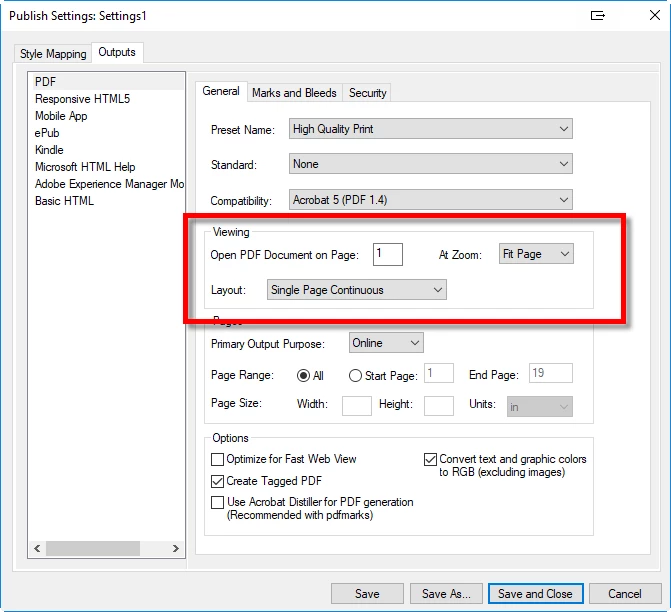
When I publish a book to PDF, I use these settings.  However, I have never had the "Viewing" settings actually follow through to the outputted PDF.  Specifically, the Fit Page zoom level and the Single Page Continuous layout.  I don't really know what to do to troubleshoot.  The output PDF always seems to be Fit to Width Scrolling.
    This topic has been closed for replies.

    3 replies

    andspence1
    Known Participant
    April 23, 2019

    Update: I haven't tried all zoom settings, but it seems to work with all numeric zoom percentages - but not "fit page"

    Adobe Employee
    April 24, 2019

    Thanks everyone for your feedback. We will try and address this as part of update 4. We have lot many fixes to take in update 4, will try and see if we can also add this in the update.

    Regards

    Amitoj Singh

    Matt-Tech Comm Tools
    Community Expert
    Community Expert
    April 23, 2019

    There were at least 8 PDF fixes in Update 3, so you might want to apply that update and try again

    https://techcommtools.com/framemaker-2019-update-3-now-available/

    -Matt Sullivan, FrameMaker Course Creator, Author, Trainer, Consultant
    andspence1
    Known Participant
    April 23, 2019

    Thank you.  I just updated, but unfortunately for this zoom setting, the bug is still there.

    Community Expert
    April 23, 2019

    Hi,

    Yes. This is a bug, and I also do not like to set this in the PDF.

    I had already added this in the bug tracker:

    https://tracker.adobe.com/#/view/FRMAKER-5728

    When you vote for this bug, it might get more attention.

    Best regards

    Winfried

    andspence1
    Known Participant
    April 23, 2019

    Just voted, thanks.