


December 20, 2025
Question

Publishing DITA 1.3 Map to PDF Causes Crash: Error 17084

  • December 20, 2025
  • 3 replies
  • 314 views

Hello:

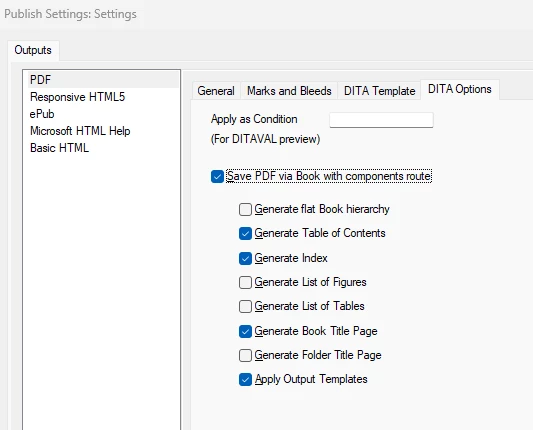
I am running into a repeated issue where publishing a structured document (DITA 1.3 Map with Topic files) causes FM to crash when "Save PDF via Book with components route" selected. It does not matter if none or all of the options are selected, the app crashes. However, the DITA map successfully publishes to PDF if "Save PDF via..." is not selected.


The issue also occurs when trying to save the map as a Book 2022 with fm components.


Any ideas on what may be causing this? I am using FM 17.0.8, Windows, and working with very basic DITA Topic files to test this out (they each have a single title and no graphics). So far, I have tried the following trouble-shooting steps:

  • Remove all graphics.
  • Import a Word document to DITA and then publish.
  • Create a very basic ditamap with two one-liner (<TITLE> and single <P>) dita files mapped to it.
  • Individually select the Save PDF via Book with Components Route options on and off to see if one of them is the culprit (none, individual, or all being selected did not make a difference).
  • Use the Adobe Distiller.
  • Confirmed that Publish as PDF with (Save PDF as Book...) option OFF works, as does Save as PDF.


It seems like this is related to publishing a book and any guidance/suggestions on how to resolve this issue are welcome! 🙂


Save PDF via Book with components route selected causes crash, no matter if all or none of the options are selected.
 

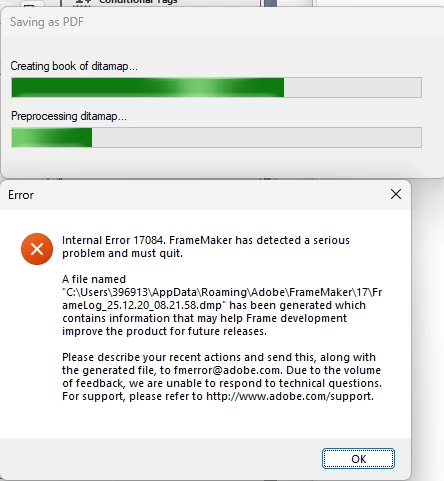
The application consistently gets hung-up on this step, producing error code 17084 for Publish as PDF or Save Ditamap as Book 2022 with FM Components.
 

    3 replies

    frameexpert
    Community Expert
    Community Expert
    December 22, 2025

    Hi Ryan, I am still using 17.0.6 because I don't want to risk breaking a couple of plugins that I have installed. I can try outputting your content here and see if it publishes. That will tell us if Adobe broke something with the latest update or if it's something with your content. If you want me to do this, please contact me offlist. rick at frameexpert dot com

    www.frameexpert.com
    Jeff_Coatsworth
    Community Expert
    Community Expert
    December 22, 2025

    I'd suggest pinging the FM folks - see https://helpx.adobe.com/contact/enterprise-support.other.html#framemaker for your Adobe Support options. I'd recommend using the tcssup@adobe.com e-mail address as it reaches a team dedicated to Technical Communication Suite products including FrameMaker.

    December 22, 2025

    I'll do that. Thanks for the reference!


    Ryan

    Community Expert
    December 20, 2025

    Have you checked whether all fonts are present? Have you tried checking or unchecking this setting:

    FrameMakerdk_0-1766274005224.png


    Bjørn Smalbro - FrameMaker.dk
    December 21, 2025

    Hello, Bjørn:


    Thanks for the comment. The setting was un-checked. I tried checking it and re-ran the PDF process. FM still failed.


    Ryan

    Participant
    December 21, 2025

    This is likely NOT the solution for your issue, but just in case: when I get this error, it is often related to the location of the final file output. Any sort of network drive, including Dropbox, seems to run the risk of FM hanging or crashing. I can do everything else but generate PDFs when using Dropbox as my primary file location.


    Steve