


taylors86343636
Participant
April 11, 2016
Answered

Publishing large manuals with responsive html setting. Is there a way to determine how the entries show up in the table of contents?

  • April 11, 2016
  • 9 replies
  • 692 views

I am publishing large manuals with responsive html setting. Is there a way to determine how the entries show up in the table of contents? If I publish a smaller section of the manual then 2nd level entries show up as blowouts under the chapter name, but if I publish the entire manual then the 2nd level headings do not show up at all. I would like them to show up as blowouts in the toc, but I need to publish the manual as a whole in order to keep the cross references. Any help will be greatly appreciated!

    This topic has been closed for replies.
    Correct answer Jeff_Coatsworth

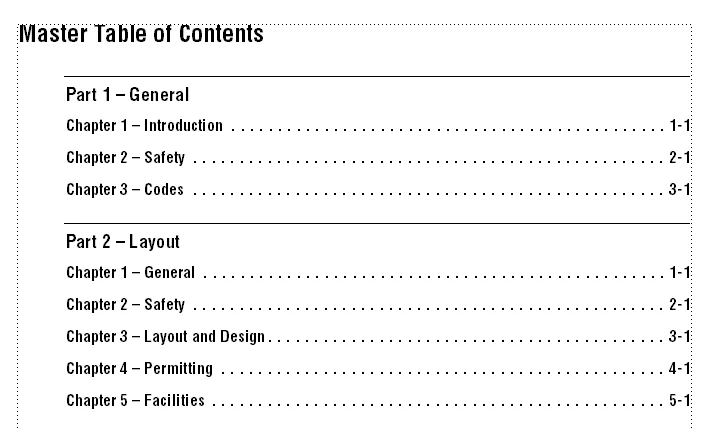
    Our Master toc is only set up for two levels. Below is the screen shot of how it is set up in FM. Perhaps we need a new master toc just for web conversion?


    I think that would make more sense - it would skip including the sub-books' TOCs also.

    9 replies

    Jeff_Coatsworth
    Community Expert
    Community Expert
    April 11, 2016

    If your TOC in FM isn’t already created on the basis of H1/H2 settings, I believe you need to set your pagination settings to have H2 topics created as well as your H1 topics.

    taylors86343636
    Participant
    April 11, 2016

    Hello,

    In FM the toc already shows the H1/H2 settings, the change occurrs when I publish, depending upon how deep the material lies. My manuals have a Master table of contents, and then each individual part within the manual has a table of contents. If I publish just an individual part, it shows up the way I wish it to. If I publish the master book, then the toc does not seem to drill down deep enough.

    I just realized that I did not phrase my original question very well. My problem is with the index file (index.html) that is generated by the publish function. I do not have RoboHelp and I am not good with js so I am not sure what I can do before I press publish to ensure that all of the toc levels show up in this file.

    Thank you!

    Jeff_Coatsworth
    Community Expert
    Community Expert
    April 12, 2016

    The publishing guts of FM are really RH, so the same principles apply. Is your FM content in a master book of books format? I believe the publishing engine has difficulty in processing multiple TOCs. If it's only the top-level TOC, the publishing engine relies on the amount of indenting present in the TOC to help it figure out what gets turned into a TOC entry. Maybe you need to show us some screenshots to illustrate what's happening/not happening? Use the camera icon in the forum's web interface to do that.

    Inspiring
    April 11, 2016

    I publish from a book, and just use the TOC.  It works for me...  Whatever I want for the book is what I get.