
Inspiring
October 27, 2023
Answered

question about footnotes

  • October 27, 2023
  • 7 replies
  • 963 views

Hello,

I have an FM file where I have a text with notes.  But these notes are very long.

But I have noticed that for the note "3" (that is in the text of the page 1), this footnote "3" begins on page 2 (it begins in another page). Why ?
This topic has been closed for replies.
Correct answer Barb Binder

Hi Pierre:


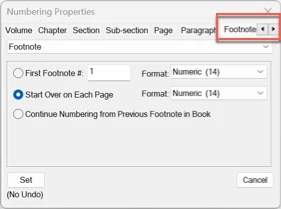
Here is the dialog box @Bob_Niland is referencing.


Yours is set to Start Over on Each Page—there are two other options.

  • First footnote: 1 will start over with 1 in each document and increment across the file.
  • Continue Numbering from Previous Footnote in Book will start with 1 in the first chapter, and increment across the book.


You can set this in each file individually, or select files in the book window, Right click > Numbering > Footnote and set the numbering for the entire book at one time. 


~Barb

7 replies

Barb Binder
Community Expert
Community Expert
October 29, 2023

We are always happy to help, Pierre.


~Barb

~Barb at Rocky Mountain Training
Inspiring
October 29, 2023

Hi Barb, Hi Bob,

You are right, I was with this setting  (start over on each page) :


And I have chosen this setting (continue numbering from previous footnote), and it works :


Thank you to all.

Barb Binder
Community Expert
Barb BinderCommunity ExpertCorrect answer
Community Expert
October 29, 2023

Hi Pierre:


Here is the dialog box @Bob_Niland is referencing.


Yours is set to Start Over on Each Page—there are two other options.

  • First footnote: 1 will start over with 1 in each document and increment across the file.
  • Continue Numbering from Previous Footnote in Book will start with 1 in the first chapter, and increment across the book.


You can set this in each file individually, or select files in the book window, Right click > Numbering > Footnote and set the numbering for the entire book at one time. 


~Barb

~Barb at Rocky Mountain Training
Inspiring
October 29, 2023

Hi Barb,

Thank you. It works perfectly.


I have a question about the window "Format/Document/Footnotes properties" :

In this screenshot you can see the page 1 with 4 lines of text (each line has a note : 1,2,3,4) :


In note properties window, if I check only "keep footnote with reference" (without increasing the "max height per column"), I have this result : the lines 3 and 4 of the text are put on page 2 and their note number has changed :

- ligne 3 : the note number 3 is changed to note number 1 (on page 2)

- ligne 4 : the note number 4 is changed to note number 2 (on page 2)

Why does the note number is changed on page 2 (it should keep note number 3 and 4 on page 2) ?


Bob_Niland
Community Expert
Community Expert
October 29, 2023

What are the settings for
Format ▼ Document » Numbering… /Footnote\
in particular you might find:
⦿ Start Over on Each Page

Barb Binder
Community Expert
Community Expert
October 28, 2023

Hi Pierre:


Format > Document > Footnote Properties:

  • Increase the Max Height per Column
  • Enable the Keep Footnotes with Reference


~Barb


~Barb at Rocky Mountain Training
Bob_Niland
Community Expert
Community Expert
October 28, 2023

If endnotes are an alternative, FM has formalized the long-standing Xref way of doing those.

K.Daube
Community Expert
Community Expert
October 28, 2023

Bob, can you elaborate a bit on this "long-standing Xref way"? I'm not aware of any semi-automatism to create end-notes. Hence my script FMnotes.

Bob_Niland
Community Expert
Community Expert
October 28, 2023

KD: I'm not aware of any semi-automatism to create end-notes.

There {still} isn't, other than external scripts & tools. What I meant by "formalized" is that at some point, Adobe added "Create and maintain endnotes" to the on-line help. This was probably before 7.0, as the topic is in the manual for that release. Before that, one had to learn about that same work-around from the internet.

frameexpert
Community Expert
Community Expert
October 27, 2023

If there is not room on the page for the number and the footnote, then the footnote moves to the next page.

Inspiring
October 28, 2023

What is the room ?

Bob_Niland
Community Expert
Community Expert
October 28, 2023

FM probably has a complex algorithm for determining where to place a footnote, and how to resolve conflicting priorities.

One of the factors is likely to include the Keeps, Widows & Orphan settings for the referencing paras. Another factor is page objects that take up significant page space (Tables, Anchored Frame content). The footnote count for the page, and size of any footnote itself is a factor.


As the world moves off print, Endnotes get more attractive (esp. in non-paginated presentations), and would be even more attractive if FM had mark-up for generating hovertips that included the whole Xref'd endnote text, in both PDF, and in HTML (as title=). The challenges don't appear to be entirely on the FM side of this.