Answered
question about line spacing
Hello,
In Word, I have a line spacing of 1,15 :
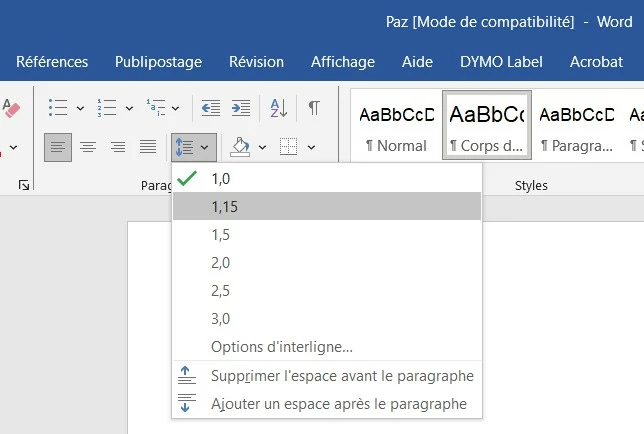
I would like to set the same line spacing in FM. How to do it ?

Hello,
In Word, I have a line spacing of 1,15 :
I would like to set the same line spacing in FM. How to do it ?
Hi Pierre:
Word uses a typewriter approach for line spacing, and typewriter words like Single, Double and 1.5, which controlled how much the page moved up when you pressed the carriage return.
FrameMaker is a page layout program, and it uses the long-standing typesetting approach. The rule of thumb for setting body text in typesetting is to start with the following forumula:
Typesize + 2pt = *Leading
(*Leading is the industry-standard word for line spacing, stemming from the use of lead strips to space out lines in manual typesetting, used for hundreds of years. FrameMaker went with the term Line Spacing in the 80s and has never looked back. They are synonyms. Leading is measured baseline to baseline. I don't know how Word calculates the spacing values it comes up with—I looked but don't see the formula.)
So, with that forumula:
12 + 2 = 14, expressed in writing as 12/14, and spoken out loud as "twelve on fourteen".
From there, it's subjective. Print the page and take a look. Does page look too dense? Set the type 12/15 or 12/16. If you need to get a little bit more text on the page, then perhaps all set to 12/13.5, or 12/14.5.
FrameMaker knows this rule and applies it automatically:
The other leading suggestions follow along—and use the typewriter terms for those baffled by the word leading because in the 80s when FrameMaker was first released, almost everyone was still using typewriters—so for 12 pt type:
Look at these as just suggestions. You get to decide what leading you want to use. I prefer a little more leading than suggested, and often go with typesize plus 3 pts or 4 pts. (The number of characters per line factors into the calculation, but that's a topic for another day.)
And I do this in Word, as well. I always choose Exactly and set the line spacing in points, just like I do in InDesign and FrameMaker.
~Barb
Already have an account? Login
Enter your E-mail address. We'll send you an e-mail with instructions to reset your password.


 AdChoices