
Inspiring
January 1, 2025
Answered

question about Mini TOC

  • January 1, 2025
  • 3 replies
  • 237 views

Hello,

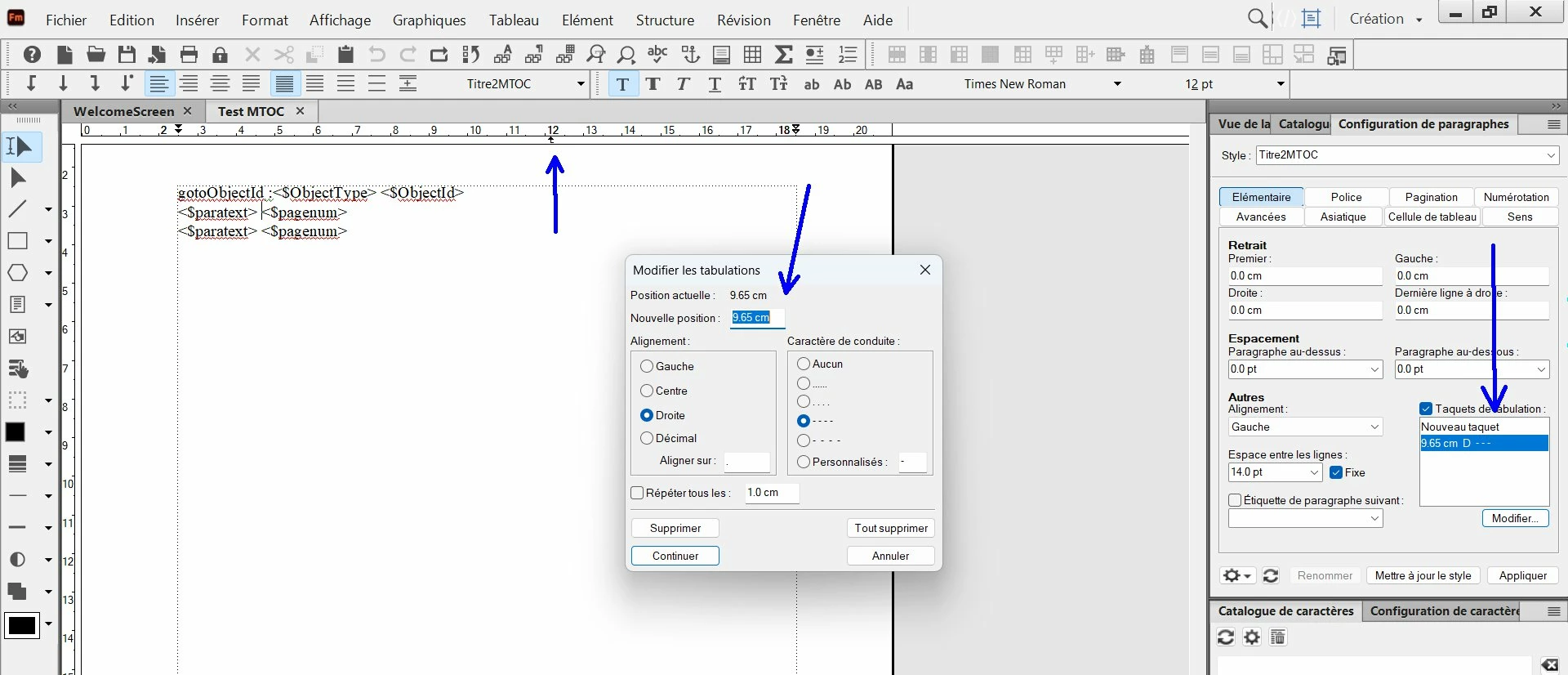
I have created a mini TOC, and in Reference page I have put a tab stop and set this tab stop with the settings : "right with dots".

But in reference page the page num does not move at right, and there is no dots. Why ?
 

Correct answer Bob_Niland

Does the Titre2MTOC template paragraph have a tab〉in it?
I don't see it, but you might have Text Symbols disabled.
In the visible Body page with the MiniTOC, is the parapgraph of interest ¶Titre2MTOC?

3 replies

Inspiring
January 2, 2025

Hi Bob, Hi Winfried,

You are right : there was no tab before pagenum, so I have removed the space before pagenum and added a tab by pressing the tab key. 


Here is what I have with text symbols enabled :


I have also deleted the pagenum for the other paragraph, as I do not need to use it.

Community Expert
January 2, 2025

As Bob said you should show text symbols in the View menu.

It seems that you have a space before the pagenum placeholder instead of a tab.

Did you apply the tab stop position in the paragraph designer as an override only for this specific paragraph? Or generally for this paragraph format?

Bob_Niland
Community Expert
Bob_NilandCommunity ExpertCorrect answer
Community Expert
January 1, 2025

Does the Titre2MTOC template paragraph have a tab〉in it?
I don't see it, but you might have Text Symbols disabled.
In the visible Body page with the MiniTOC, is the parapgraph of interest ¶Titre2MTOC?
