Inspiring
February 3, 2024
Question

question about notes

  • February 3, 2024
  • 9 replies
  • 439 views

Hello,

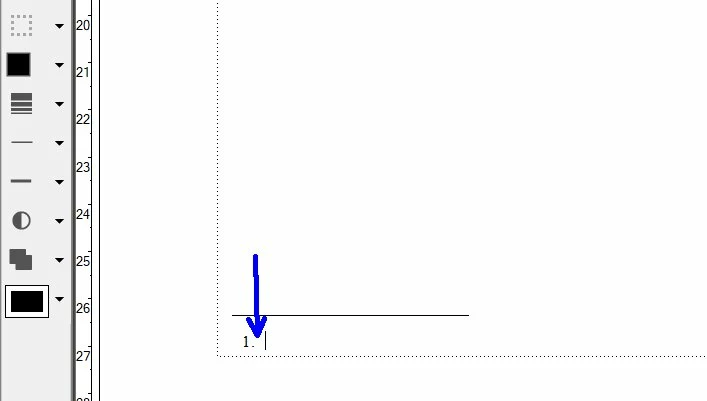
I would like to set the space between the footnote number and the text of the note. How to set it in order that when I create a new note it will keep the same setting ?

 

This topic has been closed for replies.

9 replies

Barb Binder
Community Expert
Community Expert
February 6, 2024

Hi Pierre:


No that does not work. You are showing auto-numbers, which allow nesting of a character style. Footnotes don't use auto-numbers and that isn't an option. Your only option to control the numbers individually is within Format > Document > Footnote Options.


~Barb

~Barb at Rocky Mountain Training
Inspiring
February 5, 2024

Hi Barb,

That would be good is if the paragraph style could be linked to a character style like this in FM :


But if I do that, it does not works.

Barb Binder
Community Expert
Community Expert
February 5, 2024

Hi Pierre:


Did you actually select text in Word and assign one or both of those two character styles to text? I think those two are the natural offshoot styles from the Footnote Text style in Word. In English it's Footnote Reference and Footnote Text Char, both of which we don't need in FrameMaker, which handles footnotes differently. That's why they aren't mapping. I'm sorry I didn't recognize that earlier. 

So is the goal to add italics in Word and then assign it to your character style in FrameMaker?


Two options:


1. In Word, there is a style in the list called Emphasis. You can assign it to your italics text and then map that style to Emphasis in FrameMaker. You may need to update the style if it tries to hold onto overrides. or,


2. In Word, just click the button for italics. (I in English). Enable the checkmark for importing inline styles. The text will come in with italics, but unstyled. Assign your character style to one occurence manually, then select the italics word and choose Edit > Copy Special > Character Style. In the Find/Change diaolog box:

Find: Character format: italic (everything else set to as is)

Change: By Pasting


I know this is extremely complicated. I've actually recorded most of this for the webinar that's going to be broadcast on February 21. It might be helpful to watch it. 


I'm in class tomorrow, but will check in with you at some point to see where you are. I'm not going to have much time to help this week, but I'll do my best.


~Barb

~Barb at Rocky Mountain Training
Inspiring
February 4, 2024

Hi Barb,

I have first created a character style called "personal car style".

Then, here are my settings for the Word file concerning the character style :


But the result in FM is that the notes are not tagged with the character style "personal car style" :


Barb Binder
Community Expert
Community Expert
February 4, 2024

Hi Pierre:


I would not check anything in the Conserver le format Word column. If you want your Fm styles to take over, uncheck everything.


If you have a character style actually in use in Word, you can map it to an equivalent character style in FrameMaker—just keep that checkmark to the right off, and FrameMaker should honor the Word format. If it doesn't, just assign the character style to another word, and then Update Style.  


~Barb

~Barb at Rocky Mountain Training
Inspiring
February 4, 2024

Hi Barb, Hi Bob,


1) Before to import the Word document, I have set like this for the paragraph styles. Is it correct ?


About the checkbox surrounded in blue, do Have I to check them ?


2) I have noticed that in that window, if I want to change the character style from Word to a new style I have created in FM, I change by example "Note de bas de page car" to "Personal style" (created by me in FM), but the result is : the character style of the notes has not changed. My goal would be to do that in this import window, but I see I cannot do it. 


Inspiring
February 3, 2024

Hi Barb, Hi Bob,

Ok, I have succeeded to use the tab stop for the distance between the footnote number and the footnote text.

Now, I have tried to import a Word file into an FM document, and here is the settings concerning the Word file, for the footnotes :


Result in paragraph catalog :


And in character catalog :


The FM settings for footnotes are :


I noticed that :

- the notes are tagged inside the paragraph catalog ("Footnote text")

- but the notes are not tagged inside the character catalog : the character styles from the Word file ("Footnote reference", "Note de bas de page Car") are inside the FM character catalog, but the notes are not tagged with these styles. Why ?

Bob_Niland
Community Expert
Community Expert
February 3, 2024

Pierret:  I noticed that :

- the notes are tagged inside the paragraph catalog ("Footnote text")

- but the notes are not tagged inside the character catalog…

This is just one of the problems arising from the direct import of Word files: FM auto-creates FM style names, possibly based on IDs in the .doc/docx, and these have no necessary relationship to the default style names in FM, much less to any templated style names in your enterprise.

You have to hunt them all down and fix them.

Whenever I've had to do this, I just copy the raw text out of the source document, paste it into the target template, and step through it applying the desired FM styles.

Barb Binder
Community Expert
Community Expert
February 3, 2024

Hi Pierre:


In a new default document, Fm adds a tab character between the footnote number and the text. As per @Bob_Niland, you can click on the note and then set the tab position in Paragraph Designer > Basic. You'll notice that FrameMaker also assigns a default paragraph style to that text, called Footnote, so be sure to update style after the tab adjustment so that the new tab position is picked up by all future footnotes.


That said, you may have additional questions about footnotes as you continue, so just getting a little bit ahead of you, there are four places to control how footnotes look in FrameMaker:

  1. They are paragraphs, so you can format them like any other paragraph using Paragraph Designer.
  2. Format > Document > Footnote Options allows you to control how much vertical space you will allow per footnote, the style name, the number position in both the note as well as in the text, and if you want the footnote to stay on the same page as the reference, or if it is allowed to break across pages.
  3. Format > Document > Numbering > Footnote where are you can control how the footnote numbers increment.
  4. View > Reference pages is where you will find the line above the note. If you modify the line on the reference page, he will be able they will get picked up on all the body pages.


More details here: https://www.rockymountaintraining.com/adobe-framemaker-formatting-footnotes-3/


~Barb

~Barb at Rocky Mountain Training
Bob_Niland
Community Expert
Community Expert
February 3, 2024

Barb: Format » Document » Numbering » Footnote

In any roll-up about FM footnotes, it's probably worth mentioning that:

  1. the numbering is not controlled by the usual/expected
    Format » Paragraphs » Paragraph Designer » Style [Footnote] /Numbering\
  2. in Format » Document » Numbering /Footnote\
    the Format pull-down includes a surprising variety of localized numbering styles, including a [Custom…🞃] option which allows you to do things that cannot be done with normal FM numbering.
Bob_Niland
Community Expert
Community Expert
February 3, 2024

That's controlled by the Tab Stops setting for the paragraph style (usually ¶  "Footnote").

Be sure to also update Indents to harmonize as desired.