
Inspiring
December 28, 2023
Question

question about SVG

  • December 28, 2023
  • 8 replies
  • 1560 views

Hello,

I have done Insert/Image in order to import an SVG (made with Illustrator).

But at the screen I have a strange display (see red arrows). Even if I refresh (Control+L), it does not solves the problem. And at the print (with FM) I have the same problem.
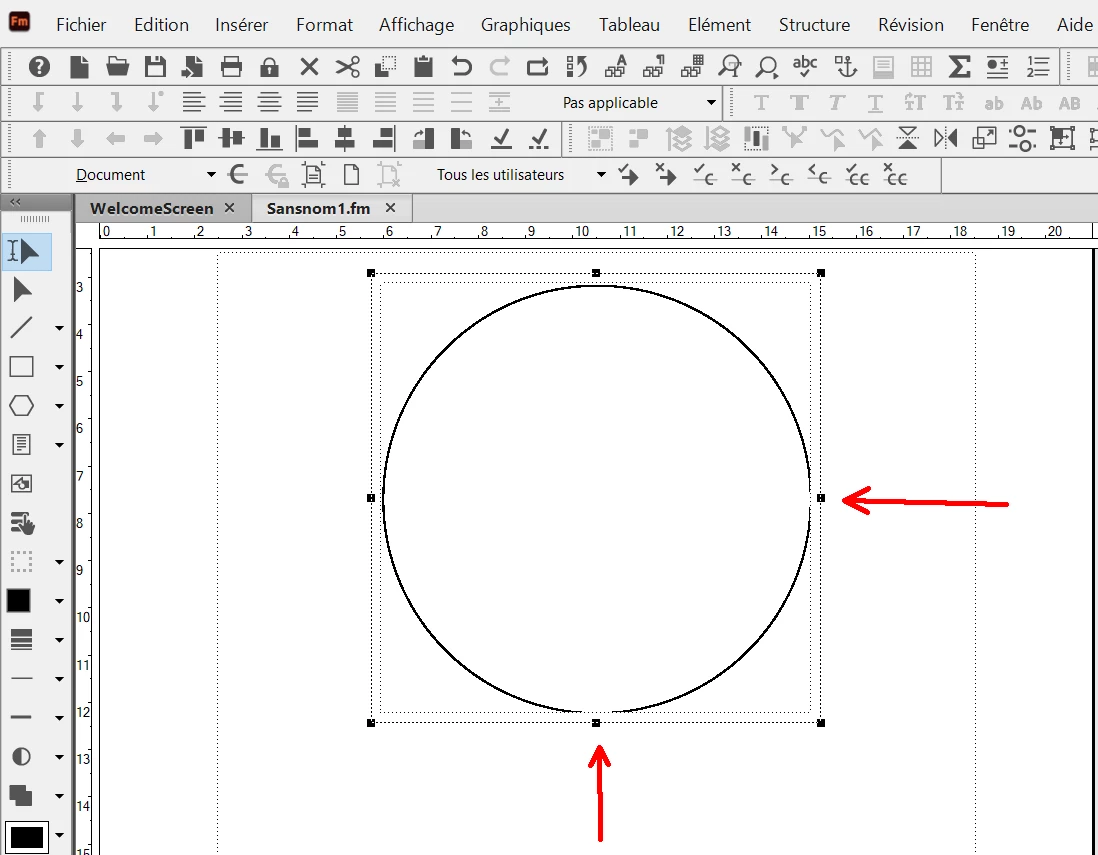
 

This topic has been closed for replies.

8 replies

Community Expert
January 2, 2024

Hm. I just created such a circle with Corel Designer and exported it to SVG.

The circle was always correctly visible. With 8 pt line width and with hairline. In FrameMaker and in PDF.

No other objects exported. Only the circle. No other objects in the anchored frame.

Therefore I cannot reproduce this issue.

Bob_Niland
Community Expert
Community Expert
December 31, 2023

I just ran a test in FM2020.

In AI 28.1, created a 40×40mm circle with 1mm stroke weight.
Performed an Object 🞃 Artboards › Fit to Artwork Bounds
which correctly set the AB extents to 41mm, and the XY⨁ offsets to 20.5, 20.5mm.
Exported or saved as .svg, .pdf, .eps


From FM2020, imported the .ai, .eps, .pdf & .svg
The EPS preview is the embedded EPS preview which is coarse.

Save-as PDF looks perfect, identical full vector circles, with or without shrink-wrap in FM.

Save-as HTM are all GIFs, bleh.

Publish-to Responsive HTML, got 3 PNGs & and an SVG.
No clipping in sight, so no insights from this experiment.

Inspiring
December 31, 2023

Hi Bob,

I have tested again on my side with a circle of 10 cm x 10 cm in Illustrator..

I have FM 17.03 (last version).


1) For this thread, in Illustrator I first selected the circle, then File/"Export the selection", and selected SVG.

And then in FM I was doing Insert/image, and printed the FM file : at the print I had the clipping problem.


2) Now, in Illustrator, I have tested ypur solution to select the object in a different way (Object 🞃 Artboards › Fit to Artwork Bounds) :

A - If I "Save As" : it does not works (the print in FM gives me also the clipping problem).

B - If I "Export As" : it worked (the print in FM gives me no clipping problem)


So you have found a workaround with your FM 2020.  Thank you !

But I don't understand why FM is unable to support all exported SVG from Illustrator ?


Bob_Niland
Community Expert
Community Expert
December 31, 2023

Glad it became a work-around. I still can't get it to fail.

But the dimension attributes in the exported SVG don't match those in the saved SVG. That's some sort of AI problem.

Inspiring
December 29, 2023

Hi,

I understand your solution to add space around the graphic in Illustrator.

But if I use the document setting/drawing board, it seems to be for the entire page.

Because, what I do in Illustrator is :

1) I select the graphic

2) File/Export the selection

3) Save as SVG

So it exports only the selection (not the entire window). 

About this selection in Illustrator, how to export it with extra margins around (margins that I could set) ?


Community Expert
December 29, 2023

I use the "Save As" feature. Not sure how the results differ.


Bjørn Smalbro - FrameMaker.dk
Inspiring
December 29, 2023

If I use the "save as" in Illustrator, it gives me the entire window. 

My goal is to have the graphic only.

Community Expert
December 29, 2023

I think the issue may be about FrameMakers lack of ability to handle the drawing board data saved with Illustrators svg format.

Try opening the graphic in Illustrator and make the drawing board a little larger the graphic. You can find the drawing board set up in Illlustrator under Document Setup in the File menu.


Bjørn Smalbro - FrameMaker.dk
Inspiring
December 29, 2023

Hi Bob,

I have this problem :

1) inside FM main window

2) on print (made by FM)

3) on PDF (made by FM)

4) on HTML (made by FM)


But, I have no problem :

1) Inside Illustrator (this was made with Illustrator)

2) in Word (Insert/image) :

Bob_Niland
Community Expert
Community Expert
December 29, 2023

pierret18811376: I have this problem :

2) on print (made by FM)

3) on PDF (made by FM)

4) on HTML (made by FM)

Then the next question needs to be what major & point release of FM?
I seem to recall some SVG bugs being fixed.

Inspiring
December 29, 2023

I have the last FM version : 17.03.


Bob_Niland
Community Expert
Community Expert
December 29, 2023

Is the clipping just of the preview image during edit in FM?
What does it look like in PDF or HTML output?

Inspiring
December 28, 2023

Hi Jeff,

If I resize the anchored frame, the problem is always here.

Jeff_Coatsworth
Community Expert
Community Expert
December 28, 2023

What's the problem? That the bottom & right of the circle are cut off? Is it just a function of the size of the anchored frame?