
Inspiring
May 31, 2023
Answered

question about Tab Key

  • May 31, 2023
  • 5 replies
  • 553 views

Hello,

In Frame Maker I have a document with text.

About the Tab Key :

1) If I click on a line and click on the space bar, the text moves to the right. But by using the Tab Key, nothing happen (the text does not move to the right).

2) If I select several lines of text with the mouse and use the Tab Key, the selected text is deleted.


Why I cannot use the Tab Key in a FM document to move the text to the right ?
This topic has been closed for replies.
Correct answer K.Daube

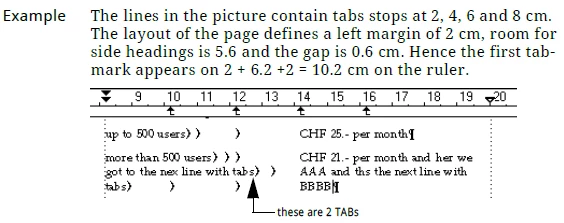
In contrast to MS Word etc. FrameMaker has no default TAB locations! They must be explicitly set in the paragraph format. And they behave differently:

FrameMaker uses absolute tabbing, whereas most text processors use relative tabbing. Hence you always need the same number of TABs to reach a certain position, whether they can actually perform or not:

5 replies

Inspiring
May 31, 2023

Hi Barb,

You have said : "If you open a file from Word, you will have default tabs stops every .5 " as per the Word default. They will be removed when you import formats from your template document.".


I have worked on the templates in order to remove all the tab stops :

1) I have first copied the content of a Word file, then I pasted this content in a FM document (plain text only). Then I deleted the content of this FM document and put the cursor on the page and create a tag : this is my template document.


2) Then I done Control+O and opened a Word document in a FM document : I can see all the tab stops in the rulers. So I done File/Import/format and import the created template. Then I selected all the text (Control+A) and clicked on the tag coming from the template : Result : the Word formatting and all the tab stops are removed.


Do you think it is a good workflow, or is there a better way to remove the formatting (coming from Word) for an FM document in one go ?

Barb Binder
Community Expert
Community Expert
May 31, 2023

Yes, that works.


~Barb

~Barb at Rocky Mountain Training
Barb Binder
Community Expert
Community Expert
May 31, 2023

Hi Pierre:


If you open a file from Word, you will have default tabs stops every .5 " as per the Word default. They will be removed when you import formats from your template document.


If you are creating a template from scratch in FrameMaker, the only place you have default tabs are in the background frames on the master pages: one center-align tab and one right-align tab.


When you need to add tabs elsewhere, you will need to:

a. Press the Tab key

b. Set the tab stop


~Barb


~Barb at Rocky Mountain Training
Inspiring
May 31, 2023

If I understand well, the key tab must be used with tab stops in the ruler.

So if we don't put tab stop in the ruler, we cannot set only the key tab on a specific value (by example 1 cm in order that if I press the key tab it moves forward of 1 cm each time I press on it) ?

K.Daube
Community Expert
K.DaubeCommunity ExpertCorrect answer
Community Expert
May 31, 2023

In contrast to MS Word etc. FrameMaker has no default TAB locations! They must be explicitly set in the paragraph format. And they behave differently:

FrameMaker uses absolute tabbing, whereas most text processors use relative tabbing. Hence you always need the same number of TABs to reach a certain position, whether they can actually perform or not:

Inspiring
May 31, 2023

1. It depends how the tabs are defined. For example, if no tabs are defined, then pressing Tab will indeed do nothing.

2. When you select text and press a key, you are replacing the text with the key. So you are replacing the lines with Tab.