
Known Participant
September 16, 2020
Answered

Quickest Way to Fix Custom TOC Numbering

  • September 16, 2020
  • 2 replies
  • 1155 views

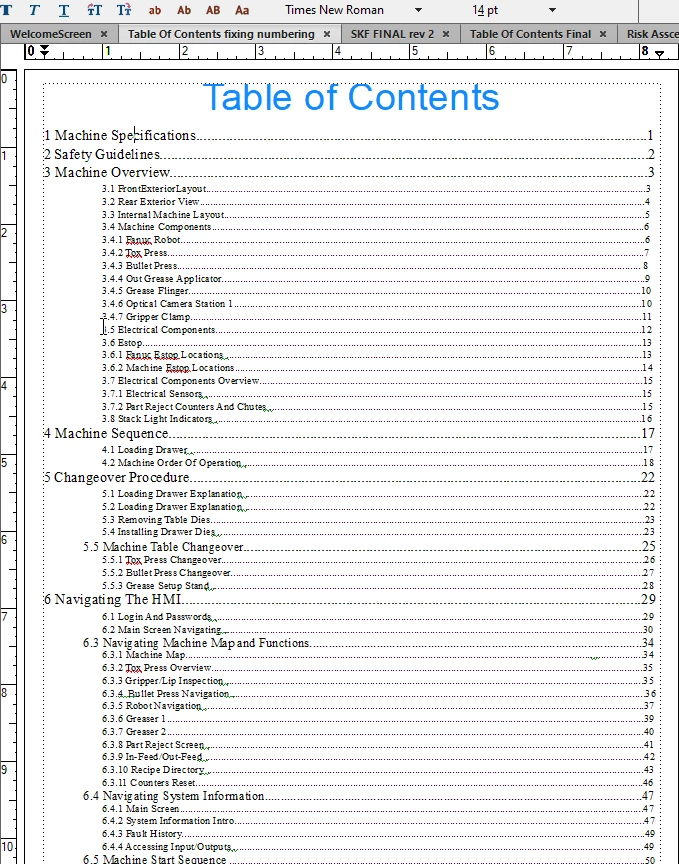
I am trying to make my page numbers line up in a custom table of contents. this is not a stand alone or mini toc. i am still learning how to do this the right away so i manually typed in everything shown on the screen. I was curious what the quickest and easiest way to get page numbers to align in the right hand side of the page is. i tryed to follow a guide i found online and i cant get it to work with right tabs stops...and i am questioning if that is the correct way to do it. the dots are typed in manually. i am assuming i will have to delete them and use the tool. hoping for a link for a breif description on how i can line these up and submit the document .  
This topic has been closed for replies.
Correct answer LinSims

First you have to generate a TOC using Insert > Table of Contents > Create Standalone TOC.

Once you have a generated TOC:

 1. Open the TOC file

 2. Click View > Reference Pages

 3. Find the Reference Page labeled TOC

 4. Place your cursor in each line that shows the following:

     <$paratext> <$pagenum>


These are the basic TOC formats (you can confirm this by looking at the status bar on the bottom of the page to see the name of the paragraph tag)


 5. Open the paragraph designer (Format > Paragraphs > Paragraph Designer)

 6. Click Edit under the Tap Stops list

 7. Add the location you want the page numbers to appear at in the New Position field, then click Right, then select the type of dot leader you want.

 8. Click Continue

 9. Apply whatever other formatting you want, including indents or bolding using the tabs in Paragraph Designer

10. Click Update Style

11. Repeat for each level of of the TOC


Read up on building blocks to see what else you can include in the TOC.

2 replies

Barb Binder
Community Expert
Community Expert
September 16, 2020

Hi Beau:


i trained myself in framemaker. i am not at that ability yet.

As your knowledge of FrameMaker increases, you will likely have additional questions on working with a table of contents (and I do think that you should let FrameMaker type it up for you!). I address the question of how to align page numbers in the post below, but since that has already been addressed, I wanted you to know that I have links at the bottom to multiple related posts that I suspect will someday be useful to you, and to others who are similarly new to working with FrameMaker's table of contents and other generated files.

https://www.rockymountaintraining.com/adobe-framemaker-adding-tabs-to-a-table-of-contents/


~Barb 

~Barb at Rocky Mountain Training
beau5CC8Author
Known Participant
September 16, 2020

barb thank you so much, working 60 hours at my desk is making it difficult to get where i want to be. im geting closer all the time. I will look at this as soon as i can!

LinSims
Community Expert
LinSimsCommunity ExpertCorrect answer
Community Expert
September 16, 2020

First you have to generate a TOC using Insert > Table of Contents > Create Standalone TOC.

Once you have a generated TOC:

 1. Open the TOC file

 2. Click View > Reference Pages

 3. Find the Reference Page labeled TOC

 4. Place your cursor in each line that shows the following:

     <$paratext> <$pagenum>


These are the basic TOC formats (you can confirm this by looking at the status bar on the bottom of the page to see the name of the paragraph tag)


 5. Open the paragraph designer (Format > Paragraphs > Paragraph Designer)

 6. Click Edit under the Tap Stops list

 7. Add the location you want the page numbers to appear at in the New Position field, then click Right, then select the type of dot leader you want.

 8. Click Continue

 9. Apply whatever other formatting you want, including indents or bolding using the tabs in Paragraph Designer

10. Click Update Style

11. Repeat for each level of of the TOC


Read up on building blocks to see what else you can include in the TOC.

beau5CC8Author
Known Participant
September 16, 2020

i did not generate this table of contents, is it possible to do this any other way? i manually typed this table of contents

LinSims
Community Expert
Community Expert
September 16, 2020

Why not? That's the easiest way to create a TOC, and it will update automatically when you change or update your files. Plus, when you create a PDF, you get clickable links.


If you insist on creating this manually, then basically follow the steps from 5 onwards. When you get to the end of your entry, press tab and it should take you to the right margin and automatically insert your dot leader.